Wednesday, December 30, 2009

Updated Navigation-Based Core Data Application Template

Periodically, while working on the Core Data chapters in More iPhone 3 Development, I would update my copy of Apple's provided Navigation-Based Core Data Application project template with logic to handle different common scenarios. While working on the previous blog post, I made some more tweaks to the template to better handle object changes that trigger managed objects to move between sections when specifying a sectionNameKeyPath. You can find the most recent version of this project template here, and I've included the four delegate methods from the template at the end of this blog post.

I've really tried to give NSFetchedResultsController the benefit of the doubt. It's a really, really great concept and when it works, I really like it, but the execution is way below Apple's normal level of code quality. All of the code I've added to this template is needed simply to handle typical use-cases supposedly supported by this class… things that should be handled out of the box without any need for additional code. In this particular case, the delegate methods should really only be required for handling extraordinary or unusual scenarios.

If I have time, I may try to encapsulate this logic into a subclass of NSFetchedResultsController, but for the time being, if you use this template or the delegate methods at the end of this posting, it should take care of the bulk of situations for you automatically. I suspect that there will be a few more tweaks to this code as I use it in real-world code, but if there are, I'll post the changes and a new version of the template here. In any case, this template is a far better starting point than Apple's provided template and may just keep you from pulling all your hair out.

- (void)controllerWillChangeContent:(NSFetchedResultsController *)controller {
[self.tableView beginUpdates];
}

- (void)controllerDidChangeContent:(NSFetchedResultsController *)controller {
[self.tableView endUpdates];
}

- (void)controller:(NSFetchedResultsController *)controller didChangeObject:(id)anObject atIndexPath:(NSIndexPath *)indexPath forChangeType:(NSFetchedResultsChangeType)type newIndexPath:(NSIndexPath *)newIndexPath {
switch(type) {
case NSFetchedResultsChangeInsert:
[self.tableView insertRowsAtIndexPaths:[NSArray arrayWithObject:newIndexPath] withRowAnimation:UITableViewRowAnimationFade];
break;
case NSFetchedResultsChangeDelete:
[self.tableView deleteRowsAtIndexPaths:[NSArray arrayWithObject:indexPath] withRowAnimation:UITableViewRowAnimationFade];
break;
case NSFetchedResultsChangeUpdate: {
NSString *sectionKeyPath = [controller sectionNameKeyPath];
if (sectionKeyPath == nil)
break;
NSManagedObject *changedObject = [controller objectAtIndexPath:indexPath];
NSArray *keyParts = [sectionKeyPath componentsSeparatedByString:@"."];
id currentKeyValue = [changedObject valueForKeyPath:sectionKeyPath];
for (int i = 0; i < [keyParts count] - 1; i++) {
NSString *onePart = [keyParts objectAtIndex:i];
changedObject = [changedObject valueForKey:onePart];
}

sectionKeyPath = [keyParts lastObject];
NSDictionary *committedValues = [changedObject committedValuesForKeys:nil];

if ([[committedValues valueForKeyPath:sectionKeyPath] isEqual:currentKeyValue])
break;

NSUInteger tableSectionCount = [self.tableView numberOfSections];
NSUInteger frcSectionCount = [[controller sections] count];
if (tableSectionCount != frcSectionCount) {
// Need to insert a section
NSArray *sections = controller.sections;
NSInteger newSectionLocation = -1;
for (id oneSection in sections) {
NSString *sectionName = [oneSection name];
if ([currentKeyValue isEqual:sectionName]) {
newSectionLocation = [sections indexOfObject:oneSection];
break;
}

}

if (newSectionLocation == -1)
return; // uh oh

if (!((newSectionLocation == 0) && (tableSectionCount == 1) && ([self.tableView numberOfRowsInSection:0] == 0)))
[self.tableView insertSections:[NSIndexSet indexSetWithIndex:newSectionLocation] withRowAnimation:UITableViewRowAnimationFade];
NSUInteger indices[2] = {newSectionLocation, 0};
newIndexPath = [[[NSIndexPath alloc] initWithIndexes:indices length:2] autorelease];
}

}

case NSFetchedResultsChangeMove:
if (newIndexPath != nil) {

NSUInteger tableSectionCount = [self.tableView numberOfSections];
NSUInteger frcSectionCount = [[controller sections] count];
if (frcSectionCount >= tableSectionCount)
[self.tableView insertSections:[NSIndexSet indexSetWithIndex:[newIndexPath section]] withRowAnimation:UITableViewRowAnimationNone];
else
if (tableSectionCount > 1)
[self.tableView deleteSections:[NSIndexSet indexSetWithIndex:[indexPath section]] withRowAnimation:UITableViewRowAnimationNone];


[self.tableView deleteRowsAtIndexPaths:[NSArray arrayWithObject:indexPath] withRowAnimation:UITableViewRowAnimationFade];
[self.tableView insertRowsAtIndexPaths: [NSArray arrayWithObject:newIndexPath]
withRowAnimation: UITableViewRowAnimationRight
]
;

}

else {
[self.tableView reloadSections:[NSIndexSet indexSetWithIndex:[indexPath section]] withRowAnimation:UITableViewRowAnimationFade];
}

break;
default:
break;
}

}

- (void)controller:(NSFetchedResultsController *)controller didChangeSection:(id <NSFetchedResultsSectionInfo>)sectionInfo atIndex:(NSUInteger)sectionIndex forChangeType:(NSFetchedResultsChangeType)type {
switch(type) {

case NSFetchedResultsChangeInsert:
if (!((sectionIndex == 0) && ([self.tableView numberOfSections] == 1)))
[self.tableView insertSections:[NSIndexSet indexSetWithIndex:sectionIndex] withRowAnimation:UITableViewRowAnimationFade];
break;
case NSFetchedResultsChangeDelete:
if (!((sectionIndex == 0) && ([self.tableView numberOfSections] == 1) ))
[self.tableView deleteSections:[NSIndexSet indexSetWithIndex:sectionIndex] withRowAnimation:UITableViewRowAnimationFade];
break;
case NSFetchedResultsChangeMove:
break;
case NSFetchedResultsChangeUpdate:
break;
default:
break;
}

}

Tuesday, December 29, 2009

SuperDB Core Data App with Sections

If you've gotten through the first few chapters of More iPhone 3 Development, you might be wondering why we included a sectionNameKeyPath when we didn't actually divide up the table into sections. What's the point of having the fetched results controller use sections if they're not displayed?

The truth of the matter is that we originally planned to take the SuperDB application further than we were able to. Unfortunately, we reached a point where we had to cut it off and move on to other topics in order to both meet our deadline and to come in at a reasonable page count (as it was, we came in 250 pages over what we contracted for). Okay, we didn't actually meet our deadline, but we would have missed it by more.

Dave and I agreed to stop working on Core Data to get the book done and leave room for the other topics, but we left open the possibility of expanding the application further here in my blog. In order to be able to do that, we left in some vestiges of the original plan to make it easier to expand the application here.

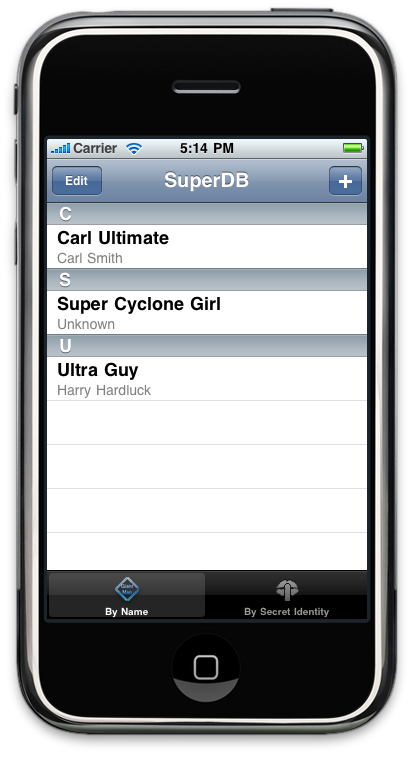
Here's the first expansion, which is to add alphabetical sections to the table, like so:

Screen shot 2009-12-29 at 5.14.44 PM.png


Let's continue on from the code in the 07 - SuperDB project. You can download the revised version from here. Make a new copy of it if you wish. The first thing we need to do is add a tableview delegate method that returns the title to be displayed in each section. To do that, add the following code to HeroListViewController.m, near the other table view methods:

- (NSString *)tableView:(UITableView *)tableView 
titleForHeaderInSection:(NSInteger)section {

if (!(section == 0 && [self.tableView numberOfSections] == 1)) {
id <NSFetchedResultsSectionInfo> sectionInfo =
[[self.fetchedResultsController sections] objectAtIndex:section];
return [sectionInfo name];
}

return nil;
}

This is a very generic method that will use the values from the fetched results controller. This method becomes basically a copy-and-paste bit of code that you can use unchanged in any controller that uses a fetched results controller with sections.

If you run your application now, however, you're going to get a separate section for each row (it would also crash, but we'll deal with that as well). In the version you've got now, we specified either name or secretIdentity as our sectionNameKeyPath, so every unique name or secret identity becomes its own section. Generally, not what want. So, the next step is to add virtual accessor method to our Hero object to return the value that we want to use to use to divide the list of heroes up. Let's do it alphabetically, so that means we need to create methods to return the first letter of the name and the secret identity. We can then use these new virtual accessor methods as our section name key paths, and the fetched results controller will divvy up the list by first letter.

In Hero.h, add the following two method declarations, just before the @end keyword:

- (NSString *)nameFirstLetter;
- (NSString *)secretIdentityFirstLetter;

Save Hero.h and switch over to Hero.m, and insert the implementation of these two methods, right above the @end keyword again:

- (NSString *)nameFirstLetter {
return [self.name substringToIndex:1];
}

- (NSString *)secretIdentityFirstLetter {
return [self.secretIdentity substringToIndex:1];
}

Save Hero.m. Next, we have to make a few changes in HeroListViewController.m. First, change the assignment of sectionKey to reflect our new virtual accessor methods. Look for the following code in the fetchedResultsController method and change the lines in bold to switch from using name and secretIdentity to using our new first-letter methods:

...
case kByName: {
NSSortDescriptor *sortDescriptor1 = [[NSSortDescriptor alloc] initWithKey:@"name" ascending:YES];
NSSortDescriptor *sortDescriptor2 = [[NSSortDescriptor alloc] initWithKey:@"secretIdentity" ascending:YES];
NSArray *sortDescriptors = [[NSArray alloc] initWithObjects:sortDescriptor1, sortDescriptor2, nil];
[fetchRequest setSortDescriptors:sortDescriptors];
[sortDescriptor1 release];
[sortDescriptor2 release];
[sortDescriptors release];
sectionKey = @"nameFirstLetter";
break;
}

case kBySecretIdentity:{
NSSortDescriptor *sortDescriptor1 = [[NSSortDescriptor alloc] initWithKey:@"secretIdentity" ascending:YES];
NSSortDescriptor *sortDescriptor2 = [[NSSortDescriptor alloc] initWithKey:@"name" ascending:YES];
NSArray *sortDescriptors = [[NSArray alloc] initWithObjects:sortDescriptor1, sortDescriptor2, nil];
[fetchRequest setSortDescriptors:sortDescriptors];
[sortDescriptor1 release];
[sortDescriptor2 release];
[sortDescriptors release];
sectionKey = @"secretIdentityFirstLetter";
break;
}

...


That's basically it. Well, no really. In testing this, I found that it crashed. For this new version, we need to tweak the fetched results controller delegate methods that we gave you in Chapter 2. Replace your existing implementations of controller:didChangeSection:atIndex:forChangeType: and controller:didChangeObject:atIndexPath:forChangeType:newIndexPath: with the following new versions:

- (void)controller:(NSFetchedResultsController *)controller didChangeObject:(id)anObject atIndexPath:(NSIndexPath *)indexPath forChangeType:(NSFetchedResultsChangeType)type newIndexPath:(NSIndexPath *)newIndexPath {
switch(type) {
case NSFetchedResultsChangeInsert:
[self.tableView insertRowsAtIndexPaths:[NSArray arrayWithObject:newIndexPath] withRowAnimation:UITableViewRowAnimationFade];
break;
case NSFetchedResultsChangeDelete:
[self.tableView deleteRowsAtIndexPaths:[NSArray arrayWithObject:indexPath] withRowAnimation:UITableViewRowAnimationFade];
break;
case NSFetchedResultsChangeUpdate: {
NSString *sectionKeyPath = [controller sectionNameKeyPath];
if (sectionKeyPath == nil)
break;
NSManagedObject *changedObject = [controller objectAtIndexPath:indexPath];
NSArray *keyParts = [sectionKeyPath componentsSeparatedByString:@"."];
id currentKeyValue = [changedObject valueForKeyPath:sectionKeyPath];
for (int i = 0; i < [keyParts count] - 1; i++) {
NSString *onePart = [keyParts objectAtIndex:i];
changedObject = [changedObject valueForKey:onePart];
}

sectionKeyPath = [keyParts lastObject];
NSDictionary *committedValues = [changedObject committedValuesForKeys:nil];

if ([[committedValues valueForKeyPath:sectionKeyPath] isEqual:currentKeyValue])
break;

NSUInteger tableSectionCount = [self.tableView numberOfSections];
NSUInteger frcSectionCount = [[controller sections] count];
if (tableSectionCount != frcSectionCount) {
// Need to insert a section
NSArray *sections = controller.sections;
NSInteger newSectionLocation = -1;
for (id oneSection in sections) {
NSString *sectionName = [oneSection name];
if ([currentKeyValue isEqual:sectionName]) {
newSectionLocation = [sections indexOfObject:oneSection];
break;
}

}

if (newSectionLocation == -1)
return; // uh oh

if (!((newSectionLocation == 0) && (tableSectionCount == 1) && ([self.tableView numberOfRowsInSection:0] == 0)))
[self.tableView insertSections:[NSIndexSet indexSetWithIndex:newSectionLocation] withRowAnimation:UITableViewRowAnimationFade];
NSUInteger indices[2] = {newSectionLocation, 0};
newIndexPath = [[[NSIndexPath alloc] initWithIndexes:indices length:2] autorelease];
}

}

case NSFetchedResultsChangeMove:
if (newIndexPath != nil) {

NSUInteger tableSectionCount = [self.tableView numberOfSections];
NSUInteger frcSectionCount = [[controller sections] count];
if (frcSectionCount >= tableSectionCount)
[self.tableView insertSections:[NSIndexSet indexSetWithIndex:[newIndexPath section]] withRowAnimation:UITableViewRowAnimationNone];
else
if (tableSectionCount > 1)
[self.tableView deleteSections:[NSIndexSet indexSetWithIndex:[indexPath section]] withRowAnimation:UITableViewRowAnimationNone];


[self.tableView deleteRowsAtIndexPaths:[NSArray arrayWithObject:indexPath] withRowAnimation:UITableViewRowAnimationFade];
[self.tableView insertRowsAtIndexPaths: [NSArray arrayWithObject:newIndexPath]
withRowAnimation: UITableViewRowAnimationRight
]
;

}

else {
[self.tableView reloadSections:[NSIndexSet indexSetWithIndex:[indexPath section]] withRowAnimation:UITableViewRowAnimationFade];
}

break;
default:
break;
}

}

- (void)controller:(NSFetchedResultsController *)controller didChangeSection:(id <NSFetchedResultsSectionInfo>)sectionInfo atIndex:(NSUInteger)sectionIndex forChangeType:(NSFetchedResultsChangeType)type {
switch(type) {

case NSFetchedResultsChangeInsert:
if (!((sectionIndex == 0) && ([self.tableView numberOfSections] == 1)))
[self.tableView insertSections:[NSIndexSet indexSetWithIndex:sectionIndex] withRowAnimation:UITableViewRowAnimationFade];
break;
case NSFetchedResultsChangeDelete:
if (!((sectionIndex == 0) && ([self.tableView numberOfSections] == 1) ))
[self.tableView deleteSections:[NSIndexSet indexSetWithIndex:sectionIndex] withRowAnimation:UITableViewRowAnimationFade];
break;
case NSFetchedResultsChangeMove:
break;
case NSFetchedResultsChangeUpdate:
break;
default:
break;
}

}

Since our original application gave every row its own section, we didn't have this problem, but what happens is when we receive notice that a row has moved, we need to make sure that the number of sections in the table and controller match. It's possible that a row moved to a new section, possibly even causing a row to be deleted or inserted in the controller, but not the table. If a row is moved from one section to another, and we don't account for it, the app will crash. If the moved row had been the last row in a section, we need to delete the section from the table, unless it was the last section, because tables have to have at least one section. If moving the row created a new section in the controller, we insert a new row into the table.

And that's really it, you now have your SuperDB's hero list divide up by first letter of either the hero's name or secret identity, depending on which tab was selected.

You should use the fetched results controller delegate methods from this posting instead of the ones in the book. The ones in the book work just fine for the application's in the book, but this one is more flexible and will handle a greater variety of situations correctly.

Monday, December 28, 2009

Camera App Update

At the request of a reader, I've updated the Chapter 16 application from Beginning iPhone 3 Development to use the new callback method. You can find the updated version here. The next time we updated the project archives on iPhoneDevBook.com, I'll include this version along with the original.

Sunday, December 27, 2009

Precompiler Defines

I had considered writing about this topic at one point, but discarded the idea as being too simple. I assumed it was already common knowledge.

In the last week, I've received two e-mails asking about this, so I decided it might be worth a quick post, even though many of you certainly know this already.

A lot of people like to put code in that is compiled into the debug version of their app, but not into the release version. Something along the lines of:

#ifdef DEBUG
NSLog(@"Some Debug Statement telling me the value of %@", foo);
#endif

I generally don't do much of this myself, preferring to use things like breakpoint actions for things that I don't want in my code. Personally, I want the code that gets compiled in Release and Debug builds to be as similar as possible to minimize unexpected surprises.

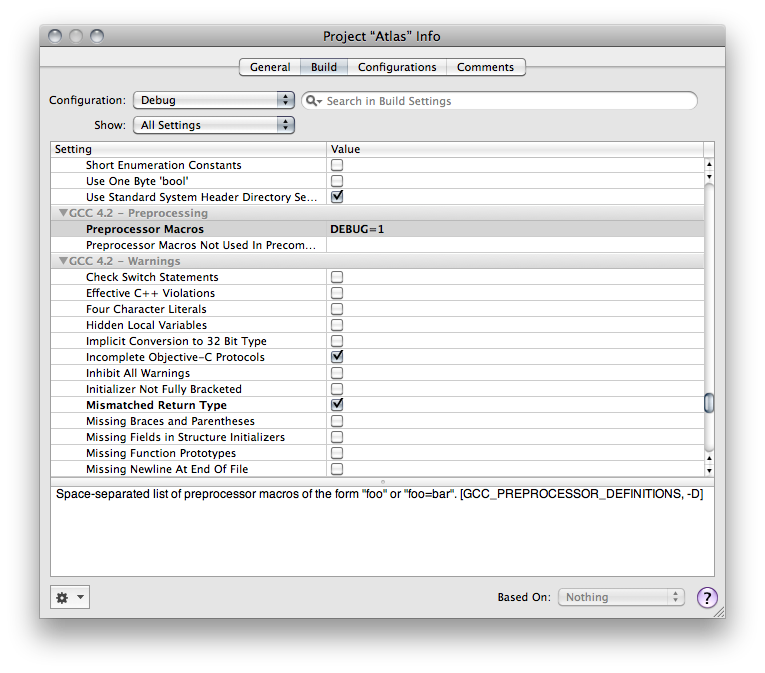
But, I recognize that this is a widely used approach that many people will want to use, and how you do it in Xcode isn't immediately obvious. If you open up the Project Info window by selecting Edit Project Settings from the Project menu, or double-clicking the project's root node in the Groups & Files pane, then click on the Build tab, you have the ability to set various options on a per-configuration basis. Under the heading GCC x.x - Preprocessing (where x.x is the version of GCC you are using), there is an option called Preprocessor Macros. You can define precompiler constants here on a per-configuration basis. Here's a screenshot that shows the value DEBUG being defined for the Debug configuration only:

Screen shot 2009-12-27 at 11.52.40 AM.png

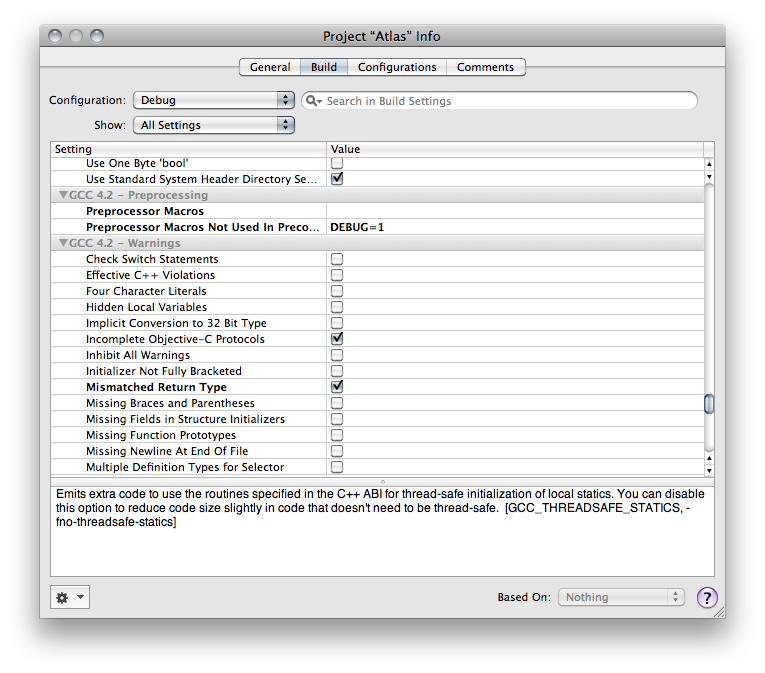
The one problem with using this option is that defining a macro here triggers the precompiled headers to get re-compiled every time. Fortunately, the next option after Preprocessor Macros is called Preprocessor Macros Not used In Precompiled Headers, and it does exactly the same thing, only it doesn't define the macros until after the .pch file is read, meaning it won't trigger a recompile of the precompiled headers. That will result in shorter compile times. So, most of the time, this is what you want, unless you manually add something to the .pch file that relies on the macro:

Screen shot 2009-12-27 at 12.09.58 PM.png

Thursday, December 24, 2009

Happy Holidays to All…

It's less than a quarter of an hour until Christmas here on the East Coast of the United States. I've been in a mostly voluntary week away from the computer since we put More iPhone 3 Development to bed (though I did take time to pen another installment in the OpenGL ES from the Ground Up before going into exile).

Although part of the reason for becoming a hermit this week was simply to unwind after way too many very long days sitting at the computer, it was also necessary. Those long days took their toll on our house, so to get the house back in shape before holiday visitors came into town required some very long days cleaning and organizing the house.

My inbox is approaching critical mass, so if you've sent me something in the last week, I do apologize. I hope to respond to everyone starting sometime next week. If you don't hear back by the New Year, you might want to ping me again. It's almost certain I'll miss a mail or two.

I hope everybody is getting to enjoy some quality time with family and friends.

Friday, December 18, 2009

Holy Cow - 78 Million iPhone OS Devices‽

According to one analyst, at least, we are on the cusp of 78 million iPhone OS devices in existence.

It wasn't that long ago that I was startled by the fact that there were 55 million devices. Another 23 million devices in just a few months strikes me as a lot of sales, even for the iPhone.

Anyway, just thought I'd share. This may be my last post for a few days. I've come down with the flu, or at least some very nasty flu-like illness. I've been sleeping away the last couple of days (apologies to anyone who has e-mailed, tweeted, or phoned, I'm not even going to try and catch up until Monday). Combine that with the holidays and everything they entail, and I may not have much time for posting over the next week.

If I don't have a chance to say it, happy Christmas / Kwanzaa / Chanukah/ New Year / Bill of Rights Day / Forefather's Day / Maritime Day / Winter Solstice / Boxing Day and any other holiday I might have missed there..