I've added three new projects to my iOS OpenGL ES repository on GitHub. They are fairly simple examples of how to use GLKit and GLKBaseEffect. You can find them in the GLKit Stuff directory.
They're kind of rough, but they should be helpful to you if you're just getting started with GLKit and trying to figure out how to use it.
Thanks to Julián Oliver for tweeting the solution to a problem I was having getting textures to work with GLKBaseEffect.
Showing posts with label Sample Code. Show all posts
Showing posts with label Sample Code. Show all posts
Wednesday, October 19, 2011

Friday, August 12, 2011
Online Session Code for Big Objects (Plus a Warning)
In Chapter 9 of More iPhone Development, we wrote a set of classes that mimicked the behavior of GameKit's peer-to-peer connectivity, but for regular network connections (GameKit's only works with BlueTooth and local network connections). Basically, we wrote a class that lets you send and receive anything that can be packaged into an instance of NSData. Since it's relatively trivial to implement NSCoding for most classes, this means passing objects between two iOS apps (or an iOS and a Mac app) becomes pretty easy. You don't have to poll for the data, or worry about chunking out the data. You just make a method call and pass an NSData instance to send data, and then implement a delegate method for receiving data back from the other end. Life is good, right?
Hmm...
Maybe not. There's a pretty big limitation in the book's implementation. That implementation, designed for passing tiny packets of data (TicTacToe game moves), kept everything in memory. If you try to send a good size image to the other connection, likely you'd run out of memory fairly quickly.
A while back, I faced exactly that situation. For a kiosk app that MartianCraft was writing for a client, I needed to send large images shot with a DSLR camera from a Mac Cocoa program to an iPad program and also needed to send pictures taken with the iPad's camera back to the Mac Cocoa app. These images, compressed, ranged from about one to about five megs. I grabbed the OnlineSession class from More, figuring I had the network code basically done, and watched my application go down in a blaze of… well… not glory, that's for sure. Not only did the iPad run out of memory, it ran out of memory FAST… much faster than I expected. Even sending the smaller iPad camera images often caused low-memory crashes.
There were two basic problems with the OnlineSession class when you try to use it for sending larger volumes of data. First, as I said, was that it relied only on physical memory. Given that the physical limitations of the original iPad, this was problematic. But there was another, much bigger problem.
The second issue was that during the process of chunking up the data to send, the code kept making unnecessary copies of the data. Put simply, I made a n00b mistake. The mistake didn't impact the TicTacToe application because the game moves would easily fit into the send buffer, but it's a mistake I've made before and definitely should've known better.
So, what, specifically, was this mistake, you ask?
Using NSData's regular convenience constructor dataWithBytes:length: when creating the new NSData instance to store the portion of the image that won't fit into the send buffer. If you read the description of dataWithBytes:length:, it very clearly says that it makes a copy of the data you provide. So, every time a packet was sent, the code would create a new NSData instance to hold the remainder that wouldn't fit in the buffer, and it would copy all the remaining unsent data for every packet. Ouch.
So, as a simple example, if we were sending a 5 meg image, and the send buffer was set to 128k, the code would make a 4.825 meg copy after the first packet was sent, then a 4.75 meg copy after the second packet was sent, a 4.265 meg copy after the third packet, and so on. After every packet, another slightly smaller copy of the data was made. A descending progression that would eat up memory fast.
After a lot of swearing at myself, I made some modifications to the class to do two things.
First, I switched to using NSData's dataWithBytes:NoCopy:length:, which uses the provided data in place without making a copy. This kept the memory footprint a lot smaller. In some instances, because the DSLR images were so large and our app needed to send so many, I still hit memory problems. So, the second thing I did was to add filesystem caching of the outbound queue so that all the encoded objects waiting to be sent didn't have to fit in memory for the application to function properly.
The new version of the class functions exactly as the one from the book, so you should be able to just drop-in replace the OnlineSession from Chapter 9 with this one without making any changes to your application code.
You can download the new version right here.
Hmm...
Maybe not. There's a pretty big limitation in the book's implementation. That implementation, designed for passing tiny packets of data (TicTacToe game moves), kept everything in memory. If you try to send a good size image to the other connection, likely you'd run out of memory fairly quickly.
A while back, I faced exactly that situation. For a kiosk app that MartianCraft was writing for a client, I needed to send large images shot with a DSLR camera from a Mac Cocoa program to an iPad program and also needed to send pictures taken with the iPad's camera back to the Mac Cocoa app. These images, compressed, ranged from about one to about five megs. I grabbed the OnlineSession class from More, figuring I had the network code basically done, and watched my application go down in a blaze of… well… not glory, that's for sure. Not only did the iPad run out of memory, it ran out of memory FAST… much faster than I expected. Even sending the smaller iPad camera images often caused low-memory crashes.
There were two basic problems with the OnlineSession class when you try to use it for sending larger volumes of data. First, as I said, was that it relied only on physical memory. Given that the physical limitations of the original iPad, this was problematic. But there was another, much bigger problem.
The second issue was that during the process of chunking up the data to send, the code kept making unnecessary copies of the data. Put simply, I made a n00b mistake. The mistake didn't impact the TicTacToe application because the game moves would easily fit into the send buffer, but it's a mistake I've made before and definitely should've known better.
So, what, specifically, was this mistake, you ask?
Using NSData's regular convenience constructor dataWithBytes:length: when creating the new NSData instance to store the portion of the image that won't fit into the send buffer. If you read the description of dataWithBytes:length:, it very clearly says that it makes a copy of the data you provide. So, every time a packet was sent, the code would create a new NSData instance to hold the remainder that wouldn't fit in the buffer, and it would copy all the remaining unsent data for every packet. Ouch.
So, as a simple example, if we were sending a 5 meg image, and the send buffer was set to 128k, the code would make a 4.825 meg copy after the first packet was sent, then a 4.75 meg copy after the second packet was sent, a 4.265 meg copy after the third packet, and so on. After every packet, another slightly smaller copy of the data was made. A descending progression that would eat up memory fast.
After a lot of swearing at myself, I made some modifications to the class to do two things.
First, I switched to using NSData's dataWithBytes:NoCopy:length:, which uses the provided data in place without making a copy. This kept the memory footprint a lot smaller. In some instances, because the DSLR images were so large and our app needed to send so many, I still hit memory problems. So, the second thing I did was to add filesystem caching of the outbound queue so that all the encoded objects waiting to be sent didn't have to fit in memory for the application to function properly.
The new version of the class functions exactly as the one from the book, so you should be able to just drop-in replace the OnlineSession from Chapter 9 with this one without making any changes to your application code.
You can download the new version right here.
Thursday, March 10, 2011
Attributed Strings in iOS
Ten months ago when the original iPad shipped, Apple released iOS 3.2, and for the first time, iOS developers had access to NSAttributedString and NSMutableAttributedString, objects designed to hold strings along with font, paragraph, and style information. We no longer had to resort to using heavy UIWebViews or complex Core Graphics calls to draw styled text.
Well, sort of…
On the Mac side of things, NSAttributedString and its counterpart NSMutableAttributedString have been around for a long, long time, as part of Foundation. But, there's also been, for nearly as long, categories on both of these classes in App Kit called the Application Kit Additions which have all sorts of useful additional methods.
These categories provide ways to create attributed strings from various sorts of formatted text documents (RTF, HTML), to create attributed strings by specifying multiple specified attributes, to tweak existing attributes, to draw the attributed string, and to determine the size of an attributed string if it were to be drawn.
In fact, most of the really useful methods for these two classes are contained in these App Kit categories and not in the base classes. Unfortunately, we don't have those categories in the iOS SDK, or even a scaled back version of them. We just have the base classes. That means we have a whopping thirteen methods on NSAttributedString, and another thirteen on NSMutableAttributedString.
Cocoa has luxury-brand attributed strings; Cocoa touch has store-brand generic ones.
Even weirder, NSAttributedString has an init method that takes a dictionary of string attributes, but the key constants for using that method aren't even included in iOS in either the public headers or the documentation. The description of the methods that take these attributes state that the constants are in the Overview section of the documentation, but that's actually only true in the Mac OS X documentation, not the iOS documentation.
In other words, you can't create an NSAttributedString or NSMutableAttributedString using initWithString:attributes: because you don't have the constants you need in order to specify the various attributes. That's not entirely true; you actually are able to use the Core Text counterparts of the NSAttributedString constants , such as kCTForegroundColorAttributeName in place of NSForegroundColorAttributeName, however this isn't actually documented anywhere, and there isn't an exact 1:1 correlation between the NS and CT string attributes (though it's close).
This situation is really odd. Apple went through great efforts to give us all the low-level pieces need to do complex text rendering, but didn't give us higher-level objects to handle most that functionality elegantly. We have the lion's share of all of the low-level Core Text and Core Graphics calls that are available on Mac OS X (still no Core Image, though). Yet, we have to write low-level Core Text and Core Graphics code to do the bulk of even the most common typesetting tasks using attributed strings.
Fortunately, NSAttributedString and NSMutableAttributedString are both toll-free bridged to their Core Foundation counterparts CFAttributedStringRef and CFMutableAttributedStringRef respectively. That means you can create, for example, a CFAttributedStringRef and simply cast it to an NSAttributedString pointer, and then calling NSAttributedString methods on it will work.
Mostly.
There's one gotcha here. On iOS, UIFont and CTFont are not toll-free bridged, even though NSFont and CTFont on the Mac are. You cannot pass a UIFont into a function that expects a CTFont and vice versa.
To get a CTFont from a UIFont, you can do this:
Notice the name of this method - the word "create" in the function name indicates that the returned CTFont object has been retained for you, and you are responsible for calling CFRelease() on it when you're done with it, to avoid leaking.
Going the other way, from a CTFont to a UIFont is only a little more involved. Here's a category method on UIFont that will create an instance of UIFont based on a CTFontRef pointer
Once you have the ability to convert the two font objects into each other, creating attributed strings really isn't that bad. Here's an example category method on NSMutableAttributedString that will create an instance by taking an NSString plus a font, a font size, and a constant representing the desired text justification. It will return an autoreleased attributed string with the text attributes applied to the entire string:
What about calculating the space needed to draw an attributable string? That's a little more involved, but it can be done. Here are two category methods on NSAttributedStringthat will tell you how much space an attributed string will require when drawn at a specified width or height, which is a useful thing to know when laying out text:
NB(1): This is a new version that's both shorter, and fixes a bug with the original version.
NB(2): A couple of people on Twitter have commented that you should save a reference to your CTFrameSetterRef when calculating height or width and re-use it, because the framesetter will cache those calculations. If you use a new one, you not only have the overhead of a new object, you will also be doing the size calculation twice. I'm planning a future post where I show how to draw attributed strings, and I need to give some thought about how to re-architect the code for that post based on that feedback.
I assume it's only a matter of time before Apple gives us the NSAttributedString UIKit Additions category, or some similar higher-level functionality. In the meantime, any time you have to deal with attributed strings, the best bet is to figure out how to do what you need to do in Core Text and/or Core Graphics (Apple's Programming Guides actually show exactly how to do the most common tasks using both of these frameworks), then wrap a generic version of that code into a category method on NSAttributedString or NSMutableAttributableString.
Well, sort of…
On the Mac side of things, NSAttributedString and its counterpart NSMutableAttributedString have been around for a long, long time, as part of Foundation. But, there's also been, for nearly as long, categories on both of these classes in App Kit called the Application Kit Additions which have all sorts of useful additional methods.
These categories provide ways to create attributed strings from various sorts of formatted text documents (RTF, HTML), to create attributed strings by specifying multiple specified attributes, to tweak existing attributes, to draw the attributed string, and to determine the size of an attributed string if it were to be drawn.
In fact, most of the really useful methods for these two classes are contained in these App Kit categories and not in the base classes. Unfortunately, we don't have those categories in the iOS SDK, or even a scaled back version of them. We just have the base classes. That means we have a whopping thirteen methods on NSAttributedString, and another thirteen on NSMutableAttributedString.
Cocoa has luxury-brand attributed strings; Cocoa touch has store-brand generic ones.
Even weirder, NSAttributedString has an init method that takes a dictionary of string attributes, but the key constants for using that method aren't even included in iOS in either the public headers or the documentation. The description of the methods that take these attributes state that the constants are in the Overview section of the documentation, but that's actually only true in the Mac OS X documentation, not the iOS documentation.
In other words, you can't create an NSAttributedString or NSMutableAttributedString using initWithString:attributes: because you don't have the constants you need in order to specify the various attributes. That's not entirely true; you actually are able to use the Core Text counterparts of the NSAttributedString constants , such as kCTForegroundColorAttributeName in place of NSForegroundColorAttributeName, however this isn't actually documented anywhere, and there isn't an exact 1:1 correlation between the NS and CT string attributes (though it's close).
This situation is really odd. Apple went through great efforts to give us all the low-level pieces need to do complex text rendering, but didn't give us higher-level objects to handle most that functionality elegantly. We have the lion's share of all of the low-level Core Text and Core Graphics calls that are available on Mac OS X (still no Core Image, though). Yet, we have to write low-level Core Text and Core Graphics code to do the bulk of even the most common typesetting tasks using attributed strings.
Fortunately, NSAttributedString and NSMutableAttributedString are both toll-free bridged to their Core Foundation counterparts CFAttributedStringRef and CFMutableAttributedStringRef respectively. That means you can create, for example, a CFAttributedStringRef and simply cast it to an NSAttributedString pointer, and then calling NSAttributedString methods on it will work.
Mostly.
There's one gotcha here. On iOS, UIFont and CTFont are not toll-free bridged, even though NSFont and CTFont on the Mac are. You cannot pass a UIFont into a function that expects a CTFont and vice versa.
To get a CTFont from a UIFont, you can do this:
CTFontRefNotice the name of this method - the word "create" in the function name indicates that the returned CTFont object has been retained for you, and you are responsible for calling CFRelease() on it when you're done with it, to avoid leaking.
Going the other way, from a CTFont to a UIFont is only a little more involved. Here's a category method on UIFont that will create an instance of UIFont based on a CTFontRef pointer
Once you have the ability to convert the two font objects into each other, creating attributed strings really isn't that bad. Here's an example category method on NSMutableAttributedString that will create an instance by taking an NSString plus a font, a font size, and a constant representing the desired text justification. It will return an autoreleased attributed string with the text attributes applied to the entire string:
+ (id)mutableAttributedStringWithString:(NSString *)string font:(UIFont *)font color:(UIColor *)color alignment:(CTTextAlignment)alignment
What about calculating the space needed to draw an attributable string? That's a little more involved, but it can be done. Here are two category methods on NSAttributedStringthat will tell you how much space an attributed string will require when drawn at a specified width or height, which is a useful thing to know when laying out text:
NB(1): This is a new version that's both shorter, and fixes a bug with the original version.
NB(2): A couple of people on Twitter have commented that you should save a reference to your CTFrameSetterRef when calculating height or width and re-use it, because the framesetter will cache those calculations. If you use a new one, you not only have the overhead of a new object, you will also be doing the size calculation twice. I'm planning a future post where I show how to draw attributed strings, and I need to give some thought about how to re-architect the code for that post based on that feedback.
- (CGFloat)boundingWidthForHeight:(CGFloat)inHeight
- (CGFloat)boundingHeightForWidth:(CGFloat)inWidth
I assume it's only a matter of time before Apple gives us the NSAttributedString UIKit Additions category, or some similar higher-level functionality. In the meantime, any time you have to deal with attributed strings, the best bet is to figure out how to do what you need to do in Core Text and/or Core Graphics (Apple's Programming Guides actually show exactly how to do the most common tasks using both of these frameworks), then wrap a generic version of that code into a category method on NSAttributedString or NSMutableAttributableString.
Wednesday, December 22, 2010
More Animation Curves than You Can Shake a Stick at
Core Animation is awesome. It makes doing a lot of complex, fancy animations downright easy. One of the really nice built-in features of Core Animation is the ability to use animation curves. These curves let you specify whether the animation happens linearly (at the same pace throughout the animation), or whether the animation eases in, eases out, or does both.
When you have to go closer to the metal and use OpenGL ES, you're not so lucky. We don't have animation curves provided for us in OpenGL ES. We have to interpolate ourselves. Fortunately, the math behind animation curves is straightforward. Plus, there are far more curves than just the four Apple offers.
I haven't run across a good library for generating animation curves, so I've decided to release my animation curve functions as public domain (no attribute required, no rights reserved). Here is a graph of all the different animation curves I'm releasing:
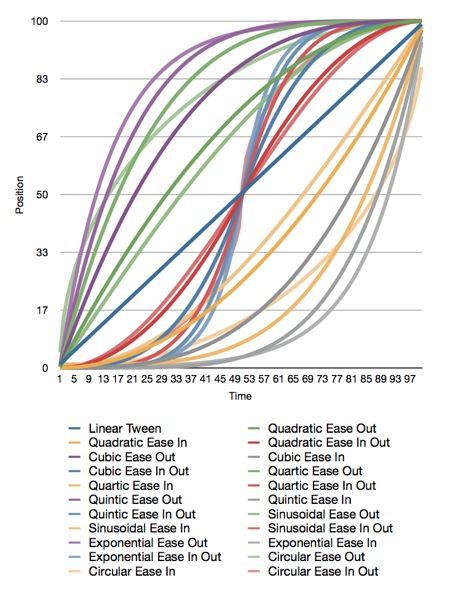
Here is the original Numbers.app document that generated the graph, and here is the Xcode project that generated the data. The project also contains all the functions needed to plot these curves.
Apple doesn't document which calculations they use for easing, but my guess is that they're quadratic. I'm not sure, though, since many of the curves yield similar results.
All of the interpolation functions included in the Xcode project above take three inputs and return a GLfloat containing the interpolated value. The first parameter, t, is the percent of the way through the animation you want a value calculated for. This is a clamped float that should be in the range 0.0 to 1.0. Values above 1.0 will be treated as 1.0 and values below 0.0 are treated as 0.0. The second parameter, start, is the value when the animation starts. The third parameter, end, is the final value to be animated toward.
If you want to apply a curve to a CGPoint or Vector3D, you have to call the function multiple times for each component (x/y or x/y/z).
Have fun!
Here are the functions included in the project above:
When you have to go closer to the metal and use OpenGL ES, you're not so lucky. We don't have animation curves provided for us in OpenGL ES. We have to interpolate ourselves. Fortunately, the math behind animation curves is straightforward. Plus, there are far more curves than just the four Apple offers.
I haven't run across a good library for generating animation curves, so I've decided to release my animation curve functions as public domain (no attribute required, no rights reserved). Here is a graph of all the different animation curves I'm releasing:
Here is the original Numbers.app document that generated the graph, and here is the Xcode project that generated the data. The project also contains all the functions needed to plot these curves.
Apple doesn't document which calculations they use for easing, but my guess is that they're quadratic. I'm not sure, though, since many of the curves yield similar results.
All of the interpolation functions included in the Xcode project above take three inputs and return a GLfloat containing the interpolated value. The first parameter, t, is the percent of the way through the animation you want a value calculated for. This is a clamped float that should be in the range 0.0 to 1.0. Values above 1.0 will be treated as 1.0 and values below 0.0 are treated as 0.0. The second parameter, start, is the value when the animation starts. The third parameter, end, is the final value to be animated toward.
If you want to apply a curve to a CGPoint or Vector3D, you have to call the function multiple times for each component (x/y or x/y/z).
Have fun!
Here are the functions included in the project above:
GLfloat
GLfloat
GLfloat
GLfloat
GLfloat
GLfloat
GLfloat
GLfloat
GLfloat
GLfloat
GLfloat
GLfloat
GLfloat
GLfloat
GLfloat
GLfloat
GLfloat
GLfloat
GLfloat
GLfloat
GLfloat
GLfloatThursday, November 4, 2010
NSExpression
The relatively new NSExpression class is incredibly powerful, yet not really used very often. Part of that is that it's not very well documented. Although the API documentation for NSExpression is fairly well detailed, the listed "companion guide" (Introduction to Predicates Programming) has very little information about how to actually use NSExpression.
NSExpression deserves to be better documented, because it brings to predicate programming (including Core Data), a lot of features from the relational database world that people often complain are missing, like unioning, intersecting, and subtracting resultsets and performing aggregate operations without loading managed objects or faults into memory.
The aggregates functionality is especially important on iOS given the limited memory on most iOS devices. If you've got a large dataset, and you want to get a count of objects, or calculate an average or sum for one of the attributes, you really don't want to have to pull the entire dataset into memory. Even if they're just faults, they're going to eat up memory you don't need to use because the underlying SQLite persistent store can figure that stuff out without the object overhead.
I don't have time to do a full NSExpression tutorial, but I thought it at least worth posting a category on NSManagedObject that lets you take advantage of some of its more useful features.
With this category, to get a sum of the attribute bar on entity Foo, you would do this:
This will calculate it for you using the database features, NOT by loading all the managed objects into memory. Much more memory and processor efficient than doing it manually.
Cheers. Category follows:
Header File:
Implementation File:
NSExpression deserves to be better documented, because it brings to predicate programming (including Core Data), a lot of features from the relational database world that people often complain are missing, like unioning, intersecting, and subtracting resultsets and performing aggregate operations without loading managed objects or faults into memory.
The aggregates functionality is especially important on iOS given the limited memory on most iOS devices. If you've got a large dataset, and you want to get a count of objects, or calculate an average or sum for one of the attributes, you really don't want to have to pull the entire dataset into memory. Even if they're just faults, they're going to eat up memory you don't need to use because the underlying SQLite persistent store can figure that stuff out without the object overhead.
I don't have time to do a full NSExpression tutorial, but I thought it at least worth posting a category on NSManagedObject that lets you take advantage of some of its more useful features.
With this category, to get a sum of the attribute bar on entity Foo, you would do this:
NSNumber *fooSum = ;This will calculate it for you using the database features, NOT by loading all the managed objects into memory. Much more memory and processor efficient than doing it manually.
Cheers. Category follows:
Header File:
Implementation File:
+(NSNumber *)aggregateOperation:(NSString *)function onAttribute:(NSString *)attributeName withPredicate:(NSPredicate *)predicate inManagedObjectContext:(NSManagedObjectContext *)context
@end
Subscribe to:
Posts (Atom)