Monday, March 29, 2010

My Last Word on NSFetchedResultsController

Somehow, I never posted my final fix for the various NSFetchedResultsController problems. I submitted a bug report to Apple to get the actual row counts out of NSFetchedResultsController including any deferred inserts and deletes, but went ahead with developing a workaround that keeps track of the inserts and deletes locally. I thought I had posted this information, but I guess I never did (Sorry!). I am optimistic that these issues will be fixed in 3.2, but haven't had time to really run the new version of NSFetchedResultsController through its paces, and even if I had, the NDA would keep me from being able to tell you what I had found. Nevertheless, the fact that it has been updated makes me optimistic that this workaround is temporary and that Apple has finally shipped a production-ready version of NSFetchedResultsController. In the meantime…

I'm going to give the changes in context of the Chapter 7 application from More iPhone 3 Development, but these changes are generic and could just be copied to any project using an NSFetchedResultsController and the delegate methods from Chapter 2. I don't usually encourage copy-and-paste coding, but for a temporary workaround it makes sense.

In HeroListViewController.h, we have to add an instance variable to keep track of the deferred inserts and deletes:

#import <UIKit/UIKit.h>

#define kSelectedTabDefaultsKey @"Selected Tab"
enum {
kByName = 0,
kBySecretIdentity,
}
;
@class ManagedObjectEditor;
@interface HeroListViewController : UIViewController <UITableViewDelegate, UITableViewDataSource, UITabBarDelegate, UIAlertViewDelegate, NSFetchedResultsControllerDelegate>{

UITableView *tableView;
UITabBar *tabBar;
ManagedObjectEditor *detailController;

@private
NSFetchedResultsController *_fetchedResultsController;
NSUInteger sectionInsertCount;
}

@property (nonatomic, retain) IBOutlet UITableView *tableView;
@property (nonatomic, retain) IBOutlet UITabBar *tabBar;
@property (nonatomic, retain) IBOutlet ManagedObjectEditor *detailController;
@property (nonatomic, readonly) NSFetchedResultsController *fetchedResultsController;
- (void)addHero;
- (IBAction)toggleEdit;
@end


Then, we need to make some changes to two of the NSFetchedResultsController delegate methods. Easiest thing is to probably just replace the existing version with these new versions. The only difference from the previous version is that we keep track of insertions and deletions for each transaction and then use the row count for sections is determined by adding the deferred insertion / deletion count to the number reported by the NSFetchedResultsController:

- (void)controllerWillChangeContent:(NSFetchedResultsController *)controller {
sectionInsertCount = 0;
[self.tableView beginUpdates];
}

- (void)controllerDidChangeContent:(NSFetchedResultsController *)controller {
[self.tableView endUpdates];
}

- (void)controller:(NSFetchedResultsController *)controller didChangeObject:(id)anObject atIndexPath:(NSIndexPath *)indexPath forChangeType:(NSFetchedResultsChangeType)type newIndexPath:(NSIndexPath *)newIndexPath {
switch(type) {
case NSFetchedResultsChangeInsert:
[self.tableView insertRowsAtIndexPaths:[NSArray arrayWithObject:newIndexPath] withRowAnimation:UITableViewRowAnimationFade];
break;
case NSFetchedResultsChangeDelete:
[self.tableView deleteRowsAtIndexPaths:[NSArray arrayWithObject:indexPath] withRowAnimation:UITableViewRowAnimationFade];
break;
case NSFetchedResultsChangeUpdate: {
NSString *sectionKeyPath = [controller sectionNameKeyPath];
if (sectionKeyPath == nil)
break;
NSManagedObject *changedObject = [controller objectAtIndexPath:indexPath];
NSArray *keyParts = [sectionKeyPath componentsSeparatedByString:@"."];
id currentKeyValue = [changedObject valueForKeyPath:sectionKeyPath];
for (int i = 0; i < [keyParts count] - 1; i++) {
NSString *onePart = [keyParts objectAtIndex:i];
changedObject = [changedObject valueForKey:onePart];
}

sectionKeyPath = [keyParts lastObject];
NSDictionary *committedValues = [changedObject committedValuesForKeys:nil];

if ([[committedValues valueForKeyPath:sectionKeyPath] isEqual:currentKeyValue])
break;

NSUInteger tableSectionCount = [self.tableView numberOfSections];
NSUInteger frcSectionCount = [[controller sections] count];
if (tableSectionCount + sectionInsertCount != frcSectionCount) {
// Need to insert a section
NSArray *sections = controller.sections;
NSInteger newSectionLocation = -1;
for (id oneSection in sections) {
NSString *sectionName = [oneSection name];
if ([currentKeyValue isEqual:sectionName]) {
newSectionLocation = [sections indexOfObject:oneSection];
break;
}

}

if (newSectionLocation == -1)
return; // uh oh

if (!((newSectionLocation == 0) && (tableSectionCount == 1) && ([self.tableView numberOfRowsInSection:0] == 0))) {
[self.tableView insertSections:[NSIndexSet indexSetWithIndex:newSectionLocation] withRowAnimation:UITableViewRowAnimationFade];
sectionInsertCount++;
}


NSUInteger indices[2] = {newSectionLocation, 0};
newIndexPath = [[[NSIndexPath alloc] initWithIndexes:indices length:2] autorelease];
}

}

case NSFetchedResultsChangeMove:
if (newIndexPath != nil) {

NSUInteger tableSectionCount = [self.tableView numberOfSections];
NSUInteger frcSectionCount = [[controller sections] count];
if (frcSectionCount != tableSectionCount + sectionInsertCount) {
[self.tableView insertSections:[NSIndexSet indexSetWithIndex:[newIndexPath section]] withRowAnimation:UITableViewRowAnimationNone];
sectionInsertCount++;
}


[self.tableView deleteRowsAtIndexPaths:[NSArray arrayWithObject:indexPath] withRowAnimation:UITableViewRowAnimationFade];
[self.tableView insertRowsAtIndexPaths: [NSArray arrayWithObject:newIndexPath]
withRowAnimation: UITableViewRowAnimationRight
]
;

}

else {
[self.tableView reloadSections:[NSIndexSet indexSetWithIndex:[indexPath section]] withRowAnimation:UITableViewRowAnimationFade];
}

break;
default:
break;
}

}

- (void)controller:(NSFetchedResultsController *)controller didChangeSection:(id <NSFetchedResultsSectionInfo>)sectionInfo atIndex:(NSUInteger)sectionIndex forChangeType:(NSFetchedResultsChangeType)type {
switch(type) {

case NSFetchedResultsChangeInsert:
if (!((sectionIndex == 0) && ([self.tableView numberOfSections] == 1))) {
[self.tableView insertSections:[NSIndexSet indexSetWithIndex:sectionIndex] withRowAnimation:UITableViewRowAnimationFade];
sectionInsertCount++;
}


break;
case NSFetchedResultsChangeDelete:
if (!((sectionIndex == 0) && ([self.tableView numberOfSections] == 1) )) {
[self.tableView deleteSections:[NSIndexSet indexSetWithIndex:sectionIndex] withRowAnimation:UITableViewRowAnimationFade];
sectionInsertCount--;
}

break;
case NSFetchedResultsChangeMove:
break;
case NSFetchedResultsChangeUpdate:
break;
default:
break;
}

}


You can find the fixed version of the Chapter 7 application right here.

Friday, March 26, 2010

Improved Irregular Shape UIButton

I took some of the feedback and improved the UIButton subclass from my last post. I implemented a cache for the alpha data and also incorporates changes based on Alfons Hoogervorst's modifications to my original UIImage category.

You can find the new and improved version of the irregular shaped UIButton code here.

Irregularly Shaped UIButtons

Note: There is an improved version of the code from this blog post right here.

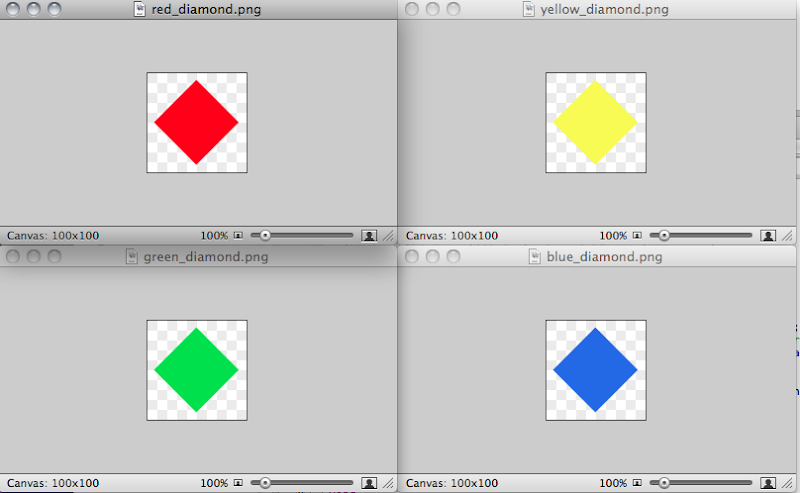
You probably know that UIButton allows you to select an image or background image with alpha, and it will respect the alpha. For example, if I create four images that look like this:

Screen shot 2010-03-26 at 1.02.47 PM.png

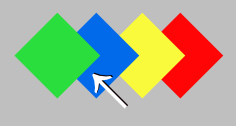
I can then use create custom buttons in Interface Builder using these images, and whatever is behind the transparent parts of the button will show through (assuming the button is not marked opaque. However, UIButton's hit-testing doesn't take the transparency into account, which means if you overlap these buttons in Interface Builder so they look like this, for example:

Screen shot 2010-03-26 at 1.04.17 PM.png

If you click here:

pointat.png

The default hit-testing is going to result in the green diamond button getting pressed, not the blue one. While this might be what you want some of the time, typically this won't be the behavior want. So, how do you get it to work like that? It's actually pretty easy, you just need to subclass UIButton and override the hit testing method.

But, first, we need a way to determine if a given point on an image is transparent. Unfortunately, UIImage is an opaque type without a mechanism to give us easy access to the bitmap data the way NSBitmapRepresentation does for NSImages in Cocoa. But, every UIImage instance does have a property called CGImage that gives us access to the underlying image data, and Apple has very nicely published a tech note telling how to get access to the underlying bitmap data from a CGImageRef.

Using the information in that technote, we can easily craft a category on UIImage with a method that takes a CGPoint as an argument and returns either YES or NO depending on whether the alpha value that corresponds to that point is transparent (0).

UIImage-Alpha.h
#import <UIKit/UIKit.h>

@interface UIImage(Alpha)
- (NSData *)ARGBData;
- (BOOL)isPointTransparent:(CGPoint)point;
@end


UIImage-Alpha.m
CGContextRef CreateARGBBitmapContext (CGImageRef inImage)
{
CGContextRef context = NULL;
CGColorSpaceRef colorSpace;
void * bitmapData;
int bitmapByteCount;
int bitmapBytesPerRow;


size_t pixelsWide = CGImageGetWidth(inImage);
size_t pixelsHigh = CGImageGetHeight(inImage);
bitmapBytesPerRow = (pixelsWide * 4);
bitmapByteCount = (bitmapBytesPerRow * pixelsHigh);

colorSpace = CGColorSpaceCreateDeviceRGB();
if (colorSpace == NULL)
return nil;

bitmapData = malloc( bitmapByteCount );
if (bitmapData == NULL)
{
CGColorSpaceRelease( colorSpace );
return nil;
}

context = CGBitmapContextCreate (bitmapData,
pixelsWide,
pixelsHigh,
8,
bitmapBytesPerRow,
colorSpace,
kCGImageAlphaPremultipliedFirst);
if (context == NULL)
{
free (bitmapData);
fprintf (stderr, "Context not created!");
}

CGColorSpaceRelease( colorSpace );

return context;
}


@implementation UIImage(Alpha)
- (NSData *)ARGBData
{
CGContextRef cgctx = CreateARGBBitmapContext(self.CGImage);
if (cgctx == NULL)
return nil;

size_t w = CGImageGetWidth(self.CGImage);
size_t h = CGImageGetHeight(self.CGImage);
CGRect rect = {{0,0},{w,h}};
CGContextDrawImage(cgctx, rect, self.CGImage);

void *data = CGBitmapContextGetData (cgctx);
CGContextRelease(cgctx);
if (!data)
return nil;

size_t dataSize = 4 * w * h; // ARGB = 4 8-bit components
return [NSData dataWithBytes:data length:dataSize];
}

- (BOOL)isPointTransparent:(CGPoint)point
{
NSData *rawData = [self ARGBData]; // See about caching this
if (rawData == nil)
return NO;

size_t bpp = 4;
size_t bpr = self.size.width * 4;

NSUInteger index = point.x * bpp + (point.y * bpr);
char *rawDataBytes = (char *)[rawData bytes];

return rawDataBytes[index] == 0;

}

@end

Once we have the ability to tell if a particular point on an image is transparent, we can then create our own subclass of UIButton and override the hitTest:withEvent: method to do a slightly more sophisticated hit test than UIButton's. The way this works is that we need to return an instance of UIView. If the point is not a hit on this view or one of its subclasses, we return nil.. If it's a hit on a subview, we return the subview that was hit, and if it's a hit on this view, we return self.

However, we can simplify this a little because, although UIButton, inherits from UIView and can technically have subviews, it is exceedingly uncommon to do so and, in fact, Interface Builder won't allow it. So, we don't have to worry about subviews in our implementation unless we're doing something really unusual. Here's a simple subclass of UIButton that does hit-testing based on the alpha channel of the image or background image of the button, but assumes there are no subviews.

IrregularShapedButton.h
#import <UIKit/UIKit.h>

@interface IrregularShapedButton : UIButton {

}


@end


IrregularShapedButton.m
#import "IrregularShapedButton.h"
#import "UIImage-Alpha.h"

@implementation IrregularShapedButton

- (UIView *)hitTest:(CGPoint)point withEvent:(UIEvent *)event
{
if (!CGRectContainsPoint([self bounds], point))
return nil;
else
{
UIImage *displayedImage = [self imageForState:[self state]];
if (displayedImage == nil) // No image found, try for background image
displayedImage = [self backgroundImageForState:[self state]];
if (displayedImage == nil) // No image could be found, fall back to
return self;
BOOL isTransparent = [displayedImage isPointTransparent:point];
if (isTransparent)
return nil;

}


return self;
}

@end


If we change the class of the four image buttons in Interface Builder from UIImage to IrregularShapedButton, they will work as expected. You can try the code out by downloading the Xcode project. Improvements and bug-fixes are welcome.

Curiously, the documentation for hitTest:withEvent: in UIView says This method ignores views that are hidden, that have disabled user interaction, or have an alpha level less than 0.1.. In my testing, this is actually not true, though I am unsure whether it's a documentation bug or an implementation bug.


Update: My Google-Fu failed me. I did search for existing implementations and tutorials about this subject before I wrote the posting (I hate reinventing the wheel), but I failed to find Ole Begemann's implementation of this from a few months ago. It's worth checking out his implementation to see different approaches to solving the same problem. There's also some discussion in the comments about the differences in our implementations that may be of interest if you like knowing the nitty-gritty details. Plus, his diamonds are prettier than mine.

Update 2: Alfons Hoogervorst tweaked the code andshowed how you could reduce the overhead by creating an alpha-only context.