Thursday, January 27, 2011
Complete Friday Q&A
Mike Ash just announced the availability of his Complete Friday Q&A book. Mike's weekly blog posting is a must read for any Cocoa developer. Mike's knowledge of the language and system internals is amazing, and having all his weekly posts available in one place formatted like a book is a great resource. Go check it out on iTunes or Amazon.

Garage Games
I noticed that Garage Games, the makers of the Torque game engine have recently had a near-death experience. As of the end of last year, it looked like they were shutting down operations. However, they appear to be in the midst of a phoenix-like return to life with, perhaps, some changes in focus and priority. The bad news for iOS folks, is that they've removed the mobile version of their 3D engine from their product list. I don't know if this means it's abandoned, or that they're just not ready to announce/release it. They are actively hiring developers and designers, and from the job descriptions they've posted, it sounds to me like they've got their sights set firmly on mobile.
To celebrate their revival, they're having a sale on all their products - you can get any of their engines, including a full source license for $99.
Now, I honestly don't know how Torque compares to, say, Unity, Sio2, or the UDK in terms of features or ease of development, but there have been a lot of very solid games created with Torque over the years and the demos show the engine is versatile and fairly powerful.
What I do know that $99 is a hell of a price for a source license to a game engine of this size and complexity. For me, it's worth that much money to get to peek around their code. There's a lot to be learned from looking at other people's code.
No word on how long the sale is for, but you can check it out here.
Note: I had an e-mail conversation with Garage Games' community manager about iTorque 3D. Unfortunately, right now the official word is that the product is off their roadmap. They have no announced plans to release it, so if you're targeting the iPhone or mobile devices in general, you're out of luck for now and should probably look at another engine.
That being said, they didn't rule out the possibility of re-introducing iTorque 3D at some future point. Frankly, if you're interested in writing games, I still think it's well worth dropping $99 for a license to be able to see the choices they've made in designing their engine as well as how they've implemented them. It's a pretty good example of a complex cross-platform project.
I have to say, I like the new public face of Garage Games. Their responses to my questions were prompt and candid. I think the new management knows exactly what they want to do and I'm looking forward to seeing where they take things.
To celebrate their revival, they're having a sale on all their products - you can get any of their engines, including a full source license for $99.
Now, I honestly don't know how Torque compares to, say, Unity, Sio2, or the UDK in terms of features or ease of development, but there have been a lot of very solid games created with Torque over the years and the demos show the engine is versatile and fairly powerful.
What I do know that $99 is a hell of a price for a source license to a game engine of this size and complexity. For me, it's worth that much money to get to peek around their code. There's a lot to be learned from looking at other people's code.
No word on how long the sale is for, but you can check it out here.
Note: I had an e-mail conversation with Garage Games' community manager about iTorque 3D. Unfortunately, right now the official word is that the product is off their roadmap. They have no announced plans to release it, so if you're targeting the iPhone or mobile devices in general, you're out of luck for now and should probably look at another engine.
That being said, they didn't rule out the possibility of re-introducing iTorque 3D at some future point. Frankly, if you're interested in writing games, I still think it's well worth dropping $99 for a license to be able to see the choices they've made in designing their engine as well as how they've implemented them. It's a pretty good example of a complex cross-platform project.
I have to say, I like the new public face of Garage Games. Their responses to my questions were prompt and candid. I think the new management knows exactly what they want to do and I'm looking forward to seeing where they take things.
Friday, December 31, 2010
On Seven Inches
Tim Bray has a year-end blog post up that's worth a read. In case you don't know, Tim Bray is Google's Android Evangelist. As you might expect from someone who would take that job, he's as enthusiastic about the Android platform as I am about iOS. Although his perspective colors his view (as does mine), his analysis is usually pretty good.
He's got one assertion in this most recent post, however, that doesn't seem to ring true to my ear.
John Gruber seems similarly skeptical, opining yesterday that:
The argument is far from over, and it's silly to even make the assertion. I have, within arm's reach, the very 7" tablet Tim refers to - a Samsung Galaxy Tab. I have spent quality time with the Tab, and think I definitely count as part of the set known as "anyone", yet I don't see this glaring hole that Tim thinks is so obvious. Personally, I found the Tab awkward for text reading, though part of that is due to Android's abysmal text rendering engine. The only way the Tab is better than the iPad for reading is that it's lighter and more portable. As for games, I'll admit that the Tab's form factor is pretty much ideal for driving games. All other types of games I've tried, it's either no better or worse than the iPad and, of course, there's no comparison in the selection of available games yet.
The Tab is a 16:9 tablet running Android 2.2. For watching 16:9 video content like movies and HD television shows, the end result is that you get roughly the same size image video as you do on the iPad in a package that's lighter and easier to hold, which sounds like a winner, right? There are downsides, however. The smaller form factor means less room for batteries and thus shorter battery life. The energy requirements for a 7" tablet are not considerably less than those of a 10" device, but there's a lot less room for batteries. As a result, while battery life is almost never an issue on my iPad, it's often one on the Tab. If you've seen the inside of an iPad, you know that most of the heft of the iPad comes from batteries. Apple made the design decision that they'd rather have a slightly heavier device that could run all day long on a single charge with normal usage. Based on sales and reviews, I think it's safe to say that was a good decision.
Batteries are getting more efficient every year, as are processors, so at some point, a 7" device with iPad-like battery life is completely feasible, however when that happens, a 10" device will have even better battery life. But battery life is far from the only downside to this form factor.
With the exception of video, some types of games (e.g. car driving games), and likely a handful of other tasks, the smaller form factor is simply not as good as the iPad for most things you'd want to do. It sits in an uncomfortable middle ground between phone-size devices and 10" tablets like the iPad and the… well, like the iPad. The Tab does nothing considerably better than either an iPhone or an iPad. It's "as good" at a handful of tasks.
What it boils down to is that the main advantage of the 7" form factor is that it's easier to carry around with you and is lighter to hold. I'm just unconvinced that's enough of a reason to make a 7" iPad inevitable.
Personally, If I were going to buy something to fit between my iPhone 4 and my iPad, I'd buy a Kindle, and recent sales numbers seem to indicate that many people are making that choice. The Kindle does less than the Tab, but it's even lighter and it does do something better than the iPad, iPhone, and Tab: it's a better ebook reader. It gets great battery life, it's easy on your eyes, has nice text, it's easy to carry, can be held comfortably in one hand, and it's much, much cheaper.
When Apple introduced the iPad, it looked like it was going to compete, and probably kill, the burgeoning ebook reader market. Instead, it pushed those special-purpose devices into a lower price bracket where they no longer compete directly with the iPad. Looking at how the sales numbers have jumped recently, the iPad may just be the best thing that ever happened to the Kindle. The Kindle and Nook are almost down into the "impulse buy" category, and as a result, they're selling like hotcakes, often to people who already own iPads.
But where does a seven inch tablet fit into the market? What would compel someone who owns an iPad to buy one, or would compel someone to buy one instead of an iPad? There isn't really a huge unmet demand for this product to fill. There's no pressing, burning need that would cause people to buy yet another device. A seven inch tablet has to compete with products that are already on the market and that are well-established. It can't compete with the Kindle on price, size, weight, or as an ebook reader. It's not noticeably cheaper than the iPad, yet has shorter batter life. It doesn't do anything that the iPad or iPhone can't. It's only compelling advantages are that it's lighter and smaller. Well, for a small segment of the market, it has another advantage: it's not from Apple.
The Galaxy Tab has been selling pretty well, but it's got novelty working for it, and it's really the only viable non-Apple tablet on the market right now. That will not be the case for long, however. The way the iPad has sold, you can expect every computer hardware manufacturer to try to claim a piece of the tablet market. Microsoft has already announced that, for them, CES would be about "slates" yet again this year (oh, boy!).
For seven inch tablets to gain traction in the long run, they will have to provide a compelling advantage over the iPad, the iPhone, and the Kindle. If they're not going to compete on price, maybe there's some feature or ability where seven inch tablets can distinguish themselves and establish a long-term foothold, but I haven't thought of it yet, and apparently neither have the current tablet manufacturers like Samsung.
The only way Apple will release a 7" tablet is if they think of some compelling reason for such a product to exist. It's possible that the reason would be price - making a more affordable and smaller iPad available to people who can't afford a $500+ device but want something bigger than an iPod touch. That's not impossible given Apple's drive for competitive pricing in their consumer products the last few years, but it's far from a foregone conclusion.
He's got one assertion in this most recent post, however, that doesn't seem to ring true to my ear.
Apple will totally do a 7" device. Anyone who’s spent quality time reading books or playing games on the Galaxy Tab knows; there’s a great big hole in the ecosystem that needs something bigger than a handset but that still fits in one hand and you can use for four hours in a row sitting up. This argument is over.
John Gruber seems similarly skeptical, opining yesterday that:
The problem is that it’s nice, for certain tasks, to be able to hold a tablet in one hand, but you can’t do that with the current iPad. I think Bray’s mistake is assuming that using a 7-inch display is the only way to solve that problem.
The argument is far from over, and it's silly to even make the assertion. I have, within arm's reach, the very 7" tablet Tim refers to - a Samsung Galaxy Tab. I have spent quality time with the Tab, and think I definitely count as part of the set known as "anyone", yet I don't see this glaring hole that Tim thinks is so obvious. Personally, I found the Tab awkward for text reading, though part of that is due to Android's abysmal text rendering engine. The only way the Tab is better than the iPad for reading is that it's lighter and more portable. As for games, I'll admit that the Tab's form factor is pretty much ideal for driving games. All other types of games I've tried, it's either no better or worse than the iPad and, of course, there's no comparison in the selection of available games yet.
The Tab is a 16:9 tablet running Android 2.2. For watching 16:9 video content like movies and HD television shows, the end result is that you get roughly the same size image video as you do on the iPad in a package that's lighter and easier to hold, which sounds like a winner, right? There are downsides, however. The smaller form factor means less room for batteries and thus shorter battery life. The energy requirements for a 7" tablet are not considerably less than those of a 10" device, but there's a lot less room for batteries. As a result, while battery life is almost never an issue on my iPad, it's often one on the Tab. If you've seen the inside of an iPad, you know that most of the heft of the iPad comes from batteries. Apple made the design decision that they'd rather have a slightly heavier device that could run all day long on a single charge with normal usage. Based on sales and reviews, I think it's safe to say that was a good decision.
Batteries are getting more efficient every year, as are processors, so at some point, a 7" device with iPad-like battery life is completely feasible, however when that happens, a 10" device will have even better battery life. But battery life is far from the only downside to this form factor.
With the exception of video, some types of games (e.g. car driving games), and likely a handful of other tasks, the smaller form factor is simply not as good as the iPad for most things you'd want to do. It sits in an uncomfortable middle ground between phone-size devices and 10" tablets like the iPad and the… well, like the iPad. The Tab does nothing considerably better than either an iPhone or an iPad. It's "as good" at a handful of tasks.
What it boils down to is that the main advantage of the 7" form factor is that it's easier to carry around with you and is lighter to hold. I'm just unconvinced that's enough of a reason to make a 7" iPad inevitable.
Personally, If I were going to buy something to fit between my iPhone 4 and my iPad, I'd buy a Kindle, and recent sales numbers seem to indicate that many people are making that choice. The Kindle does less than the Tab, but it's even lighter and it does do something better than the iPad, iPhone, and Tab: it's a better ebook reader. It gets great battery life, it's easy on your eyes, has nice text, it's easy to carry, can be held comfortably in one hand, and it's much, much cheaper.
When Apple introduced the iPad, it looked like it was going to compete, and probably kill, the burgeoning ebook reader market. Instead, it pushed those special-purpose devices into a lower price bracket where they no longer compete directly with the iPad. Looking at how the sales numbers have jumped recently, the iPad may just be the best thing that ever happened to the Kindle. The Kindle and Nook are almost down into the "impulse buy" category, and as a result, they're selling like hotcakes, often to people who already own iPads.
But where does a seven inch tablet fit into the market? What would compel someone who owns an iPad to buy one, or would compel someone to buy one instead of an iPad? There isn't really a huge unmet demand for this product to fill. There's no pressing, burning need that would cause people to buy yet another device. A seven inch tablet has to compete with products that are already on the market and that are well-established. It can't compete with the Kindle on price, size, weight, or as an ebook reader. It's not noticeably cheaper than the iPad, yet has shorter batter life. It doesn't do anything that the iPad or iPhone can't. It's only compelling advantages are that it's lighter and smaller. Well, for a small segment of the market, it has another advantage: it's not from Apple.
The Galaxy Tab has been selling pretty well, but it's got novelty working for it, and it's really the only viable non-Apple tablet on the market right now. That will not be the case for long, however. The way the iPad has sold, you can expect every computer hardware manufacturer to try to claim a piece of the tablet market. Microsoft has already announced that, for them, CES would be about "slates" yet again this year (oh, boy!).
For seven inch tablets to gain traction in the long run, they will have to provide a compelling advantage over the iPad, the iPhone, and the Kindle. If they're not going to compete on price, maybe there's some feature or ability where seven inch tablets can distinguish themselves and establish a long-term foothold, but I haven't thought of it yet, and apparently neither have the current tablet manufacturers like Samsung.
The only way Apple will release a 7" tablet is if they think of some compelling reason for such a product to exist. It's possible that the reason would be price - making a more affordable and smaller iPad available to people who can't afford a $500+ device but want something bigger than an iPod touch. That's not impossible given Apple's drive for competitive pricing in their consumer products the last few years, but it's far from a foregone conclusion.
Wednesday, December 22, 2010
More Animation Curves than You Can Shake a Stick at
Core Animation is awesome. It makes doing a lot of complex, fancy animations downright easy. One of the really nice built-in features of Core Animation is the ability to use animation curves. These curves let you specify whether the animation happens linearly (at the same pace throughout the animation), or whether the animation eases in, eases out, or does both.
When you have to go closer to the metal and use OpenGL ES, you're not so lucky. We don't have animation curves provided for us in OpenGL ES. We have to interpolate ourselves. Fortunately, the math behind animation curves is straightforward. Plus, there are far more curves than just the four Apple offers.
I haven't run across a good library for generating animation curves, so I've decided to release my animation curve functions as public domain (no attribute required, no rights reserved). Here is a graph of all the different animation curves I'm releasing:
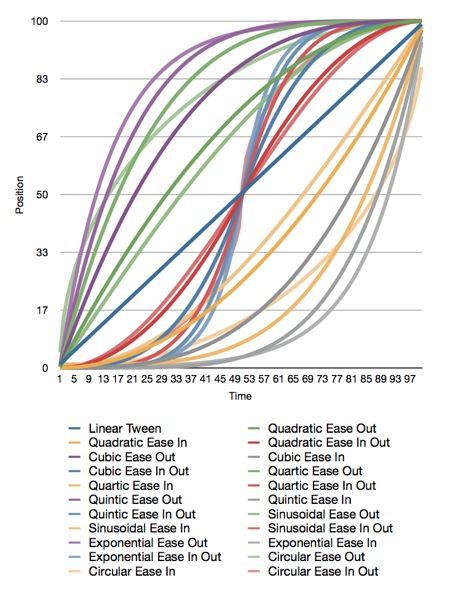
Here is the original Numbers.app document that generated the graph, and here is the Xcode project that generated the data. The project also contains all the functions needed to plot these curves.
Apple doesn't document which calculations they use for easing, but my guess is that they're quadratic. I'm not sure, though, since many of the curves yield similar results.
All of the interpolation functions included in the Xcode project above take three inputs and return a GLfloat containing the interpolated value. The first parameter, t, is the percent of the way through the animation you want a value calculated for. This is a clamped float that should be in the range 0.0 to 1.0. Values above 1.0 will be treated as 1.0 and values below 0.0 are treated as 0.0. The second parameter, start, is the value when the animation starts. The third parameter, end, is the final value to be animated toward.
If you want to apply a curve to a CGPoint or Vector3D, you have to call the function multiple times for each component (x/y or x/y/z).
Have fun!
Here are the functions included in the project above:
When you have to go closer to the metal and use OpenGL ES, you're not so lucky. We don't have animation curves provided for us in OpenGL ES. We have to interpolate ourselves. Fortunately, the math behind animation curves is straightforward. Plus, there are far more curves than just the four Apple offers.
I haven't run across a good library for generating animation curves, so I've decided to release my animation curve functions as public domain (no attribute required, no rights reserved). Here is a graph of all the different animation curves I'm releasing:
Here is the original Numbers.app document that generated the graph, and here is the Xcode project that generated the data. The project also contains all the functions needed to plot these curves.
Apple doesn't document which calculations they use for easing, but my guess is that they're quadratic. I'm not sure, though, since many of the curves yield similar results.
All of the interpolation functions included in the Xcode project above take three inputs and return a GLfloat containing the interpolated value. The first parameter, t, is the percent of the way through the animation you want a value calculated for. This is a clamped float that should be in the range 0.0 to 1.0. Values above 1.0 will be treated as 1.0 and values below 0.0 are treated as 0.0. The second parameter, start, is the value when the animation starts. The third parameter, end, is the final value to be animated toward.
If you want to apply a curve to a CGPoint or Vector3D, you have to call the function multiple times for each component (x/y or x/y/z).
Have fun!
Here are the functions included in the project above:
GLfloat
GLfloat
GLfloat
GLfloat
GLfloat
GLfloat
GLfloat
GLfloat
GLfloat
GLfloat
GLfloat
GLfloat
GLfloat
GLfloat
GLfloat
GLfloat
GLfloat
GLfloat
GLfloat
GLfloat
GLfloat
GLfloatTuesday, December 21, 2010
The Little Grashopper Blog
Well, I'm not sure how I never ran across it before, but Philip Rideout, author of O'Reilly's iPhone 3D (a book I recommended last week), has a hell of a blog for people interested in OpenGL. A lot of the posts are specific to desktop OpenGL (and recent versions of OpenGL at that!), but there's tons of great information that applies to OpenGL ES as well. It's a veritable treasure trove of advanced graphics goodness from a guy who's been doing it for years.
More Math Resources
After posting about the free Linear Algebra book, I was told about another resource for learning math via Twitter. The Khan Academy is a not-for-profit website providing online video courses on a number of topics. They don't just cover math, but they do cover math extensively. They have well over 100 video lessons on linear algebra alone. Definitely a great resource I'm happy to pass along!
Non-Deterministic Problems aka Finding Talent
As programmers, we usually deal with deterministic systems. To state it simplistically, deterministic systems are systems where the same inputs always results in the same output. Unless we intentionally introduce randomness¹ or have a relatively rare kind of bug in our code, the same inputs to our programs will always yield the same output. It could very well be the wrong result if our algorithm is bad, but it should be the same wrong result every time, which is a trait we rely on heavily.
In the real world, most things we encounter are non-deterministic. There are always factors we can't control or measure, and most systems have a human element. We are at the mercy of whim and emotion, and that's hard for a lot of programmers to deal with. Our fellow humans's decisions are decidedly non-deterministic and hard to predict, as are ours (though we usually don't notice this trait quite as much in ourselves).
You may have noticed that I haven't had much time to write lately. I've been exceedingly busy of late, even by my own standards. Although a lot of my time is being spent writing and debugging software, I've also been involved with some very non-deterministic problems as a result of my involvement with some large, complex development projects.
Probably the biggest non-programming problem that I've had to deal with lately, which most of my industry peers and nearly all of our clients are dealing with also, is finding good, experienced, reliable developers to staff projects. In short, there aren't enough experienced mobile software developers to go around. There simply aren't as many developers with multiple successful projects under their belt as there are companies who need the services of such people. I know of one large company that currently has ten open requisitions for mobile developers - five iOS and five Android - and no viable prospects at the moment. I helped one client recently bring aboard a good iOS developer, which took several months, and then I very quickly regretted it, because MartianCraft could really use that developer's services now.
Yet, on the other hand, whenever I blog about just how much work there is right now, I inevitably get several e-mails or comments from developers wanting to know how to find all this work. I make it sound like it's raining work, and they're not getting wet.
Given that, I thought it worth a few minutes to write about both sides of the equation: how to find developers, and how to find work as a developer. This isn't an exhaustive treatment, just a summary of recent observations.
Unfortunately, I've got no silver bullet for aspiring developers. Overnight success is often indistinguishable from years of hard work. There are countless issues around getting that are not mobile development-specific that I'm not going to touch, such as a willingness to relocate ("go where the work is").
As with any industry, a large part of finding work is establishing a reputation and getting to know as many people in the industry as you can. Though it's expensive, you really need to go to WWDC, and probably a couple other conferences as well. About half, maybe even more, of MartianCraft work has come directly or indirectly as a result of one of us attending a conference. Conferences are where we meet our peers and where we develop and maintain our relationships with them. You should also attend CocoaHeads and/or NSCoder Night if you have one near you. This is where you can meet and get to know local iOS and Mac developers. On the Android side, there are similar meet-ups that you can attend.
When going to hire or subcontract a developer, most people I know will automatically prefer someone they've met, talked with, and maybe shared a drink with over a stranger, no matter how good the stranger's resume looks. Confidence in someone's ability to get a job done comes more rapidly from personal interaction. Resumes are sterile, but sitting down and working through a tough bug with somebody gives you a real feel for the other person's character and technical chops in a way you can never get from a resume.
At conferences, don't worry about going to every session. Everybody tries to at their first DubDub, but don't. Really. Pace yourself so you can socialize in the evenings. That may sound like bad, or even frivolous advice - as if I'm telling you to play hooky, but the information in the sessions can be found again. Most conferences videotape their sessions, and usually some of the attendees do joint note-taking using SubEthaEdit and make those notes available. But socializing with industry peers is vital if you want to do this full time, especially as an Indie. These are the people who can give you work (and accept work when you're too busy to take on new work yourself), and they are the people who can help you when you're stuck on a gnarly technical problem. These are the people who can give you a different perspective on something you've been staring at for far too long and are the people who can help you become a smarter, better developer.
Though not perfect, the iOS and Mac developer community is incredibly giving and helpful. It's not uncommon for direct competitors to help each other out and consider each other friends. Most of us realize that it's not a zero-sum game, and helping out others in our community usually comes back with interest. Scratch that. Not usually. Always.
Getting ongoing work requires more than being liked by other developers, however. You have to give people a reason to have confidence in your abilities. Creating or contributing to open source projects can show huge (if not immediate) returns. In the early days of iOS, before Core Data was available, my SQLitePersistentObjects project brought me nearly as much recognition as having my name on the cover of iPhone programming books.
Regular blogging is also a huge opportunity. Not only does it give people an idea of the depth of your knowledge, it gives you a chance to learn and improve. I don't think I've posted more than a couple technical blog posts where there wasn't either a correction or improvement sent to me by a reader, and often there were many. Just remember not to get defensive or depressed when it happens. You don't stop making mistakes until you stop living, but if you keep learning, you can avoid making the same mistake too many times. Readers who care enough to point out your mistakes are valuable beyond belief. Tame your ego and cherish them. Nobody's going to think less of you as a developer for occasional mistakes or less-than-perfect code.
But, no matter how much of the above you do, there is one absolute prerequisite to getting work on an ongoing basis: you have to have the technical chops. This is probably the hardest thing to figure out. I've met many great developers who lacked confidence in their abilities and I've met some who've had far too much confidence in them. It's really hard to gauge your own ability and it's almost always sobering to revisit older code you've written. No matter how good you get, there's always room to get better and if you're doing it right, you will. As developers, we're paid as much for our ability to quickly assimilate new knowledge as we are for the things we already know.
Don't worry too much about your whether you have a specific degree, or a college degree at all. You don't have to have a computer science or computer engineering degree to be a good programmer. There are many, many great programmers (including inside Apple) without those degrees and, in fact, without degrees at all. College is one way to get the information and some of the experience you need to be a good programmer, but it's not the only way, and it's possible (though probably not common) to get through school with a CS or CE degree and completely suck. Some of the worst iOS programmers I've encountered have both degrees and programming experience. Objective-C is a bit of a weird beast, and overconfidence is a big problem for experienced developers coming from C++, Java, and C# background. They look at Objective-C, see familiar aspects, and think they know what they're doing, sometimes completely oblivious to the differences between a static, strongly-typed language and a dynamic, weakly-typed one or the differences between a garbage-collected language and a reference-counted one.
In a perfect world, nobody would ever be able to offer their services as an iOS developer without perfectly understanding the rules around memory management. I'm not suggesting you should, but everything else, you could learn on the job, but you have to really grok the way retain counting and memory management work to be a professional iOS developer. You can really fuck up a code base trying to fix EXC_BAD_ACCESS bugs if you don't know what you're doing and can create an awful lot of work for somebody else in the process. You can also get away with an awful lot of leaks if you're developing on the simulator that will cause significant problems later. The stakes get much higher when you're working on the same code at the same time other developers are.
One thing to seriously consider, even if you have a few apps under your belt, is to take a class or workshop. There are some excellent ones out there, including (but certainly not limited to) the Big Nerd Ranch and the Pragmatic Studio. A few thousand dollars may seem like a lot of money, but it's a hell of an investment given the work opportunities available right now. A good workshop will beat into your head the important stuff. They'll strap a firehose of information onto your face and open the spout. They will make your brain hurt, but you will come out knowing memory management and the fundamentals, and that will put you in the running.
Another key skill is debugging. Being able to fix your bugs and those you find in other people's code is vital. Plus, the more bugs you encounter, the more things you know not to do in the future. Want to test yourself? Try downloading this. It's an Xcode project — a modified version of one of the Beginning iPhone 3 Development projects — that has a number of common bugs introduced into it. You should be able to get this to compile clean (no errors or warnings), then be able to navigate into every view in the application without it crashing and with something being displayed on every view. Once you've done that, you should then be able to fix any leaks in the app using Instruments. How long it takes is going to depend on a lot of factors, but I'd say that a typical, experienced, professional iOS developer should be able to fix this in between a half hour and an hour and a half. Regardless of how long it takes, if you can fix them all without help, you've gone a long way down the path to becoming a great developer.
Don't worry if you can't find them all that quickly. The first time you encounter a particular class of bug, it takes more time. Persistence is as important as speed, and debugging this project is a good exercise. Once you see a type of bug once, it's much easier to find and fix it when you encounter it again.
If I find time over the holiday, I might do a screencast showing how to find and fix all the bugs in the project. I can't promise I'll find the time to do that given my current workload, but if I can, I will.
Lastly, if you're looking for full-time iOS or Android employment, or for contract development work, send me your resume. MartianCraft isn't hiring full-time employees at the moment, but we do often need subs, and I know of many, many open requisitions for full-time jobs and I'm always happy to pass resumes along to hiring managers.
The other side of the equation is, how do you staff a mobile development project right now? Many experienced mobile developers were attracted to the space because it offered them the ability to make a living creating what they want to create. Mobile, and especially iOS development offer opportunities for small teams without a lot of funding to make a decent living. Many of those indie developers are doing exactly what they want to be doing and it's going to be hard, if not impossible, to attract them away from that life, if they're good at what they do.
Hell, many contract developers have app ideas they'd love to be working on themselves. A friend of mine who owns a development shop stated the problem fairly succinctly recently by saying: "We've got several app ideas we'd like to build, but clients keep throwing money at us."
I don't know exactly how many contract iOS developers there are with Objective-C experience that pre-dates the release of the iPhone SDK and/or who have several successful projects under their belt, but it's less than are needed. Big businesses are finally catching on to the importance of mobile and that's making a shallow talent pool even shallower. The situation for Android is similar. Though there are more people who already know the underlying language (Java), the platform has only relatively recently hit critical mass, so there aren't a lot of people who have been involved with successful Android software projects yet compared to the work available, and even less who have successfully shipped multiple Android projects.
In all reality, you're either going to need to offer crazy rates to lure the cream of the crop to your project (and that is no guarantee you're going to get the cream) or you're going to need to invest time and money into developing internal talent. I would advise at least having one really good, experienced tech lead on any decent size project, though. As many App Store success stories can attest, it is absolutely possible to ship good software using only inexperienced developers. But, doing so increases your risk substantially. Having at least one mentor who can guide and help and solve the really icky problems is gold.
In most places, you can train developers more cheaply and more quickly than you can find existing ones, at least if you're looking for full-time employees. It's not a perfect plan - your newly trained people will be learning on the job and making mistakes and may, at times, hit problems that are beyond their ken. But, with the proper training and support, they can handle the bulk of the work, and over time, will gain the experience to handle anything. Of course, you'll have to take steps to keep them from leaving. Arming an employee with a highly marketable skill always incurs a risk of losing that employee.
You can deal with that using contract terms requiring payback of training expenses or other similar ideas, but it's far more effective (albeit harder) to create an environment where people want to work. Job satisfaction is a bigger motivator for many developers than the size of their paycheck, assuming they're making enough to be comfortable and to feel valued. We're one of the few growth industries in this economy, and there's always another paycheck somewhere if you have these skills, so if you're create a hostile environment, no amount of money is going to keep the good people around long term.
There's another option you might be considering: offshoring. Go ahead. I mean, anything I say against the practice is going to seem biased given what I do for a living, and it's true that you can get considerably lower rates by doing it. I've seen shops in other countries offering iOS development services for about what you can make working at Burger King here in the states. And there are actually success stories from offshoring to cheap development body shops. Unfortunately, there are even more horror stories. In the few cases where I've been brought in to fix² projects of this nature, it's always been a waste of time and we ended up just throwing out the old code and starting over. Let me tell you, "start over" is a suggestion that strikes fear into the hearts of project managers.
To put it as fairly as possible: Offshoring increases risk. If you're comfortable with more risk, then it might be a good choice for you. There's a chance you'll come in way under budget and be a hero. Just recognize that there's a larger chance you'll end up six months down the line starting over completely. Any way you cut it, you're likely to have language barriers, cultural differences, and a hard time enforcing accountability. The simple fact of the matter is, even in countries with considerably lower cost of living, opportunities for good mobile developers are legion, so the only way those shops can maintain those excessively low rates is with a constant stream of new, inexperienced bodies. Call me crazy, but it seems to me, that if you're going to have inexperienced bodies working on your project, you'd be better off with ones closer to home that you can train and guide and have some idea of what they're doing.
I'll be blunt. If you're looking to build a team of iOS or Android developers in-house, you've got a tough road ahead of you at the moment. At some point, we'll hit equilibrium and it will get easier, but right now, it's hard. Just as I suggested to aspiring developers, I'd encourage you to get involved with the community. Send somebody, preferably somebody with some authority to hire developers and whose day-to-day job is working with the technology, to conferences, CocoaHeads meetings, and NSCoder Nights, or the Android equivalents (Meetup.com is a good place to find both iOS and Android groups in your area).
I'm always happy to hear from companies that need iOS or Android development resources. I'm thrilled to refer potential employees your way if you're looking for in-house talent, and MartianCraft is always open to talking with with you about your development needs, whether it's for a little strategic consulting and guidance, or to fully staff a development project. And if MartianCraft isn't a good fit for your situation or doesn't have the resources available to do a great job, there's a pretty good chance we know somebody who is and does. If we do, we'll connect you with them.
1 Technically speaking, without external input of some sort, computers are not capable of true randomness, and using a pseudorandom function doesn't make a computer non-deterministic. Pseudorandomness does make the computer pretend to be non-deterministic, though, and you will appear to get different output from the same input on successive runs of the program.
2 The term that we professionals in the industry use to refer to this process is "unfucking". Surprisingly, most dictionaries have not picked up this term yet.
In the real world, most things we encounter are non-deterministic. There are always factors we can't control or measure, and most systems have a human element. We are at the mercy of whim and emotion, and that's hard for a lot of programmers to deal with. Our fellow humans's decisions are decidedly non-deterministic and hard to predict, as are ours (though we usually don't notice this trait quite as much in ourselves).
You may have noticed that I haven't had much time to write lately. I've been exceedingly busy of late, even by my own standards. Although a lot of my time is being spent writing and debugging software, I've also been involved with some very non-deterministic problems as a result of my involvement with some large, complex development projects.
Probably the biggest non-programming problem that I've had to deal with lately, which most of my industry peers and nearly all of our clients are dealing with also, is finding good, experienced, reliable developers to staff projects. In short, there aren't enough experienced mobile software developers to go around. There simply aren't as many developers with multiple successful projects under their belt as there are companies who need the services of such people. I know of one large company that currently has ten open requisitions for mobile developers - five iOS and five Android - and no viable prospects at the moment. I helped one client recently bring aboard a good iOS developer, which took several months, and then I very quickly regretted it, because MartianCraft could really use that developer's services now.
Yet, on the other hand, whenever I blog about just how much work there is right now, I inevitably get several e-mails or comments from developers wanting to know how to find all this work. I make it sound like it's raining work, and they're not getting wet.
Given that, I thought it worth a few minutes to write about both sides of the equation: how to find developers, and how to find work as a developer. This isn't an exhaustive treatment, just a summary of recent observations.
For Developers: Finding Work
Unfortunately, I've got no silver bullet for aspiring developers. Overnight success is often indistinguishable from years of hard work. There are countless issues around getting that are not mobile development-specific that I'm not going to touch, such as a willingness to relocate ("go where the work is").
As with any industry, a large part of finding work is establishing a reputation and getting to know as many people in the industry as you can. Though it's expensive, you really need to go to WWDC, and probably a couple other conferences as well. About half, maybe even more, of MartianCraft work has come directly or indirectly as a result of one of us attending a conference. Conferences are where we meet our peers and where we develop and maintain our relationships with them. You should also attend CocoaHeads and/or NSCoder Night if you have one near you. This is where you can meet and get to know local iOS and Mac developers. On the Android side, there are similar meet-ups that you can attend.
When going to hire or subcontract a developer, most people I know will automatically prefer someone they've met, talked with, and maybe shared a drink with over a stranger, no matter how good the stranger's resume looks. Confidence in someone's ability to get a job done comes more rapidly from personal interaction. Resumes are sterile, but sitting down and working through a tough bug with somebody gives you a real feel for the other person's character and technical chops in a way you can never get from a resume.
At conferences, don't worry about going to every session. Everybody tries to at their first DubDub, but don't. Really. Pace yourself so you can socialize in the evenings. That may sound like bad, or even frivolous advice - as if I'm telling you to play hooky, but the information in the sessions can be found again. Most conferences videotape their sessions, and usually some of the attendees do joint note-taking using SubEthaEdit and make those notes available. But socializing with industry peers is vital if you want to do this full time, especially as an Indie. These are the people who can give you work (and accept work when you're too busy to take on new work yourself), and they are the people who can help you when you're stuck on a gnarly technical problem. These are the people who can give you a different perspective on something you've been staring at for far too long and are the people who can help you become a smarter, better developer.
Though not perfect, the iOS and Mac developer community is incredibly giving and helpful. It's not uncommon for direct competitors to help each other out and consider each other friends. Most of us realize that it's not a zero-sum game, and helping out others in our community usually comes back with interest. Scratch that. Not usually. Always.
Getting ongoing work requires more than being liked by other developers, however. You have to give people a reason to have confidence in your abilities. Creating or contributing to open source projects can show huge (if not immediate) returns. In the early days of iOS, before Core Data was available, my SQLitePersistentObjects project brought me nearly as much recognition as having my name on the cover of iPhone programming books.
Regular blogging is also a huge opportunity. Not only does it give people an idea of the depth of your knowledge, it gives you a chance to learn and improve. I don't think I've posted more than a couple technical blog posts where there wasn't either a correction or improvement sent to me by a reader, and often there were many. Just remember not to get defensive or depressed when it happens. You don't stop making mistakes until you stop living, but if you keep learning, you can avoid making the same mistake too many times. Readers who care enough to point out your mistakes are valuable beyond belief. Tame your ego and cherish them. Nobody's going to think less of you as a developer for occasional mistakes or less-than-perfect code.
But, no matter how much of the above you do, there is one absolute prerequisite to getting work on an ongoing basis: you have to have the technical chops. This is probably the hardest thing to figure out. I've met many great developers who lacked confidence in their abilities and I've met some who've had far too much confidence in them. It's really hard to gauge your own ability and it's almost always sobering to revisit older code you've written. No matter how good you get, there's always room to get better and if you're doing it right, you will. As developers, we're paid as much for our ability to quickly assimilate new knowledge as we are for the things we already know.
Don't worry too much about your whether you have a specific degree, or a college degree at all. You don't have to have a computer science or computer engineering degree to be a good programmer. There are many, many great programmers (including inside Apple) without those degrees and, in fact, without degrees at all. College is one way to get the information and some of the experience you need to be a good programmer, but it's not the only way, and it's possible (though probably not common) to get through school with a CS or CE degree and completely suck. Some of the worst iOS programmers I've encountered have both degrees and programming experience. Objective-C is a bit of a weird beast, and overconfidence is a big problem for experienced developers coming from C++, Java, and C# background. They look at Objective-C, see familiar aspects, and think they know what they're doing, sometimes completely oblivious to the differences between a static, strongly-typed language and a dynamic, weakly-typed one or the differences between a garbage-collected language and a reference-counted one.
In a perfect world, nobody would ever be able to offer their services as an iOS developer without perfectly understanding the rules around memory management. I'm not suggesting you should, but everything else, you could learn on the job, but you have to really grok the way retain counting and memory management work to be a professional iOS developer. You can really fuck up a code base trying to fix EXC_BAD_ACCESS bugs if you don't know what you're doing and can create an awful lot of work for somebody else in the process. You can also get away with an awful lot of leaks if you're developing on the simulator that will cause significant problems later. The stakes get much higher when you're working on the same code at the same time other developers are.
One thing to seriously consider, even if you have a few apps under your belt, is to take a class or workshop. There are some excellent ones out there, including (but certainly not limited to) the Big Nerd Ranch and the Pragmatic Studio. A few thousand dollars may seem like a lot of money, but it's a hell of an investment given the work opportunities available right now. A good workshop will beat into your head the important stuff. They'll strap a firehose of information onto your face and open the spout. They will make your brain hurt, but you will come out knowing memory management and the fundamentals, and that will put you in the running.
Another key skill is debugging. Being able to fix your bugs and those you find in other people's code is vital. Plus, the more bugs you encounter, the more things you know not to do in the future. Want to test yourself? Try downloading this. It's an Xcode project — a modified version of one of the Beginning iPhone 3 Development projects — that has a number of common bugs introduced into it. You should be able to get this to compile clean (no errors or warnings), then be able to navigate into every view in the application without it crashing and with something being displayed on every view. Once you've done that, you should then be able to fix any leaks in the app using Instruments. How long it takes is going to depend on a lot of factors, but I'd say that a typical, experienced, professional iOS developer should be able to fix this in between a half hour and an hour and a half. Regardless of how long it takes, if you can fix them all without help, you've gone a long way down the path to becoming a great developer.
Don't worry if you can't find them all that quickly. The first time you encounter a particular class of bug, it takes more time. Persistence is as important as speed, and debugging this project is a good exercise. Once you see a type of bug once, it's much easier to find and fix it when you encounter it again.
If I find time over the holiday, I might do a screencast showing how to find and fix all the bugs in the project. I can't promise I'll find the time to do that given my current workload, but if I can, I will.
Lastly, if you're looking for full-time iOS or Android employment, or for contract development work, send me your resume. MartianCraft isn't hiring full-time employees at the moment, but we do often need subs, and I know of many, many open requisitions for full-time jobs and I'm always happy to pass resumes along to hiring managers.
For Companies: Finding Mobile Developers
The other side of the equation is, how do you staff a mobile development project right now? Many experienced mobile developers were attracted to the space because it offered them the ability to make a living creating what they want to create. Mobile, and especially iOS development offer opportunities for small teams without a lot of funding to make a decent living. Many of those indie developers are doing exactly what they want to be doing and it's going to be hard, if not impossible, to attract them away from that life, if they're good at what they do.
Hell, many contract developers have app ideas they'd love to be working on themselves. A friend of mine who owns a development shop stated the problem fairly succinctly recently by saying: "We've got several app ideas we'd like to build, but clients keep throwing money at us."
I don't know exactly how many contract iOS developers there are with Objective-C experience that pre-dates the release of the iPhone SDK and/or who have several successful projects under their belt, but it's less than are needed. Big businesses are finally catching on to the importance of mobile and that's making a shallow talent pool even shallower. The situation for Android is similar. Though there are more people who already know the underlying language (Java), the platform has only relatively recently hit critical mass, so there aren't a lot of people who have been involved with successful Android software projects yet compared to the work available, and even less who have successfully shipped multiple Android projects.
In all reality, you're either going to need to offer crazy rates to lure the cream of the crop to your project (and that is no guarantee you're going to get the cream) or you're going to need to invest time and money into developing internal talent. I would advise at least having one really good, experienced tech lead on any decent size project, though. As many App Store success stories can attest, it is absolutely possible to ship good software using only inexperienced developers. But, doing so increases your risk substantially. Having at least one mentor who can guide and help and solve the really icky problems is gold.
In most places, you can train developers more cheaply and more quickly than you can find existing ones, at least if you're looking for full-time employees. It's not a perfect plan - your newly trained people will be learning on the job and making mistakes and may, at times, hit problems that are beyond their ken. But, with the proper training and support, they can handle the bulk of the work, and over time, will gain the experience to handle anything. Of course, you'll have to take steps to keep them from leaving. Arming an employee with a highly marketable skill always incurs a risk of losing that employee.
You can deal with that using contract terms requiring payback of training expenses or other similar ideas, but it's far more effective (albeit harder) to create an environment where people want to work. Job satisfaction is a bigger motivator for many developers than the size of their paycheck, assuming they're making enough to be comfortable and to feel valued. We're one of the few growth industries in this economy, and there's always another paycheck somewhere if you have these skills, so if you're create a hostile environment, no amount of money is going to keep the good people around long term.
There's another option you might be considering: offshoring. Go ahead. I mean, anything I say against the practice is going to seem biased given what I do for a living, and it's true that you can get considerably lower rates by doing it. I've seen shops in other countries offering iOS development services for about what you can make working at Burger King here in the states. And there are actually success stories from offshoring to cheap development body shops. Unfortunately, there are even more horror stories. In the few cases where I've been brought in to fix² projects of this nature, it's always been a waste of time and we ended up just throwing out the old code and starting over. Let me tell you, "start over" is a suggestion that strikes fear into the hearts of project managers.
To put it as fairly as possible: Offshoring increases risk. If you're comfortable with more risk, then it might be a good choice for you. There's a chance you'll come in way under budget and be a hero. Just recognize that there's a larger chance you'll end up six months down the line starting over completely. Any way you cut it, you're likely to have language barriers, cultural differences, and a hard time enforcing accountability. The simple fact of the matter is, even in countries with considerably lower cost of living, opportunities for good mobile developers are legion, so the only way those shops can maintain those excessively low rates is with a constant stream of new, inexperienced bodies. Call me crazy, but it seems to me, that if you're going to have inexperienced bodies working on your project, you'd be better off with ones closer to home that you can train and guide and have some idea of what they're doing.
I'll be blunt. If you're looking to build a team of iOS or Android developers in-house, you've got a tough road ahead of you at the moment. At some point, we'll hit equilibrium and it will get easier, but right now, it's hard. Just as I suggested to aspiring developers, I'd encourage you to get involved with the community. Send somebody, preferably somebody with some authority to hire developers and whose day-to-day job is working with the technology, to conferences, CocoaHeads meetings, and NSCoder Nights, or the Android equivalents (Meetup.com is a good place to find both iOS and Android groups in your area).
I'm always happy to hear from companies that need iOS or Android development resources. I'm thrilled to refer potential employees your way if you're looking for in-house talent, and MartianCraft is always open to talking with with you about your development needs, whether it's for a little strategic consulting and guidance, or to fully staff a development project. And if MartianCraft isn't a good fit for your situation or doesn't have the resources available to do a great job, there's a pretty good chance we know somebody who is and does. If we do, we'll connect you with them.
1 Technically speaking, without external input of some sort, computers are not capable of true randomness, and using a pseudorandom function doesn't make a computer non-deterministic. Pseudorandomness does make the computer pretend to be non-deterministic, though, and you will appear to get different output from the same input on successive runs of the program.
2 The term that we professionals in the industry use to refer to this process is "unfucking". Surprisingly, most dictionaries have not picked up this term yet.
Subscribe to:
Posts (Atom)