MartianCraft has a fair amount of Android work right now. Personally, I try to focus on the iOS work whenever possible, but we're a small company, so nobody gets to play the primadonna. As a result, I spend a good chunk of my time on Android projects and have to stay abreast of both the Android and iOS worlds from both a hardware and a software perspective.
Last week, I found myself grudgingly admitting to myself that the Motorola Xoom is not a bad tablet. It feels incomplete in many ways. It has rough edges, some definite hardware and software CBBs¹, and a general dearth of good, native-resolution apps. But, it had potential and I definitely saw how certain demographics might be attracted to it over the iPad. I saw a tablet that normal people could use with some frustration, but not an insurmountable amount… much like Windows, post Windows-95.
The thing that I haven't seen in any of the Android tablets, however, is a compelling reason to buy them instead of the iPad. The only people I know who've bought Android tablets also own iPads. Other than a strong aversion to Apple's products or Apple as a company, what would compel somebody to pay $800 for a Xoom or Tab rather than going out and getting an iPad? Maybe there's a reason, but I can't see it. While both the Xoom and Tab had some specs that were better than the original iPad, neither offered a comparable experience let alone a better one, and neither could do anything that the iPad can't², despite higher price tags.
Then came yesterday.
Two days ago, the Xoom looked like a decent, almost finished and slightly overpriced tablet. Two days ago, it had a couple of quantifiable advantages, including native CDMA support and a better GPU. Two days ago, you could make the Xoom look better than the iPad on paper. Though marketing based on tech specs hasn't proven to be a very effective strategy in mobile computing space, at least they did have that for them. They had grounds for claiming you should buy the Xoom instead of an iPad. The arguments were thin, but two days ago they existed.
Today, simply put: The Xoom is fucked. So, I suspect, is the unreleased Samsung Tab 10.1 and the RIM Playbook. I can only imagine the discussions that are going on inside those companies today.
Only the staunchest Apple haters and self-deluded "openness" ideologues are going to pony up that kind of dough for a tablet that can't offer a comparable experience and doesn't have better tech specs. The Xoom doesn't even have the advantage of working with a carrier that Apple's tablet doesn't. In seven days, there will be both native CDMA and GSM models of the iPad 2.
Think about this: yesterday when I checked, the Android Marketplace had sixteen Honeycomb tablet-resolution apps. Sixteen. And you know what's not included in that sixteen? That space game that they show the guy playing in the Xoom commercials. In other words, they had to put a fake game in the commercial. Would they have done that if they had even one compelling application that could make the Xoom look better than the iPad?
As a tablet platform, Android has two big challenges.
First, it has a chicken-and-egg problem with software. Developers are waiting for people to buy Android tablets in sufficient quantity to support the platform, and many consumers are waiting for good apps to buy Android. In the phone world, Android seems to be past that hump. While the app situation is nowhere near as good as on iOS yet, there are apps — including some good ones — for the platform.
But, even if the Xoom were every bit as amazing of a piece of hardware as the iPad 2, it would still have the problem that it does less cool things. There's nothing comparable to Garage Band or iMovies, or any of the hundreds of jaw-dropping iPad apps that have been created in the last year like Infinity Blade, The Elements, or Alice. There's just no "wow" app you can put on your Xoom and show people that's going to make them want to run out and buy one. There's nothing you can do and confidently say "your iPad can't do that shit right there, bitch".
The second, and much larger problem is simply one of price. I see people constantly comparing the Android/iOS situation to the Windows/Mac situation of the eighties and nineties. I usually see this claim by people laughably arguing that Apple's failure is imminent.
In the nineties, Apple kept insane profit margins on their products while dozens of manufacturers created inexpensive commodity PCs running Windows. There was a margin war on the PC side, and PCs became noticeably cheaper (despite paying hefty licensing fees to Microsoft), and that price difference, combined with Microsoft closing some of the usability gap with the Mac, is what lead to the dominance of Wintel machines. In the nineties, Macs simply cost more. You could argue that Macs were cheaper based on TOC or employee efficiency, but in the quantifiable terms that bean counters understand, the Mac was a lot more expensive and didn't do noticeably more, especially once Adobe jumped ship and become cross-platform.
That's not where things are now, however. For typical consumers - people who don't have a dog in the technology race, so to speak, are going to buy based largely on price, Apple's mobile "post-PC devices" aren't just better than their competitors, they're cheaper than comparable competitors.
We don't have a situation where commodity resellers can easily assemble components into a working, desirable mobile device. Mobile devices are all about form factor, design, and ease of use. They don't sit on a desk, they go where you go. They need to be well engineered, light, get good battery life, and be easy to use. They can't require IT support staff, an instruction manual, or training. A large beige box on a desk is one thing, but in your pocket it's another thing altogether.
Why is this the case, though? Why can't these companies compete with Apple on price in the tablet space?
The prices Apple can offer is a result of two things. First, is plain and simple buying power. Apple sells a lot of devices, so they buy a lot of screens, flash memory, etc. As a result, they can get quantity discounts. Apple got to the 10 inch form factor first and cornered the market, driving up the price for 10" screen components for any competitors coming after them.
The second, however, is that they have gobs of cash on hand. A lot of market watchers say Apple is foolhardy to keep so much cash on hand. On the contrary! Apple understands psychology, and not just consumer psychology. When they go to a vendor or hardware partner and ask for exclusive arrangements, priority fulfillment, or better prices, do you know what bargaining chip they have that few other companies have?
The corporate equivalent of a suitcase full of cash.
When a vendor needs to retool for a new manufacturing process Apple has developed or needs to increase their output capacity, Apple shows up with a wad of cash in hand. They don't have to liquidate any assets or get a loan or seek permission of shareholders. They just play Daddy Warbucks and pull out a wad of million dollar bills. Apple's partners, in addition to getting large-volume contracts, can get working capital as part of their arrangment with Apple without taking out loans. A definite part of the reason you were able to buy an iPad for only $499 is because Apple didn't follow conventional wisdom about cash on hand.
Arguing that Apple would be doing better by doing what everybody else is doing isn't usually very convincing to me.
Motorola and Samsung… they're both large companies with a lot of buying power and strong brand recognition. The problem is, they don't understand the game that Apple's playing in the mobile space, so they're playing it wrong. They're so caught up in catching up that they're not even trying to innovate in this space. Maybe HP or Rim will figure it out, but I'm not going to hold my breath.
Which is unfortunate. If Apple's doing this kind of amazing stuff without any viable competition, can you imagine what they'd be doing with strong, viable competitors nipping at their heels?
1 "Could Be Betters"
2 From a consumer perspective, not from the perspective of a geek who likes to take things apart and put them back together. The Xoom, with its more powerful processor and GPU had the potential to do things the original iPad couldn't, but didn't ship with any application that proved it. Consumers believe what they see, not what the tech specs say.
Showing posts with label iPad. Show all posts
Showing posts with label iPad. Show all posts
Friday, March 4, 2011

Friday, July 2, 2010
Pressure Sensitive iPad
One thing that I've wished the iPad had from the beginning was the ability to detect different levels of pressure, similar to a Wacom tablet. That would make it much more useful for things like sketching. I've heard from a few people that the hardware supports it, but I've been skeptical of those claims. How could a capacitative touch device detect pressure? But a few people I talked to at WWDC insisted it was possible with the hardware.
Turns out they were right. This is really cool. I don't know anything about the technology - whether they're really using pressure (I tend to doubt it) or just the relative size of the area being touched, but the results in the video look promising. I also hope the final version can be accomplished with only public APIs somehow.
Turns out they were right. This is really cool. I don't know anything about the technology - whether they're really using pressure (I tend to doubt it) or just the relative size of the area being touched, but the results in the video look promising. I also hope the final version can be accomplished with only public APIs somehow.
Friday, April 23, 2010
iPad Max Touches
One thing I've been curious about for a while is what is the extent of the iPhone's ability to detect and track multiple touches. On the original iPhone, I've been able to detect and track 5 touches, though my fingers are large enough that I rarely could get it to recognize more than 4 distinct touches.
On the iPad, we've got a much bigger screen that will let all ten fingers touch at the same time without running together.
So, can the iPhone SDK track 10 fingers at once? Yep. It sure can. I wrote a simple program to just record the count of the touches set provided to the four UIResponder touch-related methods, and it had no problem identifying and tracking 10 separate fingers at the same time.
I don't know what the hardware or software limitations are on Apple's multi-touch technology, but it seems to be high enough not to be an issue.
On the iPad, we've got a much bigger screen that will let all ten fingers touch at the same time without running together.
So, can the iPhone SDK track 10 fingers at once? Yep. It sure can. I wrote a simple program to just record the count of the touches set provided to the four UIResponder touch-related methods, and it had no problem identifying and tracking 10 separate fingers at the same time.
I don't know what the hardware or software limitations are on Apple's multi-touch technology, but it seems to be high enough not to be an issue.
Wednesday, April 7, 2010
iPadDevCamp NYC April 16-18
iPadDevCampNYC will be held in New York city from April 16 through April 18 at the AOL New York offices. The non-profit event is inspired by MacHack, BarCamp, and SuperHappyDevHouse, and will be three days of hacking combined with social events, speakers, sessions, and panels. Large chunks of time are devoted, of course, to coding on the iPad.

Sounds like a great opportunity to meet other iPad devs. If you live in the NYC area, you might want to check it out. It's only $50 for the entire three-days.
Unfortunately, I can't attend, but if I lived closer I absolutely would.
Sounds like a great opportunity to meet other iPad devs. If you live in the NYC area, you might want to check it out. It's only $50 for the entire three-days.
Unfortunately, I can't attend, but if I lived closer I absolutely would.
Monday, April 5, 2010
My Weekend with iPad
I'll be honest with you: I wasn't all that excited about getting an iPad in order to use it. I was mostly excited about developing for it. I bought the lowest-end 16Gb Wi-Fi and figured it would be permanently attached to my computer. For reasons I stated shortly after the iPad introduction, I saw this as a product targeted at other, less technically savvy individuals.
And I still think it's a great product for those people. I really do. I think with just a few changes, such as a keyboard dock with a USB port and built-in Time Machine, this could be the ultimate non-techie computer.
I also saw the very obvious role as a media consumption device. It's clearly targeting the Kindle and Nook, and it's going to do great in that role. The screen is not hard on your eyes, even though it's LED. The colors are beautiful and the viewing angle is nearly 180°. Combined with the 10 hour battery life (mine actually went a fair bit longer on the first charge), it's a great eBook reader as well. I love the idea of eBooks, but until the publishing industry gets a clue and stops trying to charge me $12.99 for fifty year old books I can pick up for a dollar or get from the library, I'm hesitant to actually buy any and will limit my iPad reading to news and all the lovely classic literature available on Project Gutenberg.
But I really didn't see myself falling in love with this product. I saw it as a great vacation computer; something that would be small and easy to pack that would let me check e-mail and surf the web while on vacation without being tempted to do work, and that was about it.
But, the exact thing that makes it a good vacation computer is key. Yesterday was Easter, and I promised my wife I wouldn't work this weekend. So, I actually unplugged and closed my computer and didn't use it at all. My iPhone is great for keeping in touch when I'm away from my computer, but typing any volume of e-mail on it sucks.
The iPad allowed me to do triage with my e-mail and read the news without going upstairs to my office. Now, I have a tendency, when I get in front of my computer, to start responding to work e-mails. I'll also sometimes pull open a project that I've been having problems with if I've thought of a possible solution, or hack out some notes about possible blog postings It's very easy for me to get sucked in to doing a few hours of work completely unintentionally.
But not with iPad. Some people are complaining about there being no Xcode on it. Screw that. I don't WANT Xcode on it. I think it's perfect as-is. This is something I can use to read before bed, without getting sucked into work. This is something I can play a game with the kids on, and not get sucked into doing work afterward. This is something I can use to check the news or weather without going up to mycave office and then getting sucked into work.
The iPad is not a way to do work, it's wax for my ears against the siren call of work.
Plus, it's really fun. It's silly how much I like it.
And I still think it's a great product for those people. I really do. I think with just a few changes, such as a keyboard dock with a USB port and built-in Time Machine, this could be the ultimate non-techie computer.
I also saw the very obvious role as a media consumption device. It's clearly targeting the Kindle and Nook, and it's going to do great in that role. The screen is not hard on your eyes, even though it's LED. The colors are beautiful and the viewing angle is nearly 180°. Combined with the 10 hour battery life (mine actually went a fair bit longer on the first charge), it's a great eBook reader as well. I love the idea of eBooks, but until the publishing industry gets a clue and stops trying to charge me $12.99 for fifty year old books I can pick up for a dollar or get from the library, I'm hesitant to actually buy any and will limit my iPad reading to news and all the lovely classic literature available on Project Gutenberg.
But I really didn't see myself falling in love with this product. I saw it as a great vacation computer; something that would be small and easy to pack that would let me check e-mail and surf the web while on vacation without being tempted to do work, and that was about it.
But, the exact thing that makes it a good vacation computer is key. Yesterday was Easter, and I promised my wife I wouldn't work this weekend. So, I actually unplugged and closed my computer and didn't use it at all. My iPhone is great for keeping in touch when I'm away from my computer, but typing any volume of e-mail on it sucks.
The iPad allowed me to do triage with my e-mail and read the news without going upstairs to my office. Now, I have a tendency, when I get in front of my computer, to start responding to work e-mails. I'll also sometimes pull open a project that I've been having problems with if I've thought of a possible solution, or hack out some notes about possible blog postings It's very easy for me to get sucked in to doing a few hours of work completely unintentionally.
But not with iPad. Some people are complaining about there being no Xcode on it. Screw that. I don't WANT Xcode on it. I think it's perfect as-is. This is something I can use to read before bed, without getting sucked into work. This is something I can play a game with the kids on, and not get sucked into doing work afterward. This is something I can use to check the news or weather without going up to my
The iPad is not a way to do work, it's wax for my ears against the siren call of work.
Plus, it's really fun. It's silly how much I like it.
A Few More Notes on Creating Universal Apps
Now that I've had some more time with the iPad and making Universal Apps, I've realized there are some important things I left out of Saturday's post.
First, I talked about the newly defined macro UI_USER_INTERFACE_IDIOM(). There's a problem with this right now, however, because iPhone OS 3.2 was an iPad only release. Most of us are assuming that iPhone and iPad will eventually run on the same OS version, but for now they don't ,and UI_USER_INTERFACE_IDIOM() doesn't exist in 3.1.2 and earlier. So, if you're creating a Universal Binary, you can't compile code that uses it.
Instead, you need to use a different technique, which is the check the precompiler definition __IPHONE_OS_VERSION_MAX_ALLOWED, which is set to the OS version number without dots. The definition is five digits, the first is the major release number, the second and third are the minor release number, and the fourth and fifth number are the patch release number. So, 3.2 would be defined to 30200 and 3.1.2 would be defined to 30102, so here's how you should probably design your code for the time being:
In the future, you won't need to check this, but it won't hurt to after. Since it's resolved during pre-compilation, there are no drawbacks other than a little bit of code clutter.
I forgot to mention that there's an option to upgrade Targets to Universal under the Project menu. It will convert your target for you, and you should use it instead of manually setting the project (the way I did my first few). If the option is grayed out, make sure that your project's base SDK (not just the currently selected SDK) is iPhone Device 3.0+. If it's older, or if it can't find the Base SDK, you won't get the option.
This option will do a few things. It will update your Base SDK to 3.2 and your Deployment SDK to the original Base SDK. It will configure your targets either to create a Universal Application, or two separate applications. It will create your application's main iPad NIB for you. It will strip out the ARM6 instructions from the iPad portion of the binary.
First, I talked about the newly defined macro UI_USER_INTERFACE_IDIOM(). There's a problem with this right now, however, because iPhone OS 3.2 was an iPad only release. Most of us are assuming that iPhone and iPad will eventually run on the same OS version, but for now they don't ,and UI_USER_INTERFACE_IDIOM() doesn't exist in 3.1.2 and earlier. So, if you're creating a Universal Binary, you can't compile code that uses it.
Instead, you need to use a different technique, which is the check the precompiler definition __IPHONE_OS_VERSION_MAX_ALLOWED, which is set to the OS version number without dots. The definition is five digits, the first is the major release number, the second and third are the minor release number, and the fourth and fifth number are the patch release number. So, 3.2 would be defined to 30200 and 3.1.2 would be defined to 30102, so here's how you should probably design your code for the time being:
if (UI_USER_INTERFACE_IDIOM() == UIUserInterfaceIdiomPad)
NSLog(@"iPad Idiom");
else
NSLog(@"iPhone Idiom");
In the future, you won't need to check this, but it won't hurt to after. Since it's resolved during pre-compilation, there are no drawbacks other than a little bit of code clutter.
I forgot to mention that there's an option to upgrade Targets to Universal under the Project menu. It will convert your target for you, and you should use it instead of manually setting the project (the way I did my first few). If the option is grayed out, make sure that your project's base SDK (not just the currently selected SDK) is iPhone Device 3.0+. If it's older, or if it can't find the Base SDK, you won't get the option.
This option will do a few things. It will update your Base SDK to 3.2 and your Deployment SDK to the original Base SDK. It will configure your targets either to create a Universal Application, or two separate applications. It will create your application's main iPad NIB for you. It will strip out the ARM6 instructions from the iPad portion of the binary.
Note: As a few people have pointed out in the comments, UI_USER_INTERFACE_IDIOM() works just fine in Universal Apps. Where you can't use it is if you want to test your universal app's iPhone functionality in the simulator. The 3.2 Simulator only works in iPad configuration, so to test the iPhone build on the simulator, you need to set the Active SDK to 3.1.2, and this check will allow your code to compile against the 3.1.2 Simulator target. If you're testing on the device, the code above is unnecessary (but also doesn't hurt anything). Sorry for the confusion.
Saturday, April 3, 2010
Converting iPhone Apps to Universal Apps
Well, the NDA has finally lifted, so we can start talking about iPhone SDK 3.2 and the iPad. The logical starting place seemed to be how to convert your existing applications into a "Universal App" that runs natively both on the iPad and the iPhone/iPod touch. Now, a lot of you have likely already had to figure this stuff out so you could get your updated app on the store today, but for those who didn't go the early adopter route, let's take a few minutes to look at the process. It's pretty straightforward but there are a few gotchas.
The first thing you have to do is identify that you want to build your existing application as a universal application. For this article, I'm using the Xcode project from OpenGL ES Particle Generator Application, but I'll try to keep the information general. Note: the following step is not needed if you use Xcode's Update Project Target for iPad option talked about here.
Bring up your Project Info window in Xcode by either double-clicking on your project's root node in the Groups & Files pane or selecting Edit Project Settings from the Project menu and then navigate to the Build tab. Now, the change we're about to make needs to be made to all configurations, so make sure that the Configuration popup menu is set to All Configurations, otherwise you'll only make the change on one configuration.
We need to change a setting called Target Device Family, so type Target into the search bar, or just search for that entry manually (it'll be under the Deployment heading). Right now, it should look like this:
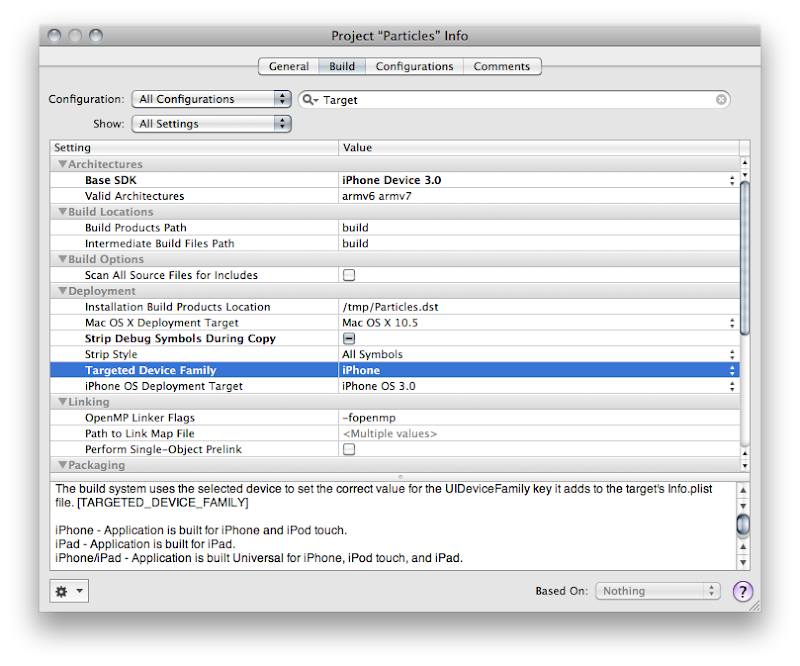
See how it says iPhone? Yeah, you know what to do. Click on it and change it so it reads iPhone/iPad, like so:
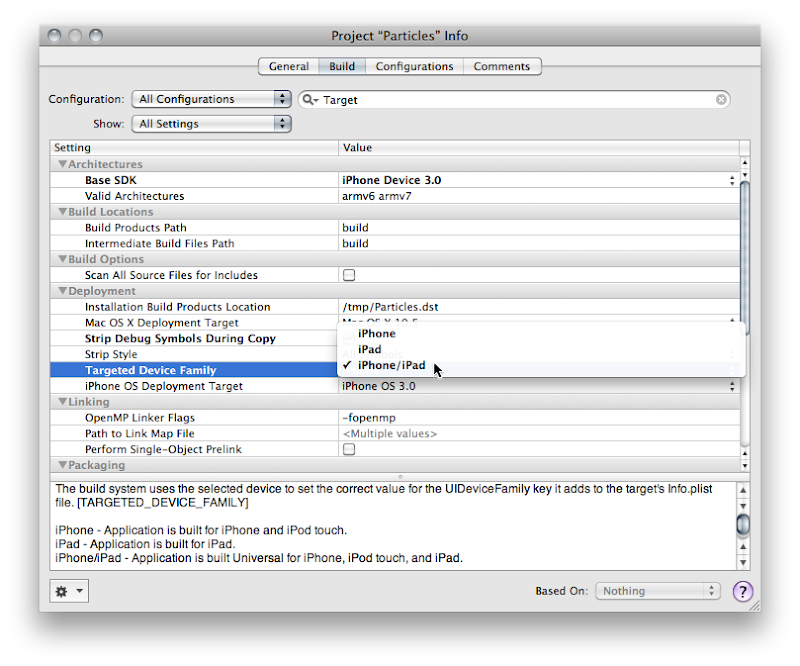
Good! now you're done, right? Most likely, no.
The next thing you're going to want to do is audit your application to see if you hard-coded the screen size anywhere in your application. You shouldn't have hardcoded those values, but let's face it, we've all done it. A Project Find (⌘⇧F) for 320 and 480 and that should turn up any of those hardcoded values. In the Particle Generator code, I did it in only one place, in code that creates a UIImage of the OpenGL view. The line of code where I did it looks like this:
Usually, the fix for this will be obvious. Instead of hardcoding, you want to pull the width and height from the OpenGL view. The code where I did it actually exists on the GLView class, so I can fix it like so:
But, what if what you've hardcoded is the actual size of the view? Then you need to pull the size from the main screen instead of the view. That's easy enough to do.
Most likely your application's one instance of UIWindow is contained in your MainWindow.xib file that gets loaded automatically. Most likely, that Window is hardcoded to 320x480. Now, you might think that you can just go into Interface Builder and set the autosize attributes for the window and it will get resized for you at launch. You would be wrong. There is no automatic check to make sure your window is the right size.
You have to make sure that the window is the right size for the device you're running on. There are, basically, two ways of doing that. If your application is such that you just need to resize the window and your autosize attributes will take care of making everything look nice, then you can just handle this programmatically in applicationDidFinishLaunching: by setting the window's size to the size of the screen, less the status bar andy any other objects controlled by the iPhone OS (this is known as the Application Frame). Doing this looks almost exactly like setting the size of the view above:
Now, this is actually a good approach for the Particles application because it has one full-screen view. However, the iPad and the iPhone are really different devices, and there are several UI components available on the iPad that aren't available (at least yet) on the iPhone, such as split views and pop up views. For many applications, especially complex applications using a lot of UIKit views and controls, you're probably going to want to provide completely different NIB file based on which device on which the code is running.
The one really important nib file in every iPhone application is, of course, MainWindow.xib, and there has to be a way to tell your application to use a different MainWindow.xib for different devices. In fact, there is. For each key that Info.plist supports, such NSMainNibFile, which is used to specify the name of the application's main nib file, you can now specify device-specific entries. If you provide a device-specific entry for the device the application is currently running on, it will use the device-specific value, otherwise it will just use the normal value.
Device-specific keys are exactly the same as the original or default key except the key name is followed by a tilde (~) and then the name of the device in all-lowercase letters. So, to tell our application to load a different nib file for the iPad, we can add a key called NSMainNibFile~ipad and then specify the name of the nib file to use when launching on an iPad. For the iPhone and iPod touch, it will continue to use the default value, MainWindow.xib, but for the iPad, it will use the nib file you've specified in the new, device-specific key.
You can add a new version of MainWindow.xib to your project by selecting the Resources group and choosing Add New File from the File menu. From the New File Assistant, select User Interface from under the iPhone OS, then select Application XIB, and make sure you select the right device in the Product drop-down.
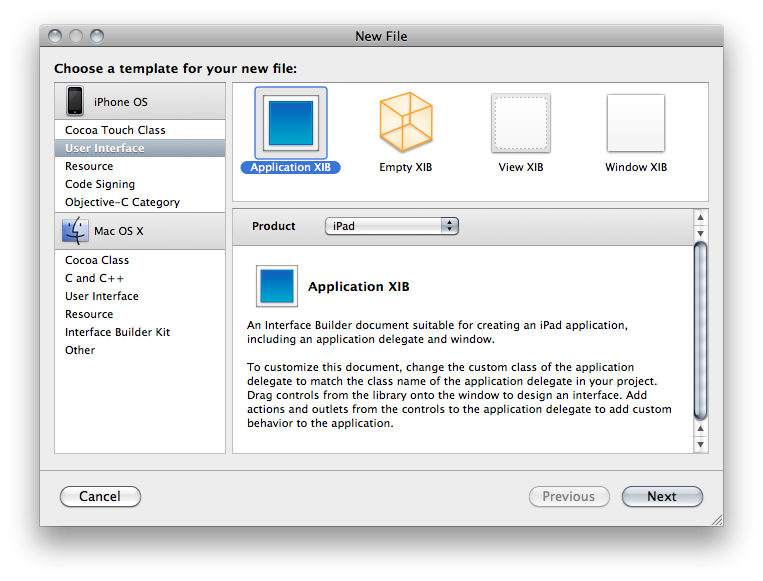
Make sure you remember to connect all the outlets and actions in this new nib to the same outlets and actions you used in the other nib. Remember, only one of the application nibs will be loaded, so there's no conflict.
For any key in the Info.plist file, you can use this same technique to override the default value with a device specific. You could, for example, have the iPhone version start in Portrait and the iPad version start in landscape, like so:
If you have code that needs to vary depending on whether it's running on the iPad or iPhone/iPod touch, Apple has provided a new macro called UI_USER_INTERFACE_IDIOM() that will tell you that. There are currently two values defined, UIUserInterfaceIdiomPhone and UIUserInterfaceIdiomPad, and this macro will return the value that corresponds to the device being run. So, for example, if you needed to push a view controller onto the navigation stack, but wanted a different nib used for the iPad than the iPhone, you might do this:
If you need finer-grain control, and need to know exactly which device, there's no official, supported way to determine the exact device. The vast majority of the time you you think you need to know the device, you don't actually need to know the device, you just need to know which features are supported. Even though you can find code around the web that will determine the device based on UIDevice, you really shouldn't base your logic on that because such code can be fragile since you don't know what future devices will exist, or what features they will have.
In cases like the Image Picker, Apple provides a way to determine which features are available on your device, such as whether there's a camera, and whether that camera supports video. When Apple hasn't provide a specific check or test, what you can do is use NSClassFromString(), which (as is probably obvious from the name) creates a Class instance based on the name of a class contained in a string. If this returns nil, then you know the class you're asking about isn't available. You can wrap your code that uses classes that aren't available everywhere in these checks and make code that works correctly on all devices, and will continue to do so in the future (for the most part - it's never possible to 100% future-proof code). Here's an example of checking for the existence of the UISplitViewController, which is a new class only available on the iPad:
You can do something similar with C functions by checking if the function is NULL For example, one of the frameworks added with iPhone SDK 3.2 is CoreText.framework. If we wanted to use the function CTFontCreateWithName() to create a new font using that framework, we could wrap the logic in an interface idiom check, like above, or we could just check to see if the function we want to use exists by seeing if the symbol CTFontCreateWithName is NULL at runtime, like so:
Well, that pretty much covers the basics you'll need to convert your existing iPhone apps to Universal Apps. The more complex your app, the more likely you'll want to consider doing separate iPad and iPhone applications. I'll show how to add another target to your Xcode project so you can generate two applications from the same project in a future post. For many apps, however, this should be enough to get you porting away, so port away!
Note: There are some additional things you should know, so read this post also before tackling your update.
Targeting All Devices
The first thing you have to do is identify that you want to build your existing application as a universal application. For this article, I'm using the Xcode project from OpenGL ES Particle Generator Application, but I'll try to keep the information general. Note: the following step is not needed if you use Xcode's Update Project Target for iPad option talked about here.
Bring up your Project Info window in Xcode by either double-clicking on your project's root node in the Groups & Files pane or selecting Edit Project Settings from the Project menu and then navigate to the Build tab. Now, the change we're about to make needs to be made to all configurations, so make sure that the Configuration popup menu is set to All Configurations, otherwise you'll only make the change on one configuration.
We need to change a setting called Target Device Family, so type Target into the search bar, or just search for that entry manually (it'll be under the Deployment heading). Right now, it should look like this:
See how it says iPhone? Yeah, you know what to do. Click on it and change it so it reads iPhone/iPad, like so:
Good! now you're done, right? Most likely, no.
Auditing for Hardcoded Sizes
The next thing you're going to want to do is audit your application to see if you hard-coded the screen size anywhere in your application. You shouldn't have hardcoded those values, but let's face it, we've all done it. A Project Find (⌘⇧F) for 320 and 480 and that should turn up any of those hardcoded values. In the Particle Generator code, I did it in only one place, in code that creates a UIImage of the OpenGL view. The line of code where I did it looks like this:
CGImageRef imageRef = CGImageCreate(320, 480, bitsPerComponent, bitsPerPixel, bytesPerRow, colorSpaceRef, bitmapInfo, provider, NULL, NO, renderingIntent);
Usually, the fix for this will be obvious. Instead of hardcoding, you want to pull the width and height from the OpenGL view. The code where I did it actually exists on the GLView class, so I can fix it like so:
CGImageRef imageRef = CGImageCreate(self.frame.size.width, self.frame.size.height, bitsPerComponent, bitsPerPixel, bytesPerRow, colorSpaceRef, bitmapInfo, provider, NULL, NO, renderingIntent);But, what if what you've hardcoded is the actual size of the view? Then you need to pull the size from the main screen instead of the view. That's easy enough to do.
UIScreen *screen = ;
;Dealing with Different Window Sizes
Most likely your application's one instance of UIWindow is contained in your MainWindow.xib file that gets loaded automatically. Most likely, that Window is hardcoded to 320x480. Now, you might think that you can just go into Interface Builder and set the autosize attributes for the window and it will get resized for you at launch. You would be wrong. There is no automatic check to make sure your window is the right size.
You have to make sure that the window is the right size for the device you're running on. There are, basically, two ways of doing that. If your application is such that you just need to resize the window and your autosize attributes will take care of making everything look nice, then you can just handle this programmatically in applicationDidFinishLaunching: by setting the window's size to the size of the screen, less the status bar andy any other objects controlled by the iPhone OS (this is known as the Application Frame). Doing this looks almost exactly like setting the size of the view above:
CGRect rect = ;
;Now, this is actually a good approach for the Particles application because it has one full-screen view. However, the iPad and the iPhone are really different devices, and there are several UI components available on the iPad that aren't available (at least yet) on the iPhone, such as split views and pop up views. For many applications, especially complex applications using a lot of UIKit views and controls, you're probably going to want to provide completely different NIB file based on which device on which the code is running.
Info.Plist Device-Specific Entries
The one really important nib file in every iPhone application is, of course, MainWindow.xib, and there has to be a way to tell your application to use a different MainWindow.xib for different devices. In fact, there is. For each key that Info.plist supports, such NSMainNibFile, which is used to specify the name of the application's main nib file, you can now specify device-specific entries. If you provide a device-specific entry for the device the application is currently running on, it will use the device-specific value, otherwise it will just use the normal value.
Device-specific keys are exactly the same as the original or default key except the key name is followed by a tilde (~) and then the name of the device in all-lowercase letters. So, to tell our application to load a different nib file for the iPad, we can add a key called NSMainNibFile~ipad and then specify the name of the nib file to use when launching on an iPad. For the iPhone and iPod touch, it will continue to use the default value, MainWindow.xib, but for the iPad, it will use the nib file you've specified in the new, device-specific key.
You can add a new version of MainWindow.xib to your project by selecting the Resources group and choosing Add New File from the File menu. From the New File Assistant, select User Interface from under the iPhone OS, then select Application XIB, and make sure you select the right device in the Product drop-down.
Make sure you remember to connect all the outlets and actions in this new nib to the same outlets and actions you used in the other nib. Remember, only one of the application nibs will be loaded, so there's no conflict.
For any key in the Info.plist file, you can use this same technique to override the default value with a device specific. You could, for example, have the iPhone version start in Portrait and the iPad version start in landscape, like so:
...
UIInterfaceOrientation
UIInterfaceOrientationPortrait
UIInterfaceOrientation~ipad
UIInterfaceOrientationLandscapeLeft
...Programmatically Determining Device
If you have code that needs to vary depending on whether it's running on the iPad or iPhone/iPod touch, Apple has provided a new macro called UI_USER_INTERFACE_IDIOM() that will tell you that. There are currently two values defined, UIUserInterfaceIdiomPhone and UIUserInterfaceIdiomPad, and this macro will return the value that corresponds to the device being run. So, for example, if you needed to push a view controller onto the navigation stack, but wanted a different nib used for the iPad than the iPhone, you might do this:
MyController *controller = nil;
if (UI_USER_INTERFACE_IDIOM() == UIUserInterfaceIdiomPad)
controller = ;
else
controller = ;
;
;If you need finer-grain control, and need to know exactly which device, there's no official, supported way to determine the exact device. The vast majority of the time you you think you need to know the device, you don't actually need to know the device, you just need to know which features are supported. Even though you can find code around the web that will determine the device based on UIDevice, you really shouldn't base your logic on that because such code can be fragile since you don't know what future devices will exist, or what features they will have.
In cases like the Image Picker, Apple provides a way to determine which features are available on your device, such as whether there's a camera, and whether that camera supports video. When Apple hasn't provide a specific check or test, what you can do is use NSClassFromString(), which (as is probably obvious from the name) creates a Class instance based on the name of a class contained in a string. If this returns nil, then you know the class you're asking about isn't available. You can wrap your code that uses classes that aren't available everywhere in these checks and make code that works correctly on all devices, and will continue to do so in the future (for the most part - it's never possible to 100% future-proof code). Here's an example of checking for the existence of the UISplitViewController, which is a new class only available on the iPad:
Class splitViewController = NSClassFromString(@"UISplitViewController");
if (splitViewController)
You can do something similar with C functions by checking if the function is NULL For example, one of the frameworks added with iPhone SDK 3.2 is CoreText.framework. If we wanted to use the function CTFontCreateWithName() to create a new font using that framework, we could wrap the logic in an interface idiom check, like above, or we could just check to see if the function we want to use exists by seeing if the symbol CTFontCreateWithName is NULL at runtime, like so:
    if (CTFontCreateWithName != NULL)
        CTFontFontRef myFont = CTFontCreateWithName(@"Comic Sans", 14.0, NULL);
Go, Go, Gadget iPad, Go!
Well, that pretty much covers the basics you'll need to convert your existing iPhone apps to Universal Apps. The more complex your app, the more likely you'll want to consider doing separate iPad and iPhone applications. I'll show how to add another target to your Xcode project so you can generate two applications from the same project in a future post. For many apps, however, this should be enough to get you porting away, so port away!
Monday, March 29, 2010
iPhone SDK 3.2 GM Seed
The GM release of the iPhone SDK 3.2 is available in iPhone Dev Center (login required). Even though this build is labeled as "GM" and this will probably be the final build before the iPad gets into the hands of consumers, and even though the official policy is that development material is covered by NDA until it goes GM, this build appears to still be under NDA, which means no iPad technical posts yet. Sorry.
The release notes and license agreement are pretty clear about the fact that this is still considered pre-release software, so the NDA is still intact and we have to wait a few more days before we can start discussing the nuances of iPad development. I'm assuming that come April 3rd, it will be considered "released". At least, I hope we don't have a repeat of the original iPhone NDA situation.
The release notes and license agreement are pretty clear about the fact that this is still considered pre-release software, so the NDA is still intact and we have to wait a few more days before we can start discussing the nuances of iPad development. I'm assuming that come April 3rd, it will be considered "released". At least, I hope we don't have a repeat of the original iPhone NDA situation.
Friday, January 29, 2010
Failure to Think Different
I'm not even going to say very much in response to this blog post, except to point out that her sense of self-importance is way out of proportion. Apple doesn't have to convince her that the iPad is "better than a netbook" because it's not about her. This isn't a product primarily targeted at techies, tech reporters, developers, gurus, pundits, or the like. Much of the target audience doesn't even grok what a netbook is.
I'm sure somebody has told you all this before, but let me point it out again: it's not always about you. Products can be successful even if they aren't right for you.
Frankly, I think this thing could be a huge success just from techies buying them for their parents or other relatives who rely on them for tech support.
This thing doesn't cost all that much more than a portable DVD player, for crying out loud, and it's smaller. I'd buy one just to watch movies when I travel.
I'm a techie, but I don't need to be able to program on every electronic device I own. I don't hate my dishwasher because I can't get to the command line. I don't hate my DVD player because it runs a proprietary operating system. Sheesh.
I'm sure somebody has told you all this before, but let me point it out again: it's not always about you. Products can be successful even if they aren't right for you.
Frankly, I think this thing could be a huge success just from techies buying them for their parents or other relatives who rely on them for tech support.
This thing doesn't cost all that much more than a portable DVD player, for crying out loud, and it's smaller. I'd buy one just to watch movies when I travel.
I'm a techie, but I don't need to be able to program on every electronic device I own. I don't hate my dishwasher because I can't get to the command line. I don't hate my DVD player because it runs a proprietary operating system. Sheesh.
Adobe's Unhappy
I was going to respond to Adobe's self-serving, biased, and not entirely factually accurate blog post, but rather than incur more wrath from the legion of Flash "developers", I'm just going to link to Chris Rawson's piece at TUAW.
Regardless of how the iPad does, with over 70 million iPhone OS devices in the world that don't run Flash, content providers who currently use depend on Flash HAVE to be looking at other options. In many cases, the other option will be an alternative instead of completely supplanting Adobe, but either way, it's good for the web.
Regardless of how the iPad does, with over 70 million iPhone OS devices in the world that don't run Flash, content providers who currently use depend on Flash HAVE to be looking at other options. In many cases, the other option will be an alternative instead of completely supplanting Adobe, but either way, it's good for the web.
Thursday, January 28, 2010
A4 Specs
Wikipedia now has a page on the Apple A4 SOC (system on a chip) with some specifics. It appears that it's a ARM-A9 multi-core chip combined with a PowerVR VXD. The article seems to suggest that OpenGL ES 3.x and OpenCL are both possibilities with this chipset.
No matter how you slice it, it's pretty fast for a mobile device and this bodes well for the next generation of iPhones if they can scale the A4 to the iPhone.
No matter how you slice it, it's pretty fast for a mobile device and this bodes well for the next generation of iPhones if they can scale the A4 to the iPhone.
GizModo Also Knows About Not Sucking…
Since I linked to them when they denigrated the iPad, it's only fair if I also link to them when they do the opposite, so here it is. Good article.
Wednesday, January 27, 2010
Same Ol' Same Ol'…
There seems to be a pattern that's formed over the last decade. Apple releases a product. It's different. It doesn't follow the rules. It defies a lot of widely accepted assumptions. Then, lots of people all over the Internet, both so-called pundits and everyday schmoes pronounce that it's a horrible device that nobody in their right mind would ever want. It doesn't support Ogg! It has no floppy drive! It has no multi-tasking! Product X already does this and it's cheaper!. Etc., etc. ad nauseum.
And then the product goes on to be a huge success, expanding the perception of who uses that type of device greatly. The iMac, the iPod, the iPhone.
So, here we go again with the iPad.
Here's the thing: It's not a general-purpose computer. It's not a Mac. They did this really subtle thing to tell you that: they didn't put "Mac" in the name anywhere. If it had been the MacPad1, then maybe some of these complaints would be perfectly valid. Maybe expecting it to act a certain way would be appropriate.
But it's not a Mac. It's a new consumer device. It's targeted at people who do e-mail, surf the web a little, play a few games, watch some movies, and listen to music. It's not a replacement for a computer if you do more than that on your computer. But most people don't. We geeks are the minority on that point, and for many people, a regular computer is both overkill and frustrating. The iPad is not a tablet computer in the sense that Windows tablets are. But what it is, is all that the vast majority of people will ever want out of a computer, and it fits in a briefcase, purse, or backpack and weighs less than two pounds.
Don't fault it for not being what it's not supposed to be and don't assume that in the handful of hours you've had since you first learned about it, that you've put more thought into this product than the engineers and designers at Apple. You haven't. I haven't either. But I see what they're doing, and it's brilliant.
Now, I very much understand the fear that we're on a slow march towards a completely enclosed platform, and that would be a bad destination. But, since Apple sold well over 3 million Macs last quarter, continues to contribute to open source projects like WebKit and Darwin, and is continuing to innovate on the Mac with things like GCD and OpenCL, I don't think that's really where we're headed. I think that Apple has realized that we all have different computing needs, and is trying to provide the best computing experience relative to our needs across the spectrum. I don't ever see the iPhone OS running on an eight-processor tower with two large screens. Just because some of Apple's products are locked down doesn't mean that the only possible destination is a future where all Apple products are. I think we're going to a place where both professionals and consumers can get what they want out of computing devices. If we go anywhere else, people will start abandoning the platform.
But as long as there are computers running Mac OS X for those of us who need the power and flexibility, this trajectory is actually a good thing2. For the bulk of consumers, ease of use trumps power or flexibility. If it doesn't for you, don't buy an iPad, or at least, don't buy it as your primary computer.
And if you doubt the efficacy of targeting the consumer market like this, just think about the fact that there are now more iPhone OS devices in existence than there are Macs, even before the iPad ships.
1 Like many others, I'd love a true MacPad - a device similar to this in hardware that runs unfettered OS X. But that doesn't mean this isn't a good product or won't be a success
2 Think of how much less time you'd have to spend being tech support for friends and family if they were all on a locked down device like the iPad. Just sayin'
And then the product goes on to be a huge success, expanding the perception of who uses that type of device greatly. The iMac, the iPod, the iPhone.
So, here we go again with the iPad.
Here's the thing: It's not a general-purpose computer. It's not a Mac. They did this really subtle thing to tell you that: they didn't put "Mac" in the name anywhere. If it had been the MacPad1, then maybe some of these complaints would be perfectly valid. Maybe expecting it to act a certain way would be appropriate.
But it's not a Mac. It's a new consumer device. It's targeted at people who do e-mail, surf the web a little, play a few games, watch some movies, and listen to music. It's not a replacement for a computer if you do more than that on your computer. But most people don't. We geeks are the minority on that point, and for many people, a regular computer is both overkill and frustrating. The iPad is not a tablet computer in the sense that Windows tablets are. But what it is, is all that the vast majority of people will ever want out of a computer, and it fits in a briefcase, purse, or backpack and weighs less than two pounds.
Don't fault it for not being what it's not supposed to be and don't assume that in the handful of hours you've had since you first learned about it, that you've put more thought into this product than the engineers and designers at Apple. You haven't. I haven't either. But I see what they're doing, and it's brilliant.
Now, I very much understand the fear that we're on a slow march towards a completely enclosed platform, and that would be a bad destination. But, since Apple sold well over 3 million Macs last quarter, continues to contribute to open source projects like WebKit and Darwin, and is continuing to innovate on the Mac with things like GCD and OpenCL, I don't think that's really where we're headed. I think that Apple has realized that we all have different computing needs, and is trying to provide the best computing experience relative to our needs across the spectrum. I don't ever see the iPhone OS running on an eight-processor tower with two large screens. Just because some of Apple's products are locked down doesn't mean that the only possible destination is a future where all Apple products are. I think we're going to a place where both professionals and consumers can get what they want out of computing devices. If we go anywhere else, people will start abandoning the platform.
But as long as there are computers running Mac OS X for those of us who need the power and flexibility, this trajectory is actually a good thing2. For the bulk of consumers, ease of use trumps power or flexibility. If it doesn't for you, don't buy an iPad, or at least, don't buy it as your primary computer.
And if you doubt the efficacy of targeting the consumer market like this, just think about the fact that there are now more iPhone OS devices in existence than there are Macs, even before the iPad ships.
1 Like many others, I'd love a true MacPad - a device similar to this in hardware that runs unfettered OS X. But that doesn't mean this isn't a good product or won't be a success
2 Think of how much less time you'd have to spend being tech support for friends and family if they were all on a locked down device like the iPad. Just sayin'
Tablet Post Mortem
Okay, so even some of my "safe" predictions were wrong. This thing is basically an iPod Touch on steroids - bigger screen, faster processor. It does run the iPhone OS, which is still called the iPhone OS, and not all that much has changed. I can't talk specifics because the new SDK version that supports the iPad is under NDA, but if you know how to program the iPhone, you know how to program the iPad. They didn't even change the major version number (much to my joy, given that we've got the version number in our book titles).
My thoughts: at $499, it's amazing. Now a lot of developers are a little disappointed. Frankly, we're not the main intended audience. For a lot of people, this is the perfect computer. For my mom, who doesn't really like computers, for example. This combined with the keyboard dock is all the computer she wants or needs. Her music, her movies, she can e-mail, browse the web. That's all she does and would do. That's all she wants from a computer. The iPad does all that and doesn't confuse her with a desktop paradigm, she doesn't have to remember to empty the trash, or try to traverse the file system to find things.
A lot of people are wondering if there's a place for this. I have no doubt. At this price point, a lot of people will go with this over a frustrating $350 netbook. I'm actually considering going with the iPad for my kids when they need new computers. At this price, I can afford to. They would have iWork, Mail, Safari, and can play some games, and that's the vast majority of what they do.
Now, for me, I don't really have much of a use for this. I'll buy one, maybe even two, so I can develop for it and play with it. But it would never suffice for my main computer, and I'm not sure there's really a need for it since I have my iPhone. My interest in this device is professional, but I'm not a typical consumer.
The iPhone wasn't successful because geeks liked it. It was successful because everybody (well, almost) liked it. I think that's what's this is going to be. This is a non-geek's computer. This is the perfect computer for somebody who does e-mail, surfs the web, plays a few games.
I hope there's a way to get pictures and music onto this thing other than through the iTunes store or through a Mac. I hope this thing is capable of standing completely on its own. I'm not sure yet if it is, but to me that seems like the most important thing. If I ONLY have an iPad, can I get pictures off my digital camera and onto it? Does the keyboard dock have a USB port. I don't know, but if not, I think it will be its Achille's heel, because I think the biggest pool of potential users of this thing are non-geeks who will use this instead of a Mac, not in addition to one.
My thoughts: at $499, it's amazing. Now a lot of developers are a little disappointed. Frankly, we're not the main intended audience. For a lot of people, this is the perfect computer. For my mom, who doesn't really like computers, for example. This combined with the keyboard dock is all the computer she wants or needs. Her music, her movies, she can e-mail, browse the web. That's all she does and would do. That's all she wants from a computer. The iPad does all that and doesn't confuse her with a desktop paradigm, she doesn't have to remember to empty the trash, or try to traverse the file system to find things.
A lot of people are wondering if there's a place for this. I have no doubt. At this price point, a lot of people will go with this over a frustrating $350 netbook. I'm actually considering going with the iPad for my kids when they need new computers. At this price, I can afford to. They would have iWork, Mail, Safari, and can play some games, and that's the vast majority of what they do.
Now, for me, I don't really have much of a use for this. I'll buy one, maybe even two, so I can develop for it and play with it. But it would never suffice for my main computer, and I'm not sure there's really a need for it since I have my iPhone. My interest in this device is professional, but I'm not a typical consumer.
The iPhone wasn't successful because geeks liked it. It was successful because everybody (well, almost) liked it. I think that's what's this is going to be. This is a non-geek's computer. This is the perfect computer for somebody who does e-mail, surfs the web, plays a few games.
I hope there's a way to get pictures and music onto this thing other than through the iTunes store or through a Mac. I hope this thing is capable of standing completely on its own. I'm not sure yet if it is, but to me that seems like the most important thing. If I ONLY have an iPad, can I get pictures off my digital camera and onto it? Does the keyboard dock have a USB port. I don't know, but if not, I think it will be its Achille's heel, because I think the biggest pool of potential users of this thing are non-geeks who will use this instead of a Mac, not in addition to one.
Apple has an accessory called the Camera Connection Kit that allows you to pull pictures directly into the iPad from a digital camera or SD cardAnd, fortunately, it doesn't have Flash.
Subscribe to:
Posts (Atom)