Saw today that Dan Grigsby of Mobile Orchard is abandoning iPhone development and ceasing publication of Mobile Orchard. This is a shame. Mobile Orchard is one of the few podcasts that's ever asked me on, and Dan is just a nice guy. The iPhone dev community is a tiny bit worse for his leaving.
And I'm not altogether unsympathetic to his reasons for going. Apple's tightening grip on the platform has me feeling very conflicted. Apple's stuff, both on the surface and under the hood is just better than their competitors as far as I'm concerned, and not just a little better. Their stuff is more fun and more intuitive to use, and it's far more fun to program. I love the platform so much that I made a fairly drastic career change to one where I could make considerably less money just so that I could work with it every day. So, for me, I'm not about to abandon the platform any time soon because I don't see a viable alternative. And by "viable" I mean, of course, "fun from my personal, subjective, and very biased perspective".
There are, of course, other "viable" mobile platforms in the more traditional sense of the word. I could get by using my Nexus One as my primary phone, but I don't love it and won't without drastic improvements and changes. I could program Java or C#, but I wouldn't enjoy either to the extent that I enjoy programming in Objective-C (I've worked with both in the past, Java quite a lot). I still love this platform way too much to willingly leave.
We all know Apple likes control, and the more they get, the more they're able to take, which is a bit of a vicious cycle that I hope gets broken before too many more developers get as frustrated as Dan and leave the platform. I have no illusion that people who leave won't be replaced. They will. But much of what I love about this platform is the community, a community that developed when it wasn't as profitable or lucrative than competing technologies. It's a community of people who love what they do. Every time someone who loves what they do leaves and is replaced, there's a chance they'll be replaced by someone doing it solely for the money; because it's the hottest mobile market. Too much of that, and we'll be no different than the "Microsoft Developer Community", which is to say… no longer a community, but just a bunch of people who made similar career choices.
Friday, April 9, 2010

Thursday, April 8, 2010
iPhone SDK 4.0
I am in the process of downloading the iPhone SDK 4.0 beta 1. So, like most of you, I haven't actually seen the new APIs, just the presentation by Steve, Phil, and Scott earlier today. If I did know more, I wouldn't be able to tell you because of the NDA.
For the most part, I'm excited about the changes that are coming. I've used Android's "multitasking", and I think that Apple has been 100% right not to just port the workstation model of "multitasking" to the phone. It's hard to say how well these new "multitasking" APIs will meet our needs as developers, but the best that I can tell from the presentation, Apple seems to have struck a good balance. Battery life can really suffer with a traditional "multitasking" approach, as I've discovered using my Nexus One. Only time will tell for sure, but I feel good about these APIs.
Folders look to be implemented well. This is not really a developer feature, so there's not much for me to say there other than it looks like a great solution to a problem that people assume was trivial. It wasn't. Both multitasking and presentation of large volumes of data are very different problems on a small, handheld device than they are on a computer workstation, and I'm glad that Apple's putting some thought into how to add these features intelligently rather than throwing in every feature that any customer requests. Companies that do that are using what I call a "kitchen sink approach" to software development, and the long-term results of that approach are not often great.
GameCenter? I have mixed feelings about it. I probably will never use it as a consumer. I'm just not much of a gamer. I love the creative process that goes into creating games, but just don't spend much time playing, and I don't really care about phony awards and accomplishments. But, I know a lot of people do, and this could be quite a boon for iPhone and iPad gaming.
Unfortunately, there are a number of competing services run by people who jumped into iPhone development early, companies like OpenFeint, who are now finding themselves in the undesirable position of trying to compete with 800 pound gorilla that is Apple. Not that this is a new tactic for Apple, nor is there necessarily anything wrong with what they've done, but it saddens me a little nonetheless.
iAds is another feature that I have mixed feelings about. If you have a free app with ads, this is probably a great thing for you. But, it's just a hard thing for me to get excited about advertisements, no matter how spiffy they look. Well, at least they're not Flash.
Overall, I'm excited and positive about this update. There was one thing about the presentation tough, that I felt was a negative. I thought some of the answers given during the Q&A period were just outright disingenuous. The most blatant case in point was when Steve was asked about distributing apps without the App Store, His response was to point out that Android has a "porn app store that your kids can get to", and then state that Apple "didn't want to go there". Whisky. Tango. Foxtrot?
Kids can get to any number of porn web sites on a Mac, iPad or iPhone.
Apple does absolutely have a right to do this: It's their walled garden. I just wish they'd be more upfront about their reasons when asked rather than giving stupid responses like "think of the children" (which has already become a bit of a joke from its use in censorship discussions). Kids are, generally speaking, more comfortable with technology than their parents. Kids can find porn if they're determined to do so. There's not a thing you can do to prevent it if they decide they want it, but to the extent that things should be done, it should be done by their parents. This is not Apple's job, nor any other corporation's job. It's not even the government's job. It's mine and, if you have kids, yours. It's also not a valid reason to give us the ability to run Apps that haven't been approved by the Mothership.
If Steve had stood up on stage and said "we want our 30% cut, so that's why you can't distribute outside the App Store", it would have felt like it was an honest answer. If he had said "we want to control the experience in any way we can", I would have bought it. I might not have liked it, but those would have felt like honest answers.
The answer we got today felt like a big "fuck you" disguised as a smarmy "we know better than you".
The next time a client gets mad because an ad hoc build won't run for them, I'm going to tell them that it won't work so kids can't get porn. I doubt I'll be able to pull it off as well as Steve did, though.
For the most part, I'm excited about the changes that are coming. I've used Android's "multitasking", and I think that Apple has been 100% right not to just port the workstation model of "multitasking" to the phone. It's hard to say how well these new "multitasking" APIs will meet our needs as developers, but the best that I can tell from the presentation, Apple seems to have struck a good balance. Battery life can really suffer with a traditional "multitasking" approach, as I've discovered using my Nexus One. Only time will tell for sure, but I feel good about these APIs.
Folders look to be implemented well. This is not really a developer feature, so there's not much for me to say there other than it looks like a great solution to a problem that people assume was trivial. It wasn't. Both multitasking and presentation of large volumes of data are very different problems on a small, handheld device than they are on a computer workstation, and I'm glad that Apple's putting some thought into how to add these features intelligently rather than throwing in every feature that any customer requests. Companies that do that are using what I call a "kitchen sink approach" to software development, and the long-term results of that approach are not often great.
GameCenter? I have mixed feelings about it. I probably will never use it as a consumer. I'm just not much of a gamer. I love the creative process that goes into creating games, but just don't spend much time playing, and I don't really care about phony awards and accomplishments. But, I know a lot of people do, and this could be quite a boon for iPhone and iPad gaming.
Unfortunately, there are a number of competing services run by people who jumped into iPhone development early, companies like OpenFeint, who are now finding themselves in the undesirable position of trying to compete with 800 pound gorilla that is Apple. Not that this is a new tactic for Apple, nor is there necessarily anything wrong with what they've done, but it saddens me a little nonetheless.
iAds is another feature that I have mixed feelings about. If you have a free app with ads, this is probably a great thing for you. But, it's just a hard thing for me to get excited about advertisements, no matter how spiffy they look. Well, at least they're not Flash.
Overall, I'm excited and positive about this update. There was one thing about the presentation tough, that I felt was a negative. I thought some of the answers given during the Q&A period were just outright disingenuous. The most blatant case in point was when Steve was asked about distributing apps without the App Store, His response was to point out that Android has a "porn app store that your kids can get to", and then state that Apple "didn't want to go there". Whisky. Tango. Foxtrot?
Kids can get to any number of porn web sites on a Mac, iPad or iPhone.
Apple does absolutely have a right to do this: It's their walled garden. I just wish they'd be more upfront about their reasons when asked rather than giving stupid responses like "think of the children" (which has already become a bit of a joke from its use in censorship discussions). Kids are, generally speaking, more comfortable with technology than their parents. Kids can find porn if they're determined to do so. There's not a thing you can do to prevent it if they decide they want it, but to the extent that things should be done, it should be done by their parents. This is not Apple's job, nor any other corporation's job. It's not even the government's job. It's mine and, if you have kids, yours. It's also not a valid reason to give us the ability to run Apps that haven't been approved by the Mothership.
If Steve had stood up on stage and said "we want our 30% cut, so that's why you can't distribute outside the App Store", it would have felt like it was an honest answer. If he had said "we want to control the experience in any way we can", I would have bought it. I might not have liked it, but those would have felt like honest answers.
The answer we got today felt like a big "fuck you" disguised as a smarmy "we know better than you".
The next time a client gets mad because an ad hoc build won't run for them, I'm going to tell them that it won't work so kids can't get porn. I doubt I'll be able to pull it off as well as Steve did, though.
Wednesday, April 7, 2010
iPadDevCamp NYC April 16-18
iPadDevCampNYC will be held in New York city from April 16 through April 18 at the AOL New York offices. The non-profit event is inspired by MacHack, BarCamp, and SuperHappyDevHouse, and will be three days of hacking combined with social events, speakers, sessions, and panels. Large chunks of time are devoted, of course, to coding on the iPad.

Sounds like a great opportunity to meet other iPad devs. If you live in the NYC area, you might want to check it out. It's only $50 for the entire three-days.
Unfortunately, I can't attend, but if I lived closer I absolutely would.
Sounds like a great opportunity to meet other iPad devs. If you live in the NYC area, you might want to check it out. It's only $50 for the entire three-days.
Unfortunately, I can't attend, but if I lived closer I absolutely would.
Monday, April 5, 2010
My Weekend with iPad
I'll be honest with you: I wasn't all that excited about getting an iPad in order to use it. I was mostly excited about developing for it. I bought the lowest-end 16Gb Wi-Fi and figured it would be permanently attached to my computer. For reasons I stated shortly after the iPad introduction, I saw this as a product targeted at other, less technically savvy individuals.
And I still think it's a great product for those people. I really do. I think with just a few changes, such as a keyboard dock with a USB port and built-in Time Machine, this could be the ultimate non-techie computer.
I also saw the very obvious role as a media consumption device. It's clearly targeting the Kindle and Nook, and it's going to do great in that role. The screen is not hard on your eyes, even though it's LED. The colors are beautiful and the viewing angle is nearly 180°. Combined with the 10 hour battery life (mine actually went a fair bit longer on the first charge), it's a great eBook reader as well. I love the idea of eBooks, but until the publishing industry gets a clue and stops trying to charge me $12.99 for fifty year old books I can pick up for a dollar or get from the library, I'm hesitant to actually buy any and will limit my iPad reading to news and all the lovely classic literature available on Project Gutenberg.
But I really didn't see myself falling in love with this product. I saw it as a great vacation computer; something that would be small and easy to pack that would let me check e-mail and surf the web while on vacation without being tempted to do work, and that was about it.
But, the exact thing that makes it a good vacation computer is key. Yesterday was Easter, and I promised my wife I wouldn't work this weekend. So, I actually unplugged and closed my computer and didn't use it at all. My iPhone is great for keeping in touch when I'm away from my computer, but typing any volume of e-mail on it sucks.
The iPad allowed me to do triage with my e-mail and read the news without going upstairs to my office. Now, I have a tendency, when I get in front of my computer, to start responding to work e-mails. I'll also sometimes pull open a project that I've been having problems with if I've thought of a possible solution, or hack out some notes about possible blog postings It's very easy for me to get sucked in to doing a few hours of work completely unintentionally.
But not with iPad. Some people are complaining about there being no Xcode on it. Screw that. I don't WANT Xcode on it. I think it's perfect as-is. This is something I can use to read before bed, without getting sucked into work. This is something I can play a game with the kids on, and not get sucked into doing work afterward. This is something I can use to check the news or weather without going up to mycave office and then getting sucked into work.
The iPad is not a way to do work, it's wax for my ears against the siren call of work.
Plus, it's really fun. It's silly how much I like it.
And I still think it's a great product for those people. I really do. I think with just a few changes, such as a keyboard dock with a USB port and built-in Time Machine, this could be the ultimate non-techie computer.
I also saw the very obvious role as a media consumption device. It's clearly targeting the Kindle and Nook, and it's going to do great in that role. The screen is not hard on your eyes, even though it's LED. The colors are beautiful and the viewing angle is nearly 180°. Combined with the 10 hour battery life (mine actually went a fair bit longer on the first charge), it's a great eBook reader as well. I love the idea of eBooks, but until the publishing industry gets a clue and stops trying to charge me $12.99 for fifty year old books I can pick up for a dollar or get from the library, I'm hesitant to actually buy any and will limit my iPad reading to news and all the lovely classic literature available on Project Gutenberg.
But I really didn't see myself falling in love with this product. I saw it as a great vacation computer; something that would be small and easy to pack that would let me check e-mail and surf the web while on vacation without being tempted to do work, and that was about it.
But, the exact thing that makes it a good vacation computer is key. Yesterday was Easter, and I promised my wife I wouldn't work this weekend. So, I actually unplugged and closed my computer and didn't use it at all. My iPhone is great for keeping in touch when I'm away from my computer, but typing any volume of e-mail on it sucks.
The iPad allowed me to do triage with my e-mail and read the news without going upstairs to my office. Now, I have a tendency, when I get in front of my computer, to start responding to work e-mails. I'll also sometimes pull open a project that I've been having problems with if I've thought of a possible solution, or hack out some notes about possible blog postings It's very easy for me to get sucked in to doing a few hours of work completely unintentionally.
But not with iPad. Some people are complaining about there being no Xcode on it. Screw that. I don't WANT Xcode on it. I think it's perfect as-is. This is something I can use to read before bed, without getting sucked into work. This is something I can play a game with the kids on, and not get sucked into doing work afterward. This is something I can use to check the news or weather without going up to my
The iPad is not a way to do work, it's wax for my ears against the siren call of work.
Plus, it's really fun. It's silly how much I like it.
A Few More Notes on Creating Universal Apps
Now that I've had some more time with the iPad and making Universal Apps, I've realized there are some important things I left out of Saturday's post.
First, I talked about the newly defined macro UI_USER_INTERFACE_IDIOM(). There's a problem with this right now, however, because iPhone OS 3.2 was an iPad only release. Most of us are assuming that iPhone and iPad will eventually run on the same OS version, but for now they don't ,and UI_USER_INTERFACE_IDIOM() doesn't exist in 3.1.2 and earlier. So, if you're creating a Universal Binary, you can't compile code that uses it.
Instead, you need to use a different technique, which is the check the precompiler definition __IPHONE_OS_VERSION_MAX_ALLOWED, which is set to the OS version number without dots. The definition is five digits, the first is the major release number, the second and third are the minor release number, and the fourth and fifth number are the patch release number. So, 3.2 would be defined to 30200 and 3.1.2 would be defined to 30102, so here's how you should probably design your code for the time being:
In the future, you won't need to check this, but it won't hurt to after. Since it's resolved during pre-compilation, there are no drawbacks other than a little bit of code clutter.
I forgot to mention that there's an option to upgrade Targets to Universal under the Project menu. It will convert your target for you, and you should use it instead of manually setting the project (the way I did my first few). If the option is grayed out, make sure that your project's base SDK (not just the currently selected SDK) is iPhone Device 3.0+. If it's older, or if it can't find the Base SDK, you won't get the option.
This option will do a few things. It will update your Base SDK to 3.2 and your Deployment SDK to the original Base SDK. It will configure your targets either to create a Universal Application, or two separate applications. It will create your application's main iPad NIB for you. It will strip out the ARM6 instructions from the iPad portion of the binary.
First, I talked about the newly defined macro UI_USER_INTERFACE_IDIOM(). There's a problem with this right now, however, because iPhone OS 3.2 was an iPad only release. Most of us are assuming that iPhone and iPad will eventually run on the same OS version, but for now they don't ,and UI_USER_INTERFACE_IDIOM() doesn't exist in 3.1.2 and earlier. So, if you're creating a Universal Binary, you can't compile code that uses it.
Instead, you need to use a different technique, which is the check the precompiler definition __IPHONE_OS_VERSION_MAX_ALLOWED, which is set to the OS version number without dots. The definition is five digits, the first is the major release number, the second and third are the minor release number, and the fourth and fifth number are the patch release number. So, 3.2 would be defined to 30200 and 3.1.2 would be defined to 30102, so here's how you should probably design your code for the time being:
if (UI_USER_INTERFACE_IDIOM() == UIUserInterfaceIdiomPad)
NSLog(@"iPad Idiom");
else
NSLog(@"iPhone Idiom");
In the future, you won't need to check this, but it won't hurt to after. Since it's resolved during pre-compilation, there are no drawbacks other than a little bit of code clutter.
I forgot to mention that there's an option to upgrade Targets to Universal under the Project menu. It will convert your target for you, and you should use it instead of manually setting the project (the way I did my first few). If the option is grayed out, make sure that your project's base SDK (not just the currently selected SDK) is iPhone Device 3.0+. If it's older, or if it can't find the Base SDK, you won't get the option.
This option will do a few things. It will update your Base SDK to 3.2 and your Deployment SDK to the original Base SDK. It will configure your targets either to create a Universal Application, or two separate applications. It will create your application's main iPad NIB for you. It will strip out the ARM6 instructions from the iPad portion of the binary.
Note: As a few people have pointed out in the comments, UI_USER_INTERFACE_IDIOM() works just fine in Universal Apps. Where you can't use it is if you want to test your universal app's iPhone functionality in the simulator. The 3.2 Simulator only works in iPad configuration, so to test the iPhone build on the simulator, you need to set the Active SDK to 3.1.2, and this check will allow your code to compile against the 3.1.2 Simulator target. If you're testing on the device, the code above is unnecessary (but also doesn't hurt anything). Sorry for the confusion.
Saturday, April 3, 2010
Converting iPhone Apps to Universal Apps
Well, the NDA has finally lifted, so we can start talking about iPhone SDK 3.2 and the iPad. The logical starting place seemed to be how to convert your existing applications into a "Universal App" that runs natively both on the iPad and the iPhone/iPod touch. Now, a lot of you have likely already had to figure this stuff out so you could get your updated app on the store today, but for those who didn't go the early adopter route, let's take a few minutes to look at the process. It's pretty straightforward but there are a few gotchas.
The first thing you have to do is identify that you want to build your existing application as a universal application. For this article, I'm using the Xcode project from OpenGL ES Particle Generator Application, but I'll try to keep the information general. Note: the following step is not needed if you use Xcode's Update Project Target for iPad option talked about here.
Bring up your Project Info window in Xcode by either double-clicking on your project's root node in the Groups & Files pane or selecting Edit Project Settings from the Project menu and then navigate to the Build tab. Now, the change we're about to make needs to be made to all configurations, so make sure that the Configuration popup menu is set to All Configurations, otherwise you'll only make the change on one configuration.
We need to change a setting called Target Device Family, so type Target into the search bar, or just search for that entry manually (it'll be under the Deployment heading). Right now, it should look like this:
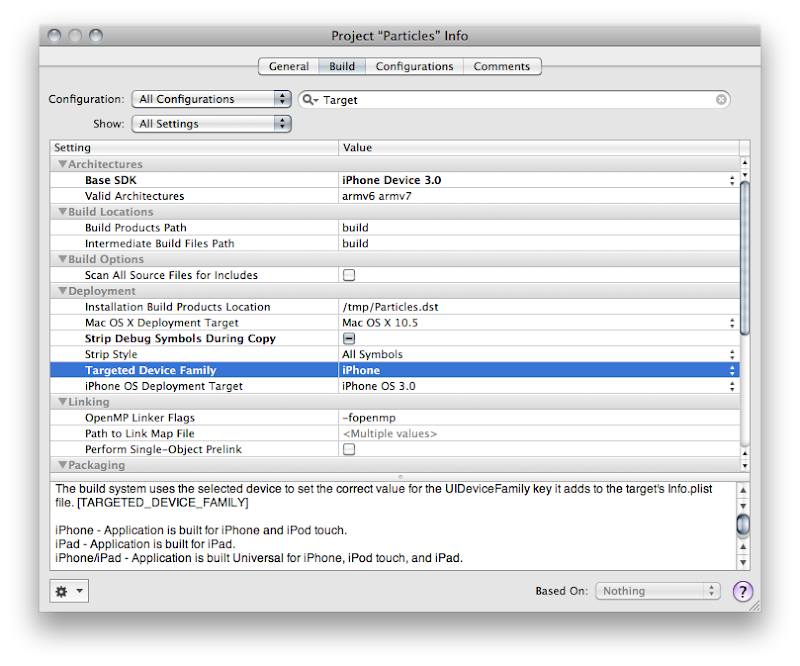
See how it says iPhone? Yeah, you know what to do. Click on it and change it so it reads iPhone/iPad, like so:
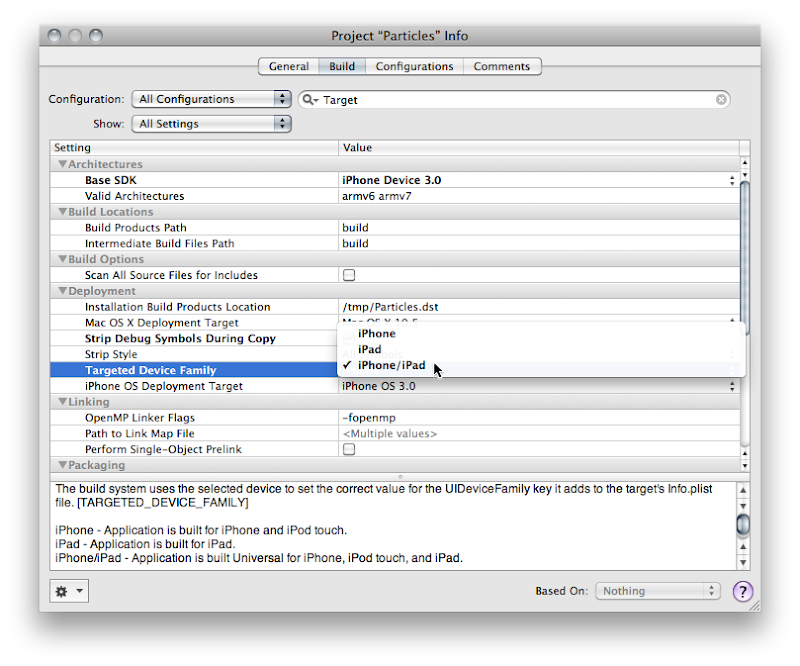
Good! now you're done, right? Most likely, no.
The next thing you're going to want to do is audit your application to see if you hard-coded the screen size anywhere in your application. You shouldn't have hardcoded those values, but let's face it, we've all done it. A Project Find (⌘⇧F) for 320 and 480 and that should turn up any of those hardcoded values. In the Particle Generator code, I did it in only one place, in code that creates a UIImage of the OpenGL view. The line of code where I did it looks like this:
Usually, the fix for this will be obvious. Instead of hardcoding, you want to pull the width and height from the OpenGL view. The code where I did it actually exists on the GLView class, so I can fix it like so:
But, what if what you've hardcoded is the actual size of the view? Then you need to pull the size from the main screen instead of the view. That's easy enough to do.
Most likely your application's one instance of UIWindow is contained in your MainWindow.xib file that gets loaded automatically. Most likely, that Window is hardcoded to 320x480. Now, you might think that you can just go into Interface Builder and set the autosize attributes for the window and it will get resized for you at launch. You would be wrong. There is no automatic check to make sure your window is the right size.
You have to make sure that the window is the right size for the device you're running on. There are, basically, two ways of doing that. If your application is such that you just need to resize the window and your autosize attributes will take care of making everything look nice, then you can just handle this programmatically in applicationDidFinishLaunching: by setting the window's size to the size of the screen, less the status bar andy any other objects controlled by the iPhone OS (this is known as the Application Frame). Doing this looks almost exactly like setting the size of the view above:
Now, this is actually a good approach for the Particles application because it has one full-screen view. However, the iPad and the iPhone are really different devices, and there are several UI components available on the iPad that aren't available (at least yet) on the iPhone, such as split views and pop up views. For many applications, especially complex applications using a lot of UIKit views and controls, you're probably going to want to provide completely different NIB file based on which device on which the code is running.
The one really important nib file in every iPhone application is, of course, MainWindow.xib, and there has to be a way to tell your application to use a different MainWindow.xib for different devices. In fact, there is. For each key that Info.plist supports, such NSMainNibFile, which is used to specify the name of the application's main nib file, you can now specify device-specific entries. If you provide a device-specific entry for the device the application is currently running on, it will use the device-specific value, otherwise it will just use the normal value.
Device-specific keys are exactly the same as the original or default key except the key name is followed by a tilde (~) and then the name of the device in all-lowercase letters. So, to tell our application to load a different nib file for the iPad, we can add a key called NSMainNibFile~ipad and then specify the name of the nib file to use when launching on an iPad. For the iPhone and iPod touch, it will continue to use the default value, MainWindow.xib, but for the iPad, it will use the nib file you've specified in the new, device-specific key.
You can add a new version of MainWindow.xib to your project by selecting the Resources group and choosing Add New File from the File menu. From the New File Assistant, select User Interface from under the iPhone OS, then select Application XIB, and make sure you select the right device in the Product drop-down.
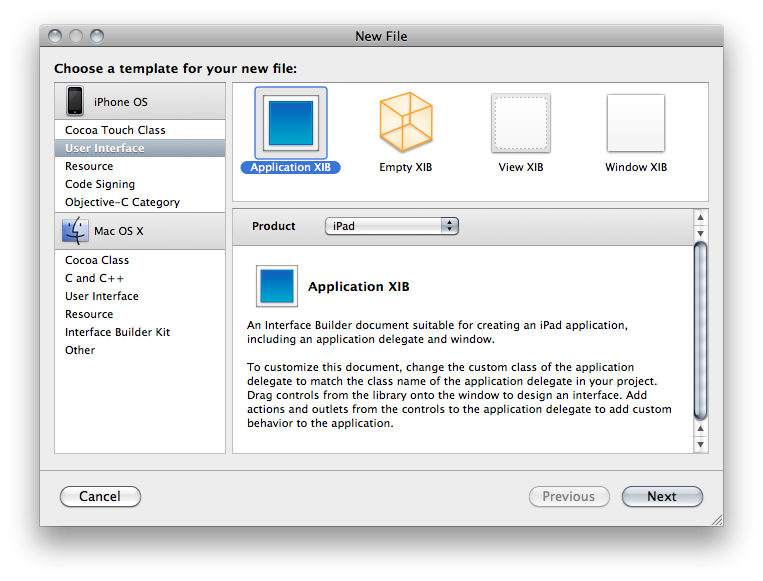
Make sure you remember to connect all the outlets and actions in this new nib to the same outlets and actions you used in the other nib. Remember, only one of the application nibs will be loaded, so there's no conflict.
For any key in the Info.plist file, you can use this same technique to override the default value with a device specific. You could, for example, have the iPhone version start in Portrait and the iPad version start in landscape, like so:
If you have code that needs to vary depending on whether it's running on the iPad or iPhone/iPod touch, Apple has provided a new macro called UI_USER_INTERFACE_IDIOM() that will tell you that. There are currently two values defined, UIUserInterfaceIdiomPhone and UIUserInterfaceIdiomPad, and this macro will return the value that corresponds to the device being run. So, for example, if you needed to push a view controller onto the navigation stack, but wanted a different nib used for the iPad than the iPhone, you might do this:
If you need finer-grain control, and need to know exactly which device, there's no official, supported way to determine the exact device. The vast majority of the time you you think you need to know the device, you don't actually need to know the device, you just need to know which features are supported. Even though you can find code around the web that will determine the device based on UIDevice, you really shouldn't base your logic on that because such code can be fragile since you don't know what future devices will exist, or what features they will have.
In cases like the Image Picker, Apple provides a way to determine which features are available on your device, such as whether there's a camera, and whether that camera supports video. When Apple hasn't provide a specific check or test, what you can do is use NSClassFromString(), which (as is probably obvious from the name) creates a Class instance based on the name of a class contained in a string. If this returns nil, then you know the class you're asking about isn't available. You can wrap your code that uses classes that aren't available everywhere in these checks and make code that works correctly on all devices, and will continue to do so in the future (for the most part - it's never possible to 100% future-proof code). Here's an example of checking for the existence of the UISplitViewController, which is a new class only available on the iPad:
You can do something similar with C functions by checking if the function is NULL For example, one of the frameworks added with iPhone SDK 3.2 is CoreText.framework. If we wanted to use the function CTFontCreateWithName() to create a new font using that framework, we could wrap the logic in an interface idiom check, like above, or we could just check to see if the function we want to use exists by seeing if the symbol CTFontCreateWithName is NULL at runtime, like so:
Well, that pretty much covers the basics you'll need to convert your existing iPhone apps to Universal Apps. The more complex your app, the more likely you'll want to consider doing separate iPad and iPhone applications. I'll show how to add another target to your Xcode project so you can generate two applications from the same project in a future post. For many apps, however, this should be enough to get you porting away, so port away!
Note: There are some additional things you should know, so read this post also before tackling your update.
Targeting All Devices
The first thing you have to do is identify that you want to build your existing application as a universal application. For this article, I'm using the Xcode project from OpenGL ES Particle Generator Application, but I'll try to keep the information general. Note: the following step is not needed if you use Xcode's Update Project Target for iPad option talked about here.
Bring up your Project Info window in Xcode by either double-clicking on your project's root node in the Groups & Files pane or selecting Edit Project Settings from the Project menu and then navigate to the Build tab. Now, the change we're about to make needs to be made to all configurations, so make sure that the Configuration popup menu is set to All Configurations, otherwise you'll only make the change on one configuration.
We need to change a setting called Target Device Family, so type Target into the search bar, or just search for that entry manually (it'll be under the Deployment heading). Right now, it should look like this:
See how it says iPhone? Yeah, you know what to do. Click on it and change it so it reads iPhone/iPad, like so:
Good! now you're done, right? Most likely, no.
Auditing for Hardcoded Sizes
The next thing you're going to want to do is audit your application to see if you hard-coded the screen size anywhere in your application. You shouldn't have hardcoded those values, but let's face it, we've all done it. A Project Find (⌘⇧F) for 320 and 480 and that should turn up any of those hardcoded values. In the Particle Generator code, I did it in only one place, in code that creates a UIImage of the OpenGL view. The line of code where I did it looks like this:
CGImageRef imageRef = CGImageCreate(320, 480, bitsPerComponent, bitsPerPixel, bytesPerRow, colorSpaceRef, bitmapInfo, provider, NULL, NO, renderingIntent);
Usually, the fix for this will be obvious. Instead of hardcoding, you want to pull the width and height from the OpenGL view. The code where I did it actually exists on the GLView class, so I can fix it like so:
CGImageRef imageRef = CGImageCreate(self.frame.size.width, self.frame.size.height, bitsPerComponent, bitsPerPixel, bytesPerRow, colorSpaceRef, bitmapInfo, provider, NULL, NO, renderingIntent);But, what if what you've hardcoded is the actual size of the view? Then you need to pull the size from the main screen instead of the view. That's easy enough to do.
UIScreen *screen = ;
;Dealing with Different Window Sizes
Most likely your application's one instance of UIWindow is contained in your MainWindow.xib file that gets loaded automatically. Most likely, that Window is hardcoded to 320x480. Now, you might think that you can just go into Interface Builder and set the autosize attributes for the window and it will get resized for you at launch. You would be wrong. There is no automatic check to make sure your window is the right size.
You have to make sure that the window is the right size for the device you're running on. There are, basically, two ways of doing that. If your application is such that you just need to resize the window and your autosize attributes will take care of making everything look nice, then you can just handle this programmatically in applicationDidFinishLaunching: by setting the window's size to the size of the screen, less the status bar andy any other objects controlled by the iPhone OS (this is known as the Application Frame). Doing this looks almost exactly like setting the size of the view above:
CGRect rect = ;
;Now, this is actually a good approach for the Particles application because it has one full-screen view. However, the iPad and the iPhone are really different devices, and there are several UI components available on the iPad that aren't available (at least yet) on the iPhone, such as split views and pop up views. For many applications, especially complex applications using a lot of UIKit views and controls, you're probably going to want to provide completely different NIB file based on which device on which the code is running.
Info.Plist Device-Specific Entries
The one really important nib file in every iPhone application is, of course, MainWindow.xib, and there has to be a way to tell your application to use a different MainWindow.xib for different devices. In fact, there is. For each key that Info.plist supports, such NSMainNibFile, which is used to specify the name of the application's main nib file, you can now specify device-specific entries. If you provide a device-specific entry for the device the application is currently running on, it will use the device-specific value, otherwise it will just use the normal value.
Device-specific keys are exactly the same as the original or default key except the key name is followed by a tilde (~) and then the name of the device in all-lowercase letters. So, to tell our application to load a different nib file for the iPad, we can add a key called NSMainNibFile~ipad and then specify the name of the nib file to use when launching on an iPad. For the iPhone and iPod touch, it will continue to use the default value, MainWindow.xib, but for the iPad, it will use the nib file you've specified in the new, device-specific key.
You can add a new version of MainWindow.xib to your project by selecting the Resources group and choosing Add New File from the File menu. From the New File Assistant, select User Interface from under the iPhone OS, then select Application XIB, and make sure you select the right device in the Product drop-down.
Make sure you remember to connect all the outlets and actions in this new nib to the same outlets and actions you used in the other nib. Remember, only one of the application nibs will be loaded, so there's no conflict.
For any key in the Info.plist file, you can use this same technique to override the default value with a device specific. You could, for example, have the iPhone version start in Portrait and the iPad version start in landscape, like so:
...
UIInterfaceOrientation
UIInterfaceOrientationPortrait
UIInterfaceOrientation~ipad
UIInterfaceOrientationLandscapeLeft
...Programmatically Determining Device
If you have code that needs to vary depending on whether it's running on the iPad or iPhone/iPod touch, Apple has provided a new macro called UI_USER_INTERFACE_IDIOM() that will tell you that. There are currently two values defined, UIUserInterfaceIdiomPhone and UIUserInterfaceIdiomPad, and this macro will return the value that corresponds to the device being run. So, for example, if you needed to push a view controller onto the navigation stack, but wanted a different nib used for the iPad than the iPhone, you might do this:
MyController *controller = nil;
if (UI_USER_INTERFACE_IDIOM() == UIUserInterfaceIdiomPad)
controller = ;
else
controller = ;
;
;If you need finer-grain control, and need to know exactly which device, there's no official, supported way to determine the exact device. The vast majority of the time you you think you need to know the device, you don't actually need to know the device, you just need to know which features are supported. Even though you can find code around the web that will determine the device based on UIDevice, you really shouldn't base your logic on that because such code can be fragile since you don't know what future devices will exist, or what features they will have.
In cases like the Image Picker, Apple provides a way to determine which features are available on your device, such as whether there's a camera, and whether that camera supports video. When Apple hasn't provide a specific check or test, what you can do is use NSClassFromString(), which (as is probably obvious from the name) creates a Class instance based on the name of a class contained in a string. If this returns nil, then you know the class you're asking about isn't available. You can wrap your code that uses classes that aren't available everywhere in these checks and make code that works correctly on all devices, and will continue to do so in the future (for the most part - it's never possible to 100% future-proof code). Here's an example of checking for the existence of the UISplitViewController, which is a new class only available on the iPad:
Class splitViewController = NSClassFromString(@"UISplitViewController");
if (splitViewController)
You can do something similar with C functions by checking if the function is NULL For example, one of the frameworks added with iPhone SDK 3.2 is CoreText.framework. If we wanted to use the function CTFontCreateWithName() to create a new font using that framework, we could wrap the logic in an interface idiom check, like above, or we could just check to see if the function we want to use exists by seeing if the symbol CTFontCreateWithName is NULL at runtime, like so:
    if (CTFontCreateWithName != NULL)
        CTFontFontRef myFont = CTFontCreateWithName(@"Comic Sans", 14.0, NULL);
Go, Go, Gadget iPad, Go!
Well, that pretty much covers the basics you'll need to convert your existing iPhone apps to Universal Apps. The more complex your app, the more likely you'll want to consider doing separate iPad and iPhone applications. I'll show how to add another target to your Xcode project so you can generate two applications from the same project in a future post. For many apps, however, this should be enough to get you porting away, so port away!
Friday, April 2, 2010
Ad Hoc Distribution, Android vs. iPhone
I've spent a fair few words on this blog discussing my perception of the Android SDK. To sum it all up simply, my overall opinion is that programming for the Android SDK is good, but nowhere near as good, nor as fun, as programming for iPhone SDK. Although Android has some places where it shines, there are relatively few where it outshines the iPhone SDK.
There is one, however. One where the experience is worlds better in the Android camp: ad hoc distribution.
When you do contract programming, ad hoc distribution is a big part of your life. A lot of people who hire others to write software aren't programmers themselves, so we have to have a way to get the applications we develop to our client for their review and for testing. On the iPhone, we have to go through this relatively convoluted process where we create an ad hoc distribution certificate then create an ad hoc provisioning profile that ties the application to certain, specific devices based on a unique identifier called a UDID. The client then has to install the provisioning profile on their phone, and then install the app.
When it works, it's not too terrible. It's a bit of a pain in the ass, but it's not too awfully time-consuming.
The problem is when it doesn't work. When a client reports that an app won't install, trying to remotely figure out why can be really tedious and time-consuming and the process creates a negative impression of the platform in the eyes of the client. And there are many reasons it can go wrong, and it does go wrong way too often in my experience. If the application bundle gets changed in any way, code signing fails and the app won't launch. If the provisioning profile doesn't get installed properly, installation of the app fails. Often, when the problem is finally fixed, we have no idea what we did that fixed it.
And we developers are left holding the bag. We're left spending hours and sometimes even days trying to get the app working on the client's device. Usually, that time we spend figuring out what the hell is going on is unbillable. When a client isn't a programmer, especially when a client isn't particularly tech-savvy, the whole process can be extraordinarily painful and frustrating both for us and for our clients. On top of that, we're limited to 100 devices that we can even do this process with. With several models of iPhone and iPod Touch, plus the iPad and the fact that most developers have multiple clients in the course of a year, we have the added hassle of having to manage our devices so we don't exceed our limit.
On Android? I drop the compiled app into my Dropbox folder and e-mail the client the URL to it. I instruct them to tap the link from their phone. That's it. It just works. No hassles, no worries. There's a one-time instruction I have to give them that involves tapping a checkbox in their phone's settings to allow third-party apps, but after that, it's just the URL. The user still has control of whether it gets installed, so it's relatively safe, but there's no provisioning profile, no iTunes requirement, no worries about the application getting corrupted or accidentally changed in transit. No angry customer calls or e-mails.
In most ways, I wish Android was more like the iPhone. In this way, I really, really wish the iPhone was more like Android. This whole process lacks the polish and ease of use that I ordinarily associate with Apple products, and after two years of developer complaints, it has improved a bit, but not nearly enough.
There is one, however. One where the experience is worlds better in the Android camp: ad hoc distribution.
When you do contract programming, ad hoc distribution is a big part of your life. A lot of people who hire others to write software aren't programmers themselves, so we have to have a way to get the applications we develop to our client for their review and for testing. On the iPhone, we have to go through this relatively convoluted process where we create an ad hoc distribution certificate then create an ad hoc provisioning profile that ties the application to certain, specific devices based on a unique identifier called a UDID. The client then has to install the provisioning profile on their phone, and then install the app.
When it works, it's not too terrible. It's a bit of a pain in the ass, but it's not too awfully time-consuming.
The problem is when it doesn't work. When a client reports that an app won't install, trying to remotely figure out why can be really tedious and time-consuming and the process creates a negative impression of the platform in the eyes of the client. And there are many reasons it can go wrong, and it does go wrong way too often in my experience. If the application bundle gets changed in any way, code signing fails and the app won't launch. If the provisioning profile doesn't get installed properly, installation of the app fails. Often, when the problem is finally fixed, we have no idea what we did that fixed it.
And we developers are left holding the bag. We're left spending hours and sometimes even days trying to get the app working on the client's device. Usually, that time we spend figuring out what the hell is going on is unbillable. When a client isn't a programmer, especially when a client isn't particularly tech-savvy, the whole process can be extraordinarily painful and frustrating both for us and for our clients. On top of that, we're limited to 100 devices that we can even do this process with. With several models of iPhone and iPod Touch, plus the iPad and the fact that most developers have multiple clients in the course of a year, we have the added hassle of having to manage our devices so we don't exceed our limit.
On Android? I drop the compiled app into my Dropbox folder and e-mail the client the URL to it. I instruct them to tap the link from their phone. That's it. It just works. No hassles, no worries. There's a one-time instruction I have to give them that involves tapping a checkbox in their phone's settings to allow third-party apps, but after that, it's just the URL. The user still has control of whether it gets installed, so it's relatively safe, but there's no provisioning profile, no iTunes requirement, no worries about the application getting corrupted or accidentally changed in transit. No angry customer calls or e-mails.
In most ways, I wish Android was more like the iPhone. In this way, I really, really wish the iPhone was more like Android. This whole process lacks the polish and ease of use that I ordinarily associate with Apple products, and after two years of developer complaints, it has improved a bit, but not nearly enough.
Subscribe to:
Posts (Atom)