Showing posts with label Open Source. Show all posts

Tuesday, April 5, 2011

Blender 2.57 Objective-C Export Script

A few days ago, the Blender Foundation put out the first release candidate of Blender 2.5. This release unexpectedly broke compatibility with most existing 2.5 python scripts, including my Objective-C header Export Script.

Which was great timing, since I needed to use the script today. I could've just gone back to an older version of Blender, but decided instead to re-write the script to work. I just added to GitHub, the new 2.57 compatible version of the export script. This version is back to being an add-on that you can add through the User Preferences.

I've also added a few options that you can select when exporting (they're on the left side of the file selection screen, underneath the volumes and recently visited locations). You can see the new options in the following screen grab:
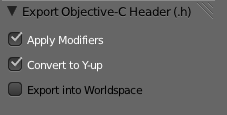
Screen shot 2011 04 05 at 2 32 44 PM

The first option lets you specify whether modifiers are applied before exporting the mesh. If you uncheck this, the script will strip the modifiers before exporting, otherwise, it will apply them to the mesh before exporting.

The second option will rotate the object 90° along the X axis, which converts the object from Blender's Z-up coordinate space to OpenGL's Y-up coordinate space. I've made this the default, but I could foresee situations where people would want to skip the conversion.

The final option will move the export the object using its world space coordinates rather than exporting it using object space coordinates. This option will, for example, preserve relative distance between multiple objects exported from the same file into different headers. Or, to put it another way, objects exported will normally have use their coordinates as they relate to the object's origin, regardless of where the object is in the Blender scene. If this is checked, the vertex coordinates will be exported relative to the scene's origin.

NB: There was a problem with the triangulation code in the version posted earlier. If you're having problems, pull again from GitHub.

Tuesday, February 22, 2011

Blender 2.5 beta 6 Objective-C Export

A kind reader updated my Objective-C export script for Blender to work with the 2.5 beta 6 version of Blender. You can find the new version on GitHub.

On a related note, if you make a change to your clone of any of my public repositories on Github, you can send me a pull request. I'm happy to take additions, bug fixes, and other updates back into the master repository.

Thanks to John Becker for updating the script!

Tuesday, February 8, 2011

MC3D - Platform Agnostic 3D Foundation

Sorry for the lack of posts recently. Things have been, well… you know. Same old story. Super busy. Which is good, but it's murder on blog post frequency.

I've recently had to port some OpenGL ES work I did from iOS to Android. It used to be that doing so would have been insanely painful (as opposed to just painful). I would have had to convert the Objective-C code to Java, and then maintain completely distinct sets of code that do the same exact thing. Fortunately, the Android NDK (Native Development Kit) allows you to write code for Android in C/C++. The version of the NDK supported on 2.2 still requires part of the Activity (Android's counterpart to an iOS view controller) to be written in Java, but does allow you to call C/C++ code using JNI. In 2.3 and 3.0, you can do entire activities in C or C++.

This is a huge step forward for Android for those of us who do performance-critical work on multiple platforms, but it's not without some pain. Debugging across the JNI bridge is… less than easy. But, being able to share code across platforms is a huge win, and being able to get native speeds in the process is teh awseome.

During these projects, I've been taking a lot of my 3D-related code and creating a new set of platform-agnostic C functions and types. I've been cleaning up and making names consistent, and placing appropriate pre-compiler macros to make sure the code compiles correctly everywhere. On iOS, the library will take advantage of the Accelerate Framework in places, but doesn't require Accelerate to function.

I've chosen C because I don't like mixing C++ and Objective-C. The object models are too different for my tastes. But I've also made sure to include proper ifdef'd extern statements so that you can import the MC3D header files from C++ without hassle.

I've dubbed this set of functions MC3D, and I'm making it open source under a simplified version of the simplified BSD license (simplified simplified BSD license?). I've taken out the attribution requirement, so the only requirement is that if you re-distribute the source code, you have to leave the copyright and license text intact. That's it. Otherwise, you can use it for free in any project, commercial or otherwise, without paying anything, without attributing, and without asking (no really, you don't need to ask).

MC3D is still very much a work in progress, and I'm only adding code to the repository that I feel is ready for public consumption. Much of what's in MC3D has been posted here before, sometimes with different names or in slightly different form.

I have other code that I plan to add in the future, including higher-level functionality like model loading, scene management, and skeletal animation, but I won't add anything until its both solid and platform agnostic.

Currently, documentation is very sparse, and I currently can't offer any support or help with using it, so caveat emptor! I will gladly accept contributions, bug fixes, and new functionality back into the MC3D codeline.

MC3D on GitHub.

Link fixed, sorry about that

Saturday, October 30, 2010

Tile Cutter Updated

Had to re-tile a large image, so spent a bit of time converting tile cutter to use NSOperationQueue. After a little playing, I opted for one operation per row, which seems to give the best all-around performance for the widest variety of images. You can download the latest version from here, or pull the source from GitHub.

For those of you having trouble running the application, I've also added i386 to the supported architectures. Because of my use of blocks, Snow Leopard is required to run the app.

Tuesday, October 19, 2010

Tile Cutter Updated

Today, I released a new version of Tile Cutter. This is just a bug-fix release; the changes have been pushed to GitHub.

OpenGL ES iOS

I've created a new public project on GitHub for classes, scripts, and projects related to OpenGL ES programming on the iPhone. I'll be slowly consolidating all of my OpenGL ES code snippets, utilities, and sample projects except for the particle generator (which has its own repository) into this location.

Right now, all it has is:
  • Blender export script for Objective-C for Blender 2.49a
  • Blender export script for Objective-C for Blender 2.5+
  • My old OpenGL ES Xcode project template for OpenGL ES 1.1
  • A fairly simple OpenGL ES 1.1 Xcode project
  • A fairly simple OpenGL ES 2.0 xcode project
  • A few OpenGL ES-related categories and classes
  • My old Wavefront OBJ file loader
I'm happy to accept back changes as well as additions.

Saturday, October 9, 2010

Tile Cutter Open Sourced

I have open-sourced Tile Cutter under the MIT license and put it on Github as a public project. This application was written extremely quickly (less than half a day) because I needed the functionality for a client project, so there are several things about this application that are klugey, including some uncomfortable crossing of the boundaries between what a view should do and what a controller should.

But, it works, and I don't see myself having time to go clean it up anytime soon, so I'm donating it to the public good, warts and all. I welcome back any enhancements, bug fixes, or modifications, but you are not required to give anything back under the license.

Friday, May 21, 2010

Gradient Buttons Yet Again

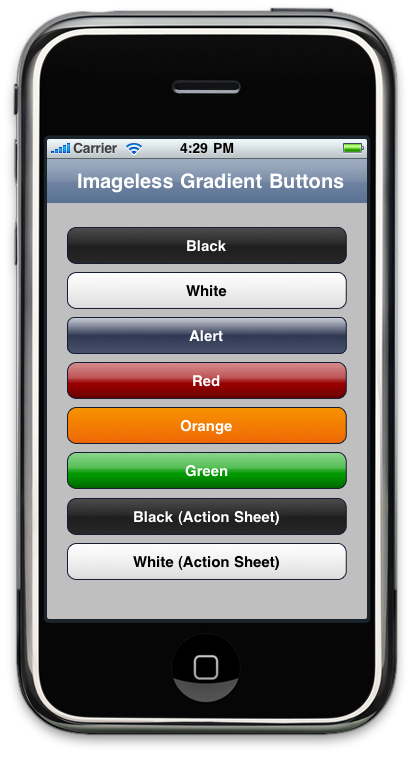
I added two more button styles to the iPhone Gradient Buttons project and made stroke color and stroke weight configurable options. The two new styles look exactly like the old Black and White style, only the highlight state is a blue gradient. These simulate the style used in alert sheets in several Apple applications.

Screen shot 2010-05-21 at 4.29.17 PM.png

Some of the Core Graphics code was machine-generated and is in kind of rough shape, but it works. I'm thinking about refactoring the different styles methods into something shorter, perhaps a plist, or just C arrays with the different numeric values.

For some strange reason, when I try to use arrayWithObjects: instead of creating a mutable array and manually adding the colors one at a time, I get a NULL gradient back. I have no idea why, but it's working this way at least.

Anyone who wants to contribute, let me know, I'd be happy to add committers.

Wednesday, May 19, 2010

Improved Gradient Buttons

I've been playing around a bit, improving my imageless gradient button class. The new version allows you to specify the gradient for the normal and highlighted state by populating two arrays, one with the colors that make up the gradients and another with the relative location for each color. I've gotten rid of the abstract parent class and individual child classes and all the functionality is now contained in a single class.

Screen shot 2010-05-19 at 11.48.50 PM.png
There are five built-in styles which can be seen in the image above, or you can manually set the gradient to any value you'd like. You can download the source codes from the Google code page. There are no restrictions or limitations on its use.

The easiest way to use these is to add a UIButton instance to your view in Interface Builder, then change the underlying class from UIButton to GradientButton. Because there's no way to create IB palettes for iPhone classes, you'll also have to implement viewDidLoad and set the gradient or use the existing methods there.

Tuesday, May 18, 2010

Programmatic Gradient Buttons

Thanks to a little insomnia, I decided to play around a little more with doing a programmatic gradient button. I started to create another gradient button, realized that the code was going to be 90% the same between the two style gradient buttons, so did a little refactoring. The result is a class you can subclass to easily make new gradient buttons. All you have to do is override three methods to specify the gradient to use when the button is in its normal state, the gradient to use when the button is in highlighted (pressed) state, and the corner radius. Here's what the alert-style button looks like now:

BlueGradientButton.h
#import <UIKit/UIKit.h>
#import "AbstractGradientButton.h"

@interface BlueGradientButton : AbstractGradientButton
{
}


@end


BlueGradientButton.m
#import "BlueGradientButton.h"

@implementation BlueGradientButton
- (CGGradientRef)createNormalGradient
{
CGFloat locations[3];
CGColorSpaceRef space = CGColorSpaceCreateDeviceRGB();
NSMutableArray *colors = [NSMutableArray arrayWithCapacity:3];
UIColor *color = [UIColor colorWithRed:0.283 green:0.32 blue:0.414 alpha:1.0];
[colors addObject:(id)[color CGColor]];
locations[0] = 0.0;
color = [UIColor colorWithRed:0.82 green:0.834 blue:0.87 alpha:1.0];
[colors addObject:(id)[color CGColor]];
locations[1] = 1.0;
color = [UIColor colorWithRed:0.186 green:0.223 blue:0.326 alpha:1.0];
[colors addObject:(id)[color CGColor]];
locations[2] = 0.483;

CGGradientRef ret = CGGradientCreateWithColors(space, (CFArrayRef)colors, locations);
CGColorSpaceRelease(space);
return ret;
}

- (CGGradientRef)createHighlightGradient
{
CGFloat locations[4];
CGColorSpaceRef space = CGColorSpaceCreateDeviceRGB();
NSMutableArray *colors = [NSMutableArray arrayWithCapacity:4];
UIColor *color = [UIColor colorWithRed:0.0 green:0.0 blue:0.0 alpha:1.0];
[colors addObject:(id)[color CGColor]];
locations[0] = 0.0;
color = [UIColor colorWithRed:0.656 green:0.683 blue:0.713 alpha:1.0];
[colors addObject:(id)[color CGColor]];
locations[1] = 1.0;
color = [UIColor colorWithRed:0.137 green:0.155 blue:0.208 alpha:1.0];
[colors addObject:(id)[color CGColor]];
locations[2] = 0.51;
color = [UIColor colorWithRed:0.237 green:0.257 blue:0.305 alpha:1.0];
[colors addObject:(id)[color CGColor]];
locations[3] = 0.654;

CGGradientRef ret = CGGradientCreateWithColors(space, (CFArrayRef)colors, locations);
CGColorSpaceRelease(space);
return ret;
}

- (CGFloat)cornerRadius
{
return 7.0;
}

@end


Adding new gradient buttons is relatively simple, since all the heavy drawing is handled in the superclass based on the values you return in these three methods. You can check out the sample project that has two gradient buttons: one that simulates the alert style button and which also works for regular bar buttons, and one that simulates the red delete button. I'll likely add more styles later.

One important notice - the CFGradientRef returned by the two methods should not be released, the super class will release it when it's done. This is a bit of an oddity, but there is no CFGradientAutorelease() function, only a CFGradientRelease() function. I changed the name to start with "create". In the Core Foundation memory management rules, functions that use create return an object with retain count of 1. There probably is a more elegant way to deal with this situation, but none occurred to me and I didn't want to have to mess around with a callback to release the memory given how straightforward the usage is here.

You can download the project here. I've also added the project to Google Code if anyone wants to contribute additional elements.

Wednesday, April 28, 2010

iPhone Barcode Library

Chris of the Yeti Factory has ported my Cocoa Barcode library to the iPhone. This has been something I've been meaning to do for a while, but I'm actually kind of glad someone else did it. I wasn't relishing diving into eight-year old code.

Monday, April 12, 2010

Core Data Library

For quite some time, I've been thinking about ways to improve the use of UITableViewController. I experimented a bit with a property-list driven model, and then simplified that into the paired-array version that is in More iPhone 3 Development. One of the things on my "would like to do list" has been to revisit that and create a good, robust tool to make table-based editable detail views easier.

Somebody beat me to the punch though. I haven't tried it out yet, but first impressions are positive and it looks like a great tool for anyone writing apps with table-based detail views.