Until today, I've kept pretty much quiet on the iPhone 4 reception issue. Part of that was simply that I didn't own a phone until a week ago when my pre-ordered phone finally arrived. Part of it was just that I'm crazy heads-down on the book and doing client work right now. And part of it is that I'm having trouble deciding exactly what I feel about it. It feels to me like the issue is being overblown, but I doubt that people who are severely impacted feel that way.
I also don't think Apple has handle the situation as well as it, perhaps, could have. Apple is normally exceptionally good at "spin", but the response to this issue has felt a little ham-handed.
For me, I can recreate the issue if I try, but not in the drastic way that some people can, and not consistently. I've been able to get my phone to drop from five bars down to three, on a few occasions even down to two. Sometimes it won't go down at all. I don't know if it's whether there's moisture on my hand or what, but sometimes no amount of pressing will cause it to drop, other times, simply placing my thumb over the break on the left side will cause it to drop one or two bars.
Fortunately, even though I usually hold my phone in my left hand both for voice and data, this just doesn't affect me. The way I hold my phone, I don't bridge the gap. But even when I do bridge the gap intentionally, my phone still functions fine even with the lower bars. In fact, my reception and data transfer speeds are measurably faster over 3G than they were on my iPhone 3Gs. We have some large "warehouse" stores in the area (Lowes, BJ's) where I have always lost reception with every cell phone I've ever head when I get more than fifteen or twenty feet into the store. That was true even back when I was on Verizon. My iPhone 4 gets signal in those stores, throughout the store. I also haven't had a single dropped call since I got my iPhone 4. So, for me, not only is this not an issue, I'm thrilled with the reception my phone.
I know it's a real and serious issue for some people and for them, it's preventing them from fully using their phone, and that's gotta suck. But for me, and for all but two people that I've talked to (and I know a few people with iPhone 4s) it's mostly a non-issue in terms of real day-to-day usage. The foofoorah over this really seems a bit overblown to me, not that I've come to expect anything more from powerhouses of journalistic integrity like Gizmodo, but still…
If Apple were to recall the phones or offer a refund, I wouldn't let them have mine. I wouldn't willingly go back to an iPhone 3G at this point. Now, if Apple offers a free bumper, I might take them up on that. I've been thinking about getting one anyway, and only the fact that I live 45 miles from the nearest Apple Store has kept me from getting one already, but I'm not going to be upset if they don't.
I'll be curious to hear what Apple does say tomorrow in their press conference. I have to think that the days of ham-handed responses to this issue are over. They can't afford for those days not to be over. This is hurting their reputation far more than it should.
Thursday, July 15, 2010

Ahh… the Sweet Smell of "Open"
I bet owners of Droid X phones are thrilled to have such an "open" phone. Man, I was just so off-base when I discussed Android and the practical reality of openness in a world controlled by wireless providers. Oh, wait… no I wasn't.
via several people on Twitter
via several people on Twitter
Wednesday, July 14, 2010
Core Data Encryption
I've been asked a number of times about the best way to encrypt a Core Data persistent store. The answers I've had to give have always been somewhat kludgey at best. Apparently, with iOS 4, there's a better answer, and I was completely unaware of the change. If you're storing anything remotely secure in Core Data, it's worth a few minutes of your time to read Nick Harris' post.
via Brent Simmon's ranchero.com
via Brent Simmon's ranchero.com
Tuesday, July 13, 2010
OpenGL ES 2.0 Book Teaser
I've been making really good progress on the OpenGL ES 2.0 book for Prags, and I'm really happy with what I've done so far. The book isn't quite as hand-holding as Beginning iPhone 3 Development was, but it's probably more hand-holding than any graphics programming book I've ever read. If you've got prior experience with graphics programming, you may get frustrated with the pace of the book. I'm working on Chapter 8 now, and I haven't even gotten to lighting yet.
Those of you who have never worked with a programmable pipeline engine like OpenGL ES 2.0 or have tried and been frustrated by the books and resources available, will (I hope) appreciate the approach I'm taking. I'm trying to be very, very thorough. I'm trying not to leave any questions hanging in the air. I've found, over the years, graphics programming books to be frustrating in that they assume a certain level of prior knowledge that's not easy to obtain outside of college math classes. It's my goal to explain not only how to do things, but why, and give at least some high-level information about the underlying concepts and math. My goal is to make graphics programming approachable for people who don't necessarily have math knowledge beyond basic high school geometry and trig. I can't do that with everything. For example, with projection matrices, I simply didn't think it was worth trying to cover homogeneous coordinates, so I focused on how projection vectors worked and mostly skipped the why. But that's an exception. In most cases, I'm really focusing on why we do what we do.
Writing books like this is fun, to be honest. I'm learning OpenGL ES 2.0 at a much deeper level than I previously knew and I feel good about the progress of the book. From the discussions I've had, I think there's a lot of people out there who want to program in OpenGL ES 2.0 so they can do cool stuff on the iPhone and iPad, but who just don't really know where to start. It's like all the cool stuff is sitting on a shelf just out of reach. And that's frustrating.
I don't know yet when the book will be available. I'm hoping that it will get accepted into the beta books program when it's far enough along. If that happens, I'll make sure to post about it here, because then the book will be available for reading online before the official release.
Now, no part of the book is ready for public consumption yet, but I'm going to post some of my code from the book today. I know there's a shortage of good, clean, straightforward iOS OpenGL ES 2.0 code out there, so I though I'd post one of the projects from the chapter I'm working on now for anybody who wanted to try and figure out how it all fits together.
Although it's a a simple app, there's a fair amount going on. I take care of setting up a perspective projection and a model view matrix that both moves and rotates the object and also do texture mapping. There's a simple vertex shader and a fragment shader that take care of transforming the scene and doing the texture mapping. Now, in OpenGL ES 2.0, there are no built-in functions to handle any of these tasks, so it's all got to be done manually, primarily in the shaders. There are also some useful classes and functions you may be able to leverage in your own code. Much of what's in here is based on code I've posted in the past, but it's all been updated and tweaked for use in the OpenGL ES 2.0 programmable pipeline.
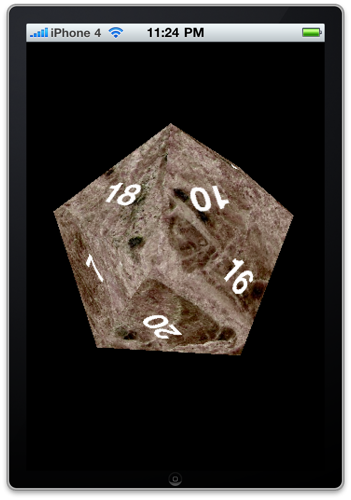
Yes, it's our old friend, the icosahedron, but all dressed up to look like a twenty-side die. Because, you know, what's more geeky than a twenty-sided die?
Now, this project hasn't been code reviewed. Heck, the chapter it's for hasn't even been written yet, so I'm sure there are mistakes and CBBs (could be betters). This is also not particularly efficient code. I'm putting off until later in the book a number of optimizations, including vectorizing the matrix and vector functions, interleaving per-vertex attributes, and using VBOs and VAOs. At this point, I'm much more focused on clarity and concepts than on performance, so just be aware of that before you decide to incorporate any of this code into a production project.
As always, there are no requirements placed on your use of this code. You don't have to give attribution, and you don't have to contribute back changes, though if you do fix or improve something, I'd be glad to hear about it.
You can find the Xcode project right here.
I've also made the original Blender and Pixelmator files I used to create the vertices and texture coordinates of the icosahedron as well as the texture. You can download those here.
I am sorry, but have to say that I won't be able to answer questions about the code. Between the book and client work right, most days I'm at my desk from 8:00 in the morning until 1:00 or 2:00 the next morning, seven days a week, so if you need explanations, you're going to have to wait for the book.
Those of you who have never worked with a programmable pipeline engine like OpenGL ES 2.0 or have tried and been frustrated by the books and resources available, will (I hope) appreciate the approach I'm taking. I'm trying to be very, very thorough. I'm trying not to leave any questions hanging in the air. I've found, over the years, graphics programming books to be frustrating in that they assume a certain level of prior knowledge that's not easy to obtain outside of college math classes. It's my goal to explain not only how to do things, but why, and give at least some high-level information about the underlying concepts and math. My goal is to make graphics programming approachable for people who don't necessarily have math knowledge beyond basic high school geometry and trig. I can't do that with everything. For example, with projection matrices, I simply didn't think it was worth trying to cover homogeneous coordinates, so I focused on how projection vectors worked and mostly skipped the why. But that's an exception. In most cases, I'm really focusing on why we do what we do.
Writing books like this is fun, to be honest. I'm learning OpenGL ES 2.0 at a much deeper level than I previously knew and I feel good about the progress of the book. From the discussions I've had, I think there's a lot of people out there who want to program in OpenGL ES 2.0 so they can do cool stuff on the iPhone and iPad, but who just don't really know where to start. It's like all the cool stuff is sitting on a shelf just out of reach. And that's frustrating.
I don't know yet when the book will be available. I'm hoping that it will get accepted into the beta books program when it's far enough along. If that happens, I'll make sure to post about it here, because then the book will be available for reading online before the official release.
Now, no part of the book is ready for public consumption yet, but I'm going to post some of my code from the book today. I know there's a shortage of good, clean, straightforward iOS OpenGL ES 2.0 code out there, so I though I'd post one of the projects from the chapter I'm working on now for anybody who wanted to try and figure out how it all fits together.
Although it's a a simple app, there's a fair amount going on. I take care of setting up a perspective projection and a model view matrix that both moves and rotates the object and also do texture mapping. There's a simple vertex shader and a fragment shader that take care of transforming the scene and doing the texture mapping. Now, in OpenGL ES 2.0, there are no built-in functions to handle any of these tasks, so it's all got to be done manually, primarily in the shaders. There are also some useful classes and functions you may be able to leverage in your own code. Much of what's in here is based on code I've posted in the past, but it's all been updated and tweaked for use in the OpenGL ES 2.0 programmable pipeline.
Yes, it's our old friend, the icosahedron, but all dressed up to look like a twenty-side die. Because, you know, what's more geeky than a twenty-sided die?
Now, this project hasn't been code reviewed. Heck, the chapter it's for hasn't even been written yet, so I'm sure there are mistakes and CBBs (could be betters). This is also not particularly efficient code. I'm putting off until later in the book a number of optimizations, including vectorizing the matrix and vector functions, interleaving per-vertex attributes, and using VBOs and VAOs. At this point, I'm much more focused on clarity and concepts than on performance, so just be aware of that before you decide to incorporate any of this code into a production project.
As always, there are no requirements placed on your use of this code. You don't have to give attribution, and you don't have to contribute back changes, though if you do fix or improve something, I'd be glad to hear about it.
You can find the Xcode project right here.
I've also made the original Blender and Pixelmator files I used to create the vertices and texture coordinates of the icosahedron as well as the texture. You can download those here.
I am sorry, but have to say that I won't be able to answer questions about the code. Between the book and client work right, most days I'm at my desk from 8:00 in the morning until 1:00 or 2:00 the next morning, seven days a week, so if you need explanations, you're going to have to wait for the book.
Friday, July 9, 2010
Thumb
I thought I had done a post on this at some point, but after Googling around, I guess I never did. There were a couple of Twitter discussions about the subject in the past few days, so I thought it was worth mentioning. You can get more in-depth detail about this subject by watching the two OpenGL ES videos from the 2009 Tech Talk World Tour Videos (iTunes link, requires logging in with iPhone SDK account).
The ARM architecture has something called thumb mode (or just thumb). Now, I'm not a hardware engineer so the following may not be 100% technically accurate, but my understanding is that basically thumb mode uses a subset of the processor's available operations and passes two 16-bit operations in the space of a single 32-bit operation, allowing commands to be sent to the CPU twice as fast. For most applications, this is great, and leads to an improvement in overall performance.
However, with the ARMv6-based chips in the original iPhone, the iPhone 3g, and the first generation iPod touch¹, thumb mode didn't have access to the vector processors, so floating point operations forced the processor to convert the two 16-bit operations back into two 32-bit operations, perform the floating point math, and then convert back to the thumb operations, meaning you not only didn't see a performance increase, you often saw a dramatic decrease in performance with thumb on when writing heavy floating-point code, such as you would for an OpenGL ES application.
The version of thumb in ARMv7 which is used by the chip in the iPhone 3Gs and which is also used by Apple's A4 chip and therefore available on the iPad and iPhone 4, does have full access to the vector processors, so you can get the benefit of thumb while doing large amounts of floating point operations, so you want thumb on for these processors.
Therefore, if you're writing an OpenGL ES application, or anything else that does a lot of floating point operations, you want to use conditional build settings in Xcode to turn "Compile for Thumb" ON for ARMv7 and OFF for ARMv6.
You can add conditional build settings by selecting the build setting in Xcode and using the little gear button in the lower left corner of the Build Settings window. If you click it, it will popup a menu, and one of the options will be "Add Conditional Build Setting", which will add a new subrow to that setting. Select "ARMv6" on the left column and use the right column to turn it off. Once you do that, your application will build as a fat binary with an ARMv6 version that doesn't use thumb, and an ARMv7 version of the binary that does. Generally, the increase in application size is relatively minor compared to application's image and sound resources, and the performance gains can be substantial.
The ARM architecture has something called thumb mode (or just thumb). Now, I'm not a hardware engineer so the following may not be 100% technically accurate, but my understanding is that basically thumb mode uses a subset of the processor's available operations and passes two 16-bit operations in the space of a single 32-bit operation, allowing commands to be sent to the CPU twice as fast. For most applications, this is great, and leads to an improvement in overall performance.
However, with the ARMv6-based chips in the original iPhone, the iPhone 3g, and the first generation iPod touch¹, thumb mode didn't have access to the vector processors, so floating point operations forced the processor to convert the two 16-bit operations back into two 32-bit operations, perform the floating point math, and then convert back to the thumb operations, meaning you not only didn't see a performance increase, you often saw a dramatic decrease in performance with thumb on when writing heavy floating-point code, such as you would for an OpenGL ES application.
The version of thumb in ARMv7 which is used by the chip in the iPhone 3Gs and which is also used by Apple's A4 chip and therefore available on the iPad and iPhone 4, does have full access to the vector processors, so you can get the benefit of thumb while doing large amounts of floating point operations, so you want thumb on for these processors.
Therefore, if you're writing an OpenGL ES application, or anything else that does a lot of floating point operations, you want to use conditional build settings in Xcode to turn "Compile for Thumb" ON for ARMv7 and OFF for ARMv6.
You can add conditional build settings by selecting the build setting in Xcode and using the little gear button in the lower left corner of the Build Settings window. If you click it, it will popup a menu, and one of the options will be "Add Conditional Build Setting", which will add a new subrow to that setting. Select "ARMv6" on the left column and use the right column to turn it off. Once you do that, your application will build as a fat binary with an ARMv6 version that doesn't use thumb, and an ARMv7 version of the binary that does. Generally, the increase in application size is relatively minor compared to application's image and sound resources, and the performance gains can be substantial.
Friday, July 2, 2010
Pressure Sensitive iPad
One thing that I've wished the iPad had from the beginning was the ability to detect different levels of pressure, similar to a Wacom tablet. That would make it much more useful for things like sketching. I've heard from a few people that the hardware supports it, but I've been skeptical of those claims. How could a capacitative touch device detect pressure? But a few people I talked to at WWDC insisted it was possible with the hardware.
Turns out they were right. This is really cool. I don't know anything about the technology - whether they're really using pressure (I tend to doubt it) or just the relative size of the area being touched, but the results in the video look promising. I also hope the final version can be accomplished with only public APIs somehow.
Turns out they were right. This is really cool. I don't know anything about the technology - whether they're really using pressure (I tend to doubt it) or just the relative size of the area being touched, but the results in the video look promising. I also hope the final version can be accomplished with only public APIs somehow.
Thursday, July 1, 2010
Synthesize by Default
So, in my previous post, I told you I was excited about the "synthesize by default" functionality that's now available in LLVM 1.5. And I am, very much so. But it turns out there's a caveat that tempers my excitement at the moment.
With synthesized iVars, we've had direct access to the underlying synthesized variable for a while now, so if you created a class like this:
You're able to access the NSString variable foo that backs the property of the same name within the scope of your class. So, in your dealloc method, you can do this, to give one common example:
However, if you enable the "synthesize by default" feature in LLVM 1.5 and use it, meaning you don't actually have a @synthesize statement for the foo property, you lose this direct access to the underlying variables, leaving you with a bit of a conundrum - how do you do your memory cleanup without unintentionally triggering unwanted functionality, such as those in a lazy accessor or some more involved mutators.
Earlier today, I tweeted a question asking about the correct way to deal with this situation. After a bit of a Who's on First-like back and forth with many smart people, it finally came out that this is a bug in LLVM, not an intentional design decision. Hopefully it will be fixed before too long, but in the meantime, the best answer is probably to just keep using @synthesize.
Thanks to a whole bunch of people on Twitter, many of whom I'm sure I missed!
With synthesized iVars, we've had direct access to the underlying synthesized variable for a while now, so if you created a class like this:
You're able to access the NSString variable foo that backs the property of the same name within the scope of your class. So, in your dealloc method, you can do this, to give one common example:
- (void)dealloc
However, if you enable the "synthesize by default" feature in LLVM 1.5 and use it, meaning you don't actually have a @synthesize statement for the foo property, you lose this direct access to the underlying variables, leaving you with a bit of a conundrum - how do you do your memory cleanup without unintentionally triggering unwanted functionality, such as those in a lazy accessor or some more involved mutators.
Earlier today, I tweeted a question asking about the correct way to deal with this situation. After a bit of a Who's on First-like back and forth with many smart people, it finally came out that this is a bug in LLVM, not an intentional design decision. Hopefully it will be fixed before too long, but in the meantime, the best answer is probably to just keep using @synthesize.
Thanks to a whole bunch of people on Twitter, many of whom I'm sure I missed!
Subscribe to:
Posts (Atom)